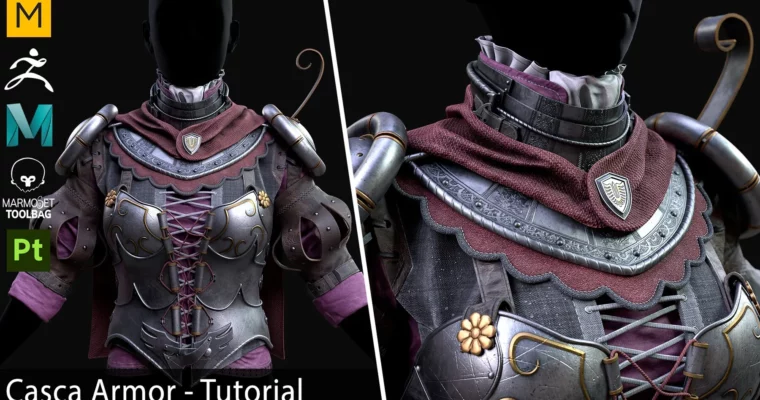
Tutorial – Casca’s Armor by Vadim Meshcherekov

Duration:25 hours
Actual Duration:25h 54m
Release date:2024
Publisher:Artstation
Skill level:Intermediate
Language:Russian
Exercise files:Yes
Software:Marvelous Designer, Clo3D, ZBrush, Maya, Marmoset Toolbag 4, Substance Painter
Course URL:https://www.artstation.com/marketplace/p/5gOKd/tutorial-casca-s-armor
This is a full-pipeline breakdown of Casca’s armor from Berserk. No shortcuts, no timelapses — just 25 hours of real-time work with Russian voiceover and English subtitles. You’ll follow along as Vadim takes the piece from Marvelous Designer pattern drafting all the way to a polished Marmoset Toolbag render.
🎯 What you’ll learn
- Create game-ready armor with clean quad topology
- Build complex cloth pieces using Marvelous Designer simulation
- Sculpt high-detail armor plates and ornaments in ZBrush
- Set up efficient UVs and bake without artifacts
- Texture metal, leather, and fabric in Substance Painter
- Light and present your model in Marmoset Toolbag 4
✅ Requirements
- Skills: Working knowledge of ZBrush, Maya, and Substance Painter interfaces. Familiar with Marvelous Designer basics helps but isn’t mandatory.
- Tools: 3-button mouse, drawing tablet for sculpting
- Hardware: Minimum 16GB RAM, dedicated GPU with at least 4GB VRAM
📝 Description
This tutorial is built around a single, focused goal: recreating Casca’s armor as a game-ready asset. Vadim doesn’t waste time on theory — every chapter targets a specific production problem and solves it in real time. You’ll see exactly how he handles cloth simulation in Marvelous Designer, transfers that geometry into a clean retopology, then pushes detail in ZBrush until the armor feels lived-in and believable.
The course is structured chronologically, mirroring a real production pipeline. You start with the fabric pieces because they define the overall silhouette. From there, you block out the armor plates, refine them through multiple sculpting passes, and finally move into UVs and baking. The texturing phase in Substance Painter covers metal wear, leather grain, and fabric weave — all the surface detail that sells the materiality of the piece.
What sets this tutorial apart is the sheer amount of footage. At 25 hours, you’re not getting a condensed highlight reel. You’re getting the full process, including the mistakes and the problem-solving that happens when things don’t work the first time. The Russian voiceover with English subtitles keeps the technical explanations clear without losing the natural flow of the work session.
The included project files are a major bonus. You get the complete Maya scene, the ZBrush project, the Substance Painter file, and the Marmoset scene — everything you need to reverse-engineer any step you’re unsure about. The game-ready base mesh comes in both OBJ and FBX formats with 4K TGA textures, so you can also use it as a portfolio piece or study reference.
🧑🎓 Who this course is for
- Intermediate 3D artists who want to see a complete armor production workflow from start to finish
- Character artists looking to improve their hard-surface sculpting and cloth simulation skills
- Game artists preparing portfolio pieces who want a reference-quality project with full source files
🧑🏫 About the Author
Vadim Meshcherekov is a 3D artist with extensive experience in game asset production. His work focuses on character and armor, with a strong emphasis on clean topology and efficient texturing workflows. He shares his process openly, showing not just the final results but the practical decisions that get you there.
🏁 Final Result
- A complete, game-ready 3D model of Casca’s armor with clean quad topology
- 4K textures in TGA format covering all PBR maps
- Full project files for every stage of the pipeline — Marvelous Designer, ZBrush, Maya, Substance Painter, and Marmoset Toolbag
- A portfolio-ready render you can present immediately
 Channel