3D Weapon Tutorial for Portfolio by Promesh

Duration:34 hours
Actual Duration:34h 23m
Release date:2026, May 8
Publisher:Gumroad
Skill level:Intermediate
Language:English
Exercise files:Yes
Software:Plasticity, ZBrush, PIXYZ, 3ds Max, RizomUV, Marmoset Toolbag, Substance Painter
Course URL:https://promesh.gumroad.com/l/dhbqg
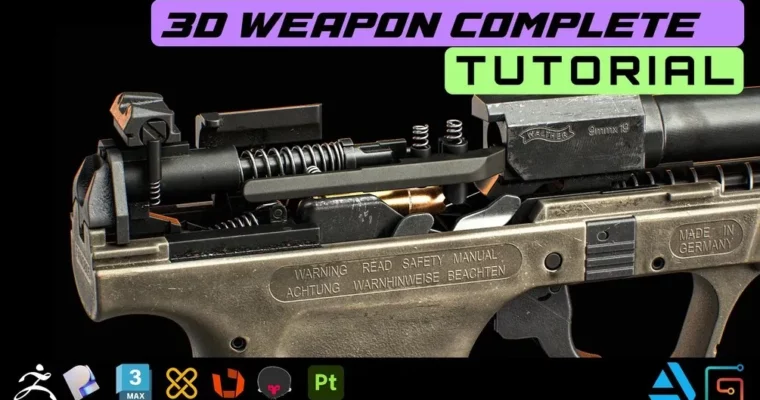
Over 34 hours of fully narrated content walks you through the entire 3D weapon pipeline, from high-poly blockout to final portfolio render. This isn’t just a tutorial—it’s a real-world workflow used in professional studios, covering Plasticity, ZBrush, 3ds Max, RizomUV, Marmoset Toolbag, and Substance Painter.
🎯 What you’ll learn
- High-poly modeling with Plasticity and ZBrush
- Low-poly modeling and optimization with PIXYZ and 3ds Max
- Professional UV unwrapping in 3ds Max and RizomUV
- Baking normals and maps in Marmoset Toolbag
- Realistic weapon texturing in Substance Painter
- Final rendering and presentation in Marmoset Toolbag
✅ Requirements
- Skills: Basic understanding of 3D modeling and texturing concepts
- Tools: 3-button mouse, drawing tablet recommended for ZBrush
- Hardware: Minimum 16GB RAM, dedicated GPU for rendering
📝 Description
This tutorial is built around real industry techniques I use every day. You’ll start with a rough weapon blockout, then move into high-poly sculpting using Plasticity and ZBrush—two tools that let you push hard-surface detail without losing control. From there, you’ll learn how to create a clean low-poly model with PIXYZ and 3ds Max, making sure everything is optimized for game engines or portfolio renders.
UV unwrapping gets its own deep dive with 3ds Max and RizomUV, so you can avoid stretching and wasted space. Then it’s into Marmoset Toolbag for baking, where you’ll generate clean normal maps, AO, and ID maps. The texturing phase in Substance Painter covers realistic materials, wear, and tear—everything that makes a weapon feel lived-in. Finally, you’ll set up lighting and render your model in Marmoset Toolbag to create a portfolio shot that stands out.
Every chapter is fully narrated in English, with 29 1440p video files. You also get the Substance Painter file, FBX files, and a PureRef file to follow along.
🧑🎓 Who this course is for
- Intermediate to advanced 3D artists looking to polish their hard-surface portfolio
- Beginners who want a structured, real-world pipeline to grow fast
- Game artists and hobbyists aiming to create realistic weapon assets
🧑🏫 About the Author
Promesh is a professional 3D artist with years of experience in the game and film industries. They specialize in hard-surface modeling and texturing, using tools like Plasticity, ZBrush, and Substance Painter to create high-quality assets for portfolios and production. This tutorial reflects the exact workflows they use in professional environments.
🏁 Final Result
- A fully textured and rendered 3D weapon model ready for your portfolio
- Mastery of a complete hard-surface pipeline from blockout to final presentation
- Practical knowledge of industry-standard tools and techniques
 Channel