Ad Clicks : Ad Views : Ad Clicks : Ad Views : Ad Clicks : Ad Views : Ad Clicks : Ad Views :
Oh Snap!

It looks like you're using an adblocker. Adblockers make us sad. We use ads to keep our content happy and free. If you like what we are doing please consider supporting us by whitelisting our website. You can report badly-behaved ads by clicking/tapping the nearby 'Advertisement' X text.

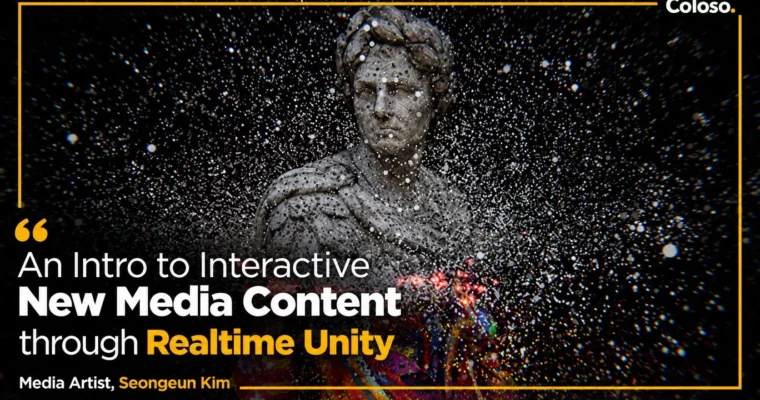
Introduction to Interactive New Media Content with Real-Time Unity by Seongeun Kim

Introduction to Interactive New Media Content with Real-Time Unity by Seongeun Kim

/

Author:Seongeun Kim

Duration:9 hours 59 minutes

Actual Duration:18h 36m

Release date:2023

Publisher:Coloso

Skill level:Intermediate

Language:English

Exercise files:Yes

Software:Unity

Course URL:https://coloso.co.kr/products/3ddesign-kimseongeun

Build real-time interactive artworks in Unity VFX Graph, from generative particles to sound and webcam reactions.

Move past flat deliverables and make work that reacts to its audience. New media artist Seongeun Kim β€” head of studio Scenes and a former Unity Masters expert β€” teaches the real-time Unity pipeline for interactive artworks: VFX Graph fundamentals, generative techniques from your own images, video and 3D, and sound/webcam interaction built with provided code modules, no coding experience required. Across 24 lectures / 9 hours 59 minutes you complete 7 example artworks and learn the full workflow from planning to on-site installation.

🎯 What you’ll learn

  • Navigate the Unity VFX Graph: spawn, initialize, update and output blocks, contexts and node logic
  • Shape particles with forces, sine waves, turbulence, noise, curves and Shader Graph linkage
  • Build reusable looks: rippling particles and forward-moving block particles
  • Turn logos, photos and paintings into generative point-cache artworks with sampling curves, gradients and filter nodes
  • Animate particles from video and motion-graphics data with wave and transition effects
  • Convert 3D models to point caches: UV color textures, morphing and partial effects; scan real spaces into point-cloud and hologram looks
  • Make artworks react in real time to microphone/sound and webcam/movement input using sample code and plugins

βœ… Requirements

  • Skills: Basic 3D or graphic-design familiarity helps but is not required; no coding experience needed (sample code and plugins provided)
  • Tools: Unity 2021.3.2f1, a microphone and webcam for the interactive chapters
  • Hardware: PC capable of running Unity VFX Graph in real time, minimum 16GB RAM, dedicated GPU recommended

πŸ“ Description

This is a single-pipeline class: every chapter feeds one real-time workflow. You start with the development structure behind interactive content and the two graphs that power it β€” VFX Graph for particle behavior and Shader Graph for surface response β€” learning each block family (spawn, initialize, update, output) as an instrument: where particles are born, how they take initial data, how they change per frame, and how they render as lit or unlit mesh and quad output.

The generative core turns your own sources into systems. Logos and photos become point caches driven by sampling curves and gradients; video and motion graphics become wave and transition fields; 3D models become morphing particle bodies with UV-driven color; real rooms captured with a scanning app become point-cloud and hologram spaces with noise, glow and firefly finishes. Each example ends with the conversion step β€” how the same system becomes an interactive piece.

The final block is interaction without code fear: provided modules map microphone/sound levels and webcam/movement data into live artwork parameters, and the course closes on the on-site concerns other tutorials skip β€” sensors, installation flow and the planning-to-delivery process of a working new media artist. Project scene files (9 types), PDF notes, 3D space and scissors-modeling data, image sources and character motion-graphics video are included.

Course is in English (level: beginner to intermediate, 24 lectures / 9h 59m, project files included). Card built from the manufacturer page via the Coloso dump pipeline.

πŸ§‘β€πŸŽ“ Who this course is for

  • Creators who want to apply interactive content to media art and exhibitions
  • Graphic designers and 3D artists who want to widen their skill spectrum with Unity
  • New hires at new media studios who need production-ready interactive and generative skills fast

πŸ§‘β€πŸ« About the Author

Seongeun Kim (김성은) is a new media artist running the studio Scenes, and a former member of Unity Masters, the Unity Korea certified expert group. Her commercial interactive and generative work includes Netflix, Laneige, The Hyundai and Zinus projects alongside collaborations with public exhibition venues, spanning data visualization, large-scale signage and real-time brand installations. She teaches the VFX and shader techniques she is known for in production, including the conference and webinar material previously shared through Unity Korea.

🏁 Final Result

  • Seven finished example artworks: image-based, video-based, 3D-based and spatial-data generative pieces plus sound-reactive and webcam-reactive interactive works
  • A repeatable real-time Unity pipeline from artwork sourcing to interactive installation, including sensors and on-site workflow
Curriculum

πŸ“‹ Course content

  1. SECTION 01. Intro
      1. Orientation (instructor and course intro, why Unity for content, why VFX Graph and Shader Graph techniques)
      1. New media content development process with Unity (simple dev structure, interactive content pipeline)
  2. SECTION 02. VFX Graph for generative art technique
      1. Visual Effect Graph (Unity setup, VFX Graph overview, emitter and particle creation, graph window, contexts/blocks/systems, node logic)
      1. Spawn block (spawn system, controlling particle playback from key input)
      1. Initialize block (data initialization, custom values, set position: line, circle, box, sphere, cone)
      1. Update block (per-frame changes, color from position, force and sine-wave ripple, turbulence, noise, AABOX and collider sphere)
      1. Output block (rendering particles, output types, mesh and quad output, lit and unlit, curves, Shader Graph linkage)
  3. SECTION 03. High-utility VFX techniques
      1. Rippling particles (continuous spawning, ripple effect)
      1. Back-and-forth block particles (single spawning, generative objects from particle elements)
  4. SECTION 04. Generative art with images
      1. Example 01: logo-image artwork 1 (selecting logo/photo images, VFX setup, assigning positions in spawn/update blocks)
      1. Example 01: logo-image artwork 2 (particle lifetime data, sampling-curve motion and color, combining nodes, nebula spread effect)
      1. Example 02: multi-image artwork 1 (two ways to import varied resolution and color data, color-data assignment differences)
      1. Example 02: multi-image artwork 2 (sampling textures for zoned effects, lerp/step filter nodes, targeted effects)
      1. Example 02: multi-image artwork 3 (combining techniques, sampling curves and gradients, multi-image build, converting to interactive)
  5. SECTION 05. Generative art with video
      1. Example 03: video-file artwork 1 (selecting and playing video, video data in VFX Graph, position/sine/lerp nodes, wave transitions)
      1. Example 03: video-file artwork 2 (partial effects per element with sampling textures, variation zones)
      1. Example 03: video-file artwork 3 (processing video data for detailed effects)
  6. SECTION 06. Generative art with 3D
      1. Example 04: modeling-file artwork 1 (model to point cache, UV color textures, zoned effects, partial effects with position data and step functions)
      1. Example 04: modeling-file artwork 2 (particle motion in change zones via sampling curves, morphing from particle positions)
      1. Example 05: spatial-data effects 1 (capturing space data with an app, mapping space color onto particles, noise on visualized space, property-driven motion)
      1. Example 05: spatial-data effects 2 (oncoming line effect, color change from position and noise, rippling approach over time)
      1. Example 05: spatial-data effects 3 (post-processing glow, firefly effect, interactive content ideation)
  7. SECTION 07. Interactive skills with sample code and plugins
      1. Example 06: real-time artwork reacting to mic and sound input
      1. Example 07: real-time artwork reacting to webcam and human movement

πŸ“’ Guys, this is a Group Buy campaign, check the GBC forum thread to get access

You can find the course preview in the download section below.

Watch online or Download for Free
Introduction to Interactive New Media Content with Real-Time Unity by Seongeun Kim
NAME
SIZEDURATION
Seongeun Kim Eng Dub
55.9 MB20m
SECTION 02. VFX Graph for Generative Art Technique
11.4 MB5m
SECTION 03. High-Utility VFX Techniques
0 B
SECTION 04. Generative Art with Images
0 B
SECTION 05. Generative Art with Video
0 B
SECTION 06. Generative Art with 3D
0 B
SECTION 07. Interactive Skills with Sample Code and Plugins
11.4 MB5m
Seongeun Kim Eng Sub
44.6 MB15m
SECTION 02. μ œλ„ˆλ ˆμ΄ν‹°λΈŒ μ•„νŠΈ ν…Œν¬λ‹‰μ„ μœ„ν•œ λΉ„μ£Όμ–Ό μ΄νŽ™νŠΈ κ·Έλž˜ν”„
0 B
SECTION 03. ν™œμš©λ„ 높은 λΉ„μ£Όμ–Ό μ΄νŽ™νŠΈ ν…Œν¬λ‹‰
0 B
SECTION 04. 이미지λ₯Ό μ΄μš©ν•œ μ œλ„ˆλ ˆμ΄ν‹°λΈŒ μ•„νŠΈ ν…Œν¬λ‹‰
0 B
SECTION 05. μ˜μƒμ„ μ΄μš©ν•œ μ œλ„ˆλ ˆμ΄ν‹°λΈŒ μ•„νŠΈ ν…Œν¬λ‹‰
0 B
SECTION 06. 3Dλ₯Ό μ΄μš©ν•œ μ œλ„ˆλ ˆμ΄ν‹°λΈŒ μ•„νŠΈ ν…Œν¬λ‹‰
0 B
SECTION 07. μƒ˜ν”Œ μ½”λ“œ 및 ν”ŒλŸ¬κ·ΈμΈμ„ ν†΅ν•œ μΈν„°λž™ν‹°λΈŒ μŠ€ν‚¬
11.4 MB5m

Download all

Join us on
  Channel    and      Group

Leave a Comment

Your email address will not be published. Required fields are marked *