Ad Clicks : Ad Views : Ad Clicks : Ad Views : Ad Clicks : Ad Views : Ad Clicks : Ad Views :
Oh Snap!

It looks like you're using an adblocker. Adblockers make us sad. We use ads to keep our content happy and free. If you like what we are doing please consider supporting us by whitelisting our website. You can report badly-behaved ads by clicking/tapping the nearby 'Advertisement' X text.

Unreal Engine 5 – One Course Solution For Niagara VFX by Vince Petrelli

Unreal Engine 5 – One Course Solution For Niagara VFX by Vince Petrelli

/

Author:Vince Petrelli

Duration:17.5 hours

Actual Duration:16h 47m

Release date:2026

Publisher:Udemy

Skill level:Beginner

Language:English

Exercise files:Yes

Software:Unreal Engine 5, Niagara, Blender

Course URL:https://www.udemy.com/course/unreal-engine-5-one-course-solution-for-niagara-vfx

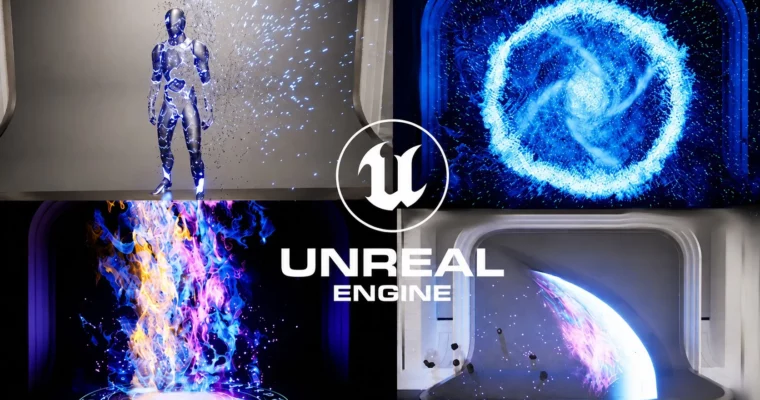
Learn to build game-ready VFX in Unreal Engine 5 with Niagara, from basic emitters to custom modules and character disintegration.

This course is a complete walkthrough for creating VFX in Unreal Engine 5 using Niagara. You’ll start with the absolute basics—no prior knowledge needed—and build up to complex effects like character disintegration, rain, waterfalls, and attack abilities. It’s a hands-on, project-based approach where you learn by doing, not just watching.

🎯 What you’ll learn

  • Create different types of game-ready VFX using Niagara emitters and renderers
  • Build master materials for VFX and bake noise textures directly in Unreal
  • Use blueprints to program VFX behavior and spawners
  • Create custom Niagara modules for unique particle behaviors
  • Develop environment FX like dandelion, rain, and waterfalls
  • Build attack FX like energy strikes, lightning hits, and projectiles

✅ Requirements

  • Skills: No prior knowledge of Niagara needed—everything is taught from scratch. Basic familiarity with Unreal Engine’s interface is helpful but not required.
  • Tools: A computer capable of running Unreal Engine 5. Blender is used briefly for creating a projectile mesh, so having it installed is recommended.
  • Hardware: A dedicated GPU with at least 8GB VRAM is recommended for smooth performance in Unreal Engine 5.

📝 Description

This isn’t just another tutorial dump. It’s a structured path that takes you from zero to a solid understanding of Niagara in Unreal Engine 5. The course is split into three logical sections, each building on the last. You start with the fundamentals—emitters, renderers, and materials—by creating simple effects like a floating dandelion and a flamethrower. These early projects get you comfortable with the interface and core concepts without overwhelming you.

The second section ramps things up. You’ll tackle full-blown attack effects: portals, meteor strikes, laser beams, energy strikes, and projectile slashes. This is where you’ll start using blueprints to create VFX spawners and control behavior dynamically. You’ll also jump into Blender to model a projectile mesh, then bring it back into Unreal to use with Niagara. It’s a realistic look at how VFX artists work across tools.

The final section is where things get interesting. You’ll learn to write custom Niagara modules—the building blocks for truly unique particle behaviors. This knowledge powers advanced effects like rain with collision events, waterfalls with caustics, and a full character disintegration sequence using distance fields and material dissolves. By the end, you’re not just following steps; you understand why each node and parameter works the way it does.

The teaching style is direct and practical. Each effect is broken down into manageable chunks, with challenges sprinkled throughout to test your understanding. You’re not just watching—you’re building a portfolio of VFX that proves you can handle real game development tasks.

🧑‍🎓 Who this course is for

  • Learners who want to create VFX in Unreal Engine 5 using Niagara, starting from scratch
  • Game developers looking to add polish to their projects with custom particle effects
  • 3D artists who want to expand their skillset into real-time VFX
  • Anyone interested in learning how to build VFX materials and meshes for games

🧑‍🏫 About the Author

Vince Petrelli is a VFX artist and instructor with a focus on Unreal Engine 5 and Niagara. He has created this course to be a one-stop resource for learning Niagara, drawing from his experience in game development and real-time effects. His teaching style is hands-on and project-oriented, emphasizing practical skills over theory. He’s known for breaking down complex systems into understandable steps, making advanced VFX techniques accessible to beginners.

🏁 Final Result

By the end of this course, you’ll have a portfolio of game-ready VFX, including a portal effect, meteor attack, laser attack, energy strike, projectile slash, rain system, waterfall, and a character disintegration sequence. You’ll also have a solid grasp of Niagara’s architecture—emitters, modules, parameters, and renderers—so you can create your own custom effects from scratch. Plus, you’ll know how to integrate blueprints to make your VFX interactive and responsive in a game environment.

Curriculum

📋 Course content

  1. Module 1: Niagara Basics
    • Course Intro5:39
    • What Consists Of A Niagara VFX?3:43
    • Create A VFX Project9:28
    • First Emitter7:40
    • Emitter Stage13:38
    • Simple Moving Sprite9:28
    • Shape Location10:22
    • Forces8:30
    • GPU Sprite13:11
    • First VFX Material12:34
    • Section Challenge: Create Floating Dandelion9:10
    • Sub UV Animation13:27
    • Start Of Flame Thrower: Create The Main Flame8:10
    • Smoke For Flame Thrower5:28
    • Section Challenge: Blue Flame And Ember12:37
    • Create Heat Distortion16:02
    • End Of Flame Thrower: Recap3:40
    • Mesh Renderer5:58
    • Custom Mesh10:44
    • Baking Texture In Unreal6:15
    • Draw Material To Render Target16:37
    • Ribbon Renderer8:45
    • Material Refresher: UV Manipulation8:39
    • Create Pan Distort Material18:27
    • Create Perlin Noise20:07
    • Variation From Voronoi Noise13:53
    • Section Wrap Up3:55
  2. Module 2: Skill VFX
    • Niagara Skill VFX Section Overview1:50
    • Set Up The Demo Room2:55
    • Start Of Portal FX: Create The Outline Of Portal13:19
    • Depth Fade And SubUV Animation8:53
    • Center Rotating Particles8:34
    • Center Rotating Patterns8:40
    • Material Effect With Mesh Renderer13:21
    • End Of Portal FX: Details And Debris16:54
    • Start Of Hit Impact: Create VFX Spawner8:43
    • Hit Impact Surface17:09
    • End Of Hit Impact: Section Challenge1 – Hit Impact Body7:28
    • Section Challenge2: Butterfly FX7:47
    • Start Of Meteor Attack: Anticipation For Meteor Attack9:08
    • Meteor Shell Mesh8:44
    • Create Shell FX11:27
    • Climax For Meteor Attack18:40
    • End Of Meteor Attack: Dissipation For Meteor Attack6:03
    • Start Of Laser Attack: Create Laser Mesh7:17
    • Create Laser Core9:18
    • Laser Shell7:31
    • Laser Fire Pattern8:03
    • End Of Laser Attack: Decoration Particles16:39
    • Start Of Energy Strike: Custom Sprite Alignment15:07
    • Location Event11:06
    • Custom Rotator13:19
    • Dynamic Parameters15:44
    • Section Challenge3: More Elements For Climax14:03
    • Section Challenge4: Cylinder FX12:08
    • End Of Energy Strike: Dissipation9:36
    • Start Of Projectile FX: Blade Slash Mesh15:20
    • Linear Gradient6:05
    • BP Projectile Master12:05
    • Projectile VFX Spawner19:10
    • Blade Slash Variations9:35
    • Following Particles9:54
    • Ground Particles16:25
    • Section Challenge4: Muzzle And Hit Impact VFX12:25
    • End Of Projectile FX: Different VFX Meshes10:47
    • Section Wrap Up3:27
  3. Module 3: Custom Niagara Modules
    • Custom Niagara Module VFX Section Overview2:44
    • Custom Niagara Module 10117:10
    • Attributes Reader14:20
    • Follow The Leader Advanced19:41
    • Start Of Rain FX: Fresnel13:53
    • Liquid Master Dyn Param11:35
    • Main Rain Drops7:14
    • Generate Collision Event15:27
    • Section Challenge: Rain Splash Large10:05
    • Ripples6:53
    • Check Collision Normal8:43
    • End Of Rain FX: Custom Niagara Enums12:11
    • Start Of Waterfall FX: Waterfall Mesh11:35
    • Master Material For Waterfall8:16
    • Waterfall Refraction10:50
    • Waterfall Caustics9:10
    • Falling Water9:08
    • End Of Waterfall FX: Waterfall Splashes11:20
    • Use Niagara To Sample Textures13:05
    • Start Of Dissolving Static Mesh: Static Mesh Location8:51
    • End Of Dissolving Static Mesh: Particle Color For Dissolving9:20
    • Start Of Character Disintegration: Mesh Reproduction Sprites13:47
    • Lerp Particle Attributes10:32
    • Distance Fields6:28
    • Use Distance Fields For Dissolving11:31
    • Trigger Material Dissolve By BP13:40
    • Particle FX For Dissolving5:58
    • Noise Dissolve Material16:51
    • End Of Character Disintegration: Apply Noise Dissolve Material10:23
    • Restore The Character Mesh2:47
    • Section Wrap Up2:14
    • Where To Go From Here3:51
Watch online or Download for Free
Unreal Engine 5 – One Course Solution For Niagara VFX by Vince Petrelli
NAME
SIZEDURATION
01 – Introduction
51.9 MB18m
03 – Niagara Skill VFX
880.8 MB7h 7m
05 – Congratulations
3.4 MB3m

Download all Videos (100)
2.1 GB16h 47m


Download all

Join us on
  Channel    and      Group

Leave a Comment

Your email address will not be published. Required fields are marked *