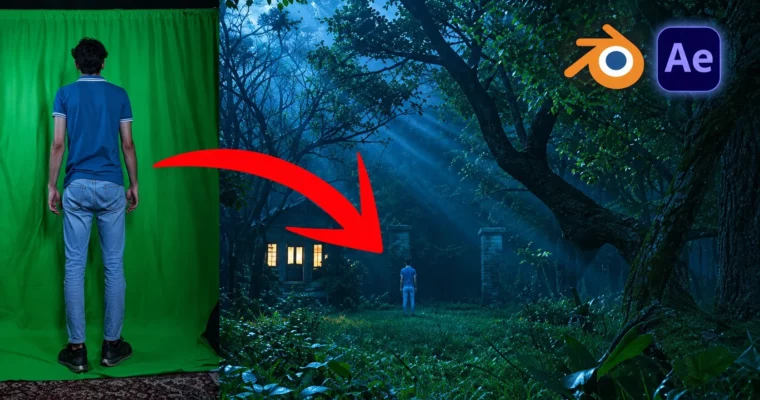
Mastering Realistic 3D Environment in Blender & Green Screen by Hassaan Sheikh

Duration:4h 39m
Actual Duration:4h 39m
Release date:2024, July
Publisher:Udemy
Skill level:Beginner
Language:English
Exercise files:Yes
Software:Blender, After Effects
Course URL:https://www.udemy.com/course/mastering-realistic-3d-environment-in-blender-green-screen
Want to put yourself inside a 3D forest without leaving your room? This course walks you through building a realistic environment in Blender and blending in real actors with green screen keying in After Effects. You start from a blank plane and end with a rendered, composited shot.
🎯 What you’ll learn
- Create realistic 3D environments in Blender from scratch
- Key out green screen footage in After Effects and export as PNG sequence
- Integrate keyed footage into Blender scenes with matching light and scale
- Kitbash with free assets to dress large environments fast
- Set up lighting, god rays, background and camera animation
- Dial in render settings and fix common Blender and After Effects issues
- Finish a portfolio-ready VFX shot with compositing and color grading
✅ Requirements
- Skills: No prior Blender experience required, basic computer skills and a strong interest in 3D and VFX
- Tools: Blender (latest version recommended), Adobe After Effects
- Hardware: Computer capable of running Blender and After Effects, dedicated GPU recommended for faster renders
📝 Description
Got some green screen footage and no idea how to make it look real? Hassaan shows his full process for faking it well. You build the world in Blender, pull the key in After Effects, and bring the two together so the light, scale, and edges actually sit right.
You start simple. Install Blender, learn the basics you actually need, then add the free tools that do the heavy lifting: BlenderKit, Botaniq, and Geo-Scatter. No endless theory. You sculpt a ground plane, throw on materials, scatter trees and rocks, and kitbash imported models to fill out the shot.
Then comes the look. You will set up sun, sky, and background, add volumetric lighting for those god rays, and animate the camera for a slow push-in. Hassaan spends a lot of time on lighting here because that is what sells realism. He also covers render settings that keep quality high without melting your PC.
Last part is the fun VFX bit. You key the footage in After Effects, export it as a PNG sequence, bring it into Blender as an image sequence, render it out, and finish with compositing and color grading. Glow, grade, done. By the end you have a repeatable workflow you can reuse for shorts, music videos, or client work.
🧑🎓 Who this course is for
- Beginners who want to create realistic 3D environments in Blender with no experience
- Content creators and YouTubers who want better-looking VFX shots
- Video editors and graphic designers adding 3D and VFX to their skill set
- Blender and After Effects users who want a practical green screen workflow
- Hobbyists who like building cool digital art projects from start to finish
🧑🏫 About the Author
Hassaan Sheikh is a Blender generalist and visual effects creator focused on practical, low-budget workflows. He works with environment building, kitbashing, and green screen integration for video projects. His teaching style is straight to the point: install the tools, build the scene, fix what breaks, and finish the shot.
🏁 Final Result
- A finished VFX shot featuring a realistic Blender forest environment with integrated green screen actor, lit, rendered, and composited with color grade
 Channel