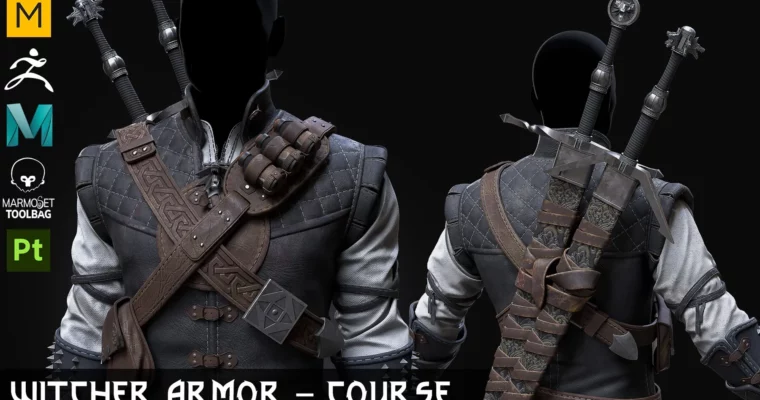
Course – Witcher Manticore Armor Set by Vadim Meshcherekov

Duration:20 hours
Actual Duration:20h 32m
Release date:2024
Publisher:Artstation
Skill level:Intermediate
Language:English
Exercise files:Yes
Software:Marvelous Designer, Clo3D, ZBrush, Maya, Marmoset Toolbag 4, Substance Painter
Course URL:https://www.artstation.com/marketplace/p/POmd7/course-witcher-manticore-armor-set
This course is a full, no-nonsense production walkthrough for creating the Witcher Manticore Armor Set from scratch. You’ll follow a complete game-art pipeline: pattern-making in Marvelous Designer, high-poly sculpting in ZBrush, retopology and UVs in Maya, texturing in Substance Painter, and final presentation in Marmoset Toolbag 4. It’s 20 hours of pure, text-annotated video with no voiceover, so you can move at your own pace and focus entirely on the screen.
🎯 What you’ll learn
- Create a game-ready armor set using a full PBR pipeline.
- Tailor realistic cloth and leather patterns in Marvelous Designer.
- Sculpt high-poly details and ornaments in ZBrush.
- Build clean quad topology and UVs in Maya.
- Bake high-poly details to low-poly game meshes.
- Texture the armor with realistic wear and tear in Substance Painter.
- Set up studio lighting and materials for a final Marmoset Toolbag render.
✅ Requirements
- Skills: Basic understanding of 3D modeling and navigation in Maya or similar software. Familiarity with ZBrush and Substance Painter interfaces is helpful.
- Tools: A three-button mouse is essential. A tablet is highly recommended for sculpting in ZBrush.
- Hardware: A dedicated GPU with at least 4GB VRAM for smooth viewport performance in ZBrush and Marmoset. Minimum 16GB RAM.
📝 Description
This isn’t a sped-up timelapse with vague explanations. It’s a 20-hour, text-annotated breakdown where every click is visible on screen. The lack of voiceover actually works in your favor: you can pause, rewind, and follow along without missing a beat. The instructor focuses on the why behind each step, not just the how.
The course is built around a real production asset. You’ll start with an Avatar base mesh and a Marvelous Designer project file, then move through the entire armor creation process. The chapters are logically sequenced, so you’re never jumping between tools without context. By the end, you’ll have a complete game-ready asset with quad topology and 4K textures ready for portfolio use.
A key highlight is the accessories modeling section. The instructor shows how to build the metal buckles, straps, and pauldrons with clean hard-surface techniques that hold up under close inspection. The texturing phase is equally thorough, covering leather grain, metal scratches, and the subtle dirt accumulation that makes the armor feel lived-in.
The included project files are a goldmine. You get the Maya scene, ZBrush project, Substance Painter project, and Marmoset scene—everything you need to reverse-engineer the final result. Note that sword modeling is not included, but the armor set itself is fully covered.
🧑🎓 Who this course is for
- Intermediate 3D artists who want to see a complete game-ready armor pipeline from start to finish.
- Character artists looking to improve their hard-surface and cloth workflow.
- Anyone preparing a portfolio piece and wanting a production-quality asset with clean topology and textures.
🧑🏫 About the Author
Vadim Meshcherekov is a professional 3D artist with extensive experience in game asset production. His work focuses on character props and armor, with a strong emphasis on clean topology and efficient texturing workflows. This course reflects his practical, no-fluff approach to teaching, prioritizing real-world production techniques over theory.
🏁 Final Result
- A fully textured, game-ready Witcher Manticore Armor Set with quad topology and 4K PBR textures.
- A complete Marmoset Toolbag scene with studio lighting and camera setups for portfolio-ready renders.
- All source project files (Maya, ZBrush, Substance Painter, Marvelous Designer) for future reference and iteration.
 Channel