It looks like you're using an adblocker.
Adblockers make us sad. We use ads to keep our content happy and free. If you like what we are doing please consider supporting us by whitelisting our website. You can report badly-behaved ads by clicking/tapping the nearby 'Advertisement' X text.
Master Blender 3D with Wild West Environments by 3D Tudor, Luke PolyGoods 3D
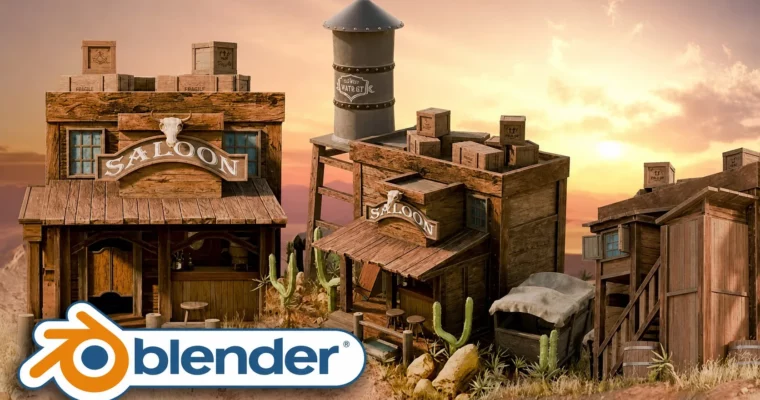
Build a complete, stylized Wild West environment in Blender 4, from greyboxing to final cinematic renders.
Ready to build your own dusty frontier town in 3D? This course dives deep into creating a complete, stylized Wild West environment using Blender 4. You’ll go from initial planning and greyboxing all the way through to detailed modeling, Geometry Nodes for terrain and props, stylized sculpting, and finally, stunning cinematic lighting and renders. It’s perfect for anyone looking to create a portfolio-ready environment with a unique artistic touch.
🎯 What you’ll learn
Plan, greybox, and assemble an entire Western-themed environment from scratch.
Model and texture iconic Western props like saloons, water towers, barrels, and wagons with clean topology.
Utilize Geometry Nodes to generate stylized desert terrains, scatter foliage, and create repeating elements like planks and chains.
Sculpt organic elements such as cacti and cow skull signs, then optimize them for game-ready or cinematic scenes.
Master Blender’s Asset Manager for efficient workflow and scene organization.
Create compelling cinematic lighting, turntable animations, and final composited renders.
✅ Requirements
Skills: No previous experience in Blender or 3D modeling is necessary.
Tools: A computer (Microsoft, Linux or Mac) with Blender downloaded.
Hardware: A computer capable of running Blender.
📝 Description
Get ready to saddle up for a 3D adventure through dusty desert towns, towering water towers, and iconic saloon doors! This course guides you from a blank scene to a fully-realized, portfolio-ready Wild West environment in Blender 4. You’ll learn to build a sprawling, stylized Western world from scratch, covering greyboxing, UV mapping, Geometry Nodes, and more.
We’ll explore powerful workflows, including a robust resource pack with custom shaders, decals, and Geometry Nodes setups for terrain and props. You’ll also learn stylized sculpting for organic elements, asset management using Blender’s Asset Manager, and how to achieve cinematic lighting and renders. This course is designed to be beginner-friendly while delivering pro-level results, making it ideal for hobbyists, indie game devs, or industry pros looking to expand their skillset.
🧑🎓 Who this course is for
Beginners looking for a comprehensive introduction to environment design in Blender.
Intermediate 3D artists aiming to master stylized workflows and Geometry Nodes.
Game developers, concept artists, and environment artists focused on building optimized, reusable assets for game worlds.
Hobbyists and creative explorers interested in conjuring a dusty, sun-scorched Western town on their computer.
🧑🏫 About the Author
3D Tudor (Neil Bettison)
Neil Bettison founded 3D Tudor out of a passion for 3D modeling. With 9 years of professional experience in assets, characters, and environments, Neil is a successful instructor known for his clear, to-the-point guidance and unique on-screen tooltips. His courses often focus on medieval or sci-fi themes and are highly rated on Udemy. Neil uses a range of software including Blender, Maya, ZBrush, Unreal Engine, Unity, Photoshop, and Substance Suite.
Luke PolyGoods 3D (Luke)
Luke is a freelance artist with over 5 years of creative industry experience, driven by a passion for video games. He has worked on mobile and real-time strategy games, honing his optimization skills for game assets. His current workflow heavily features Maya, ZBrush, Substance Painter, and Unreal Engine 4, focusing on realism while allowing for creative freedom. Luke enjoys discovering and implementing new techniques and sharing his passion with others.
🏁 Final Result
A complete, stylized Wild West environment diorama, ready to be showcased in a portfolio or demo reel.
Proficiency in Blender’s environment creation pipeline, from initial blocking to final renders.
A solid understanding of stylized art principles, Geometry Nodes, asset management, and cinematic lighting techniques.
Curriculum
📋 Course content
Introduction
Referencing Image Basics (Pureref Introduction) In Blender 3D12:54
Resource Pack And Its Overview, All In Blender 3D6:02
Blender Navigation Basics In Blender 3D8:00
Greyboxing
Greybox In Blender 3D12:35
Edit Mode In Blender 3D19:50
Backside Greyboxing In Blender 3D15:37
Working With Greybox Slopes And Water In Blender 3D15:39
Greybox Preview Setup In Blender 3D10:08
Working On Back Attachment And Base In Blender 3D10:28
Greyboxing Smaller Props To Break Up In Blender 3D12:00
Using Transorm Data To Keep Wagon In Blender 3D18:59
Modeling Front Section Of The Greybox, In Blender 3D15:07
Working With Bar Proportions In Blender 3D12:47
Adjusting Proportions Of Bar Table In Blender 3D9:29
Modeling Water Tower, Add Collection Management In Blender 3D12:12
Modeling Metal Bolts In Blender 3D5:13
Using Modifiers Array And Curve Deformer In Blender 3D9:37
Seams and Sharps
Seams And Sharps Basics In Blender 3D10:25
Creating Seams For Water Tower In Blender 3D10:56
UV Basics and Shading
Uv Basics And Importing Resource Pack In Blender 3D12:40
Shading Basics In Blender 3D13:52
Assigning Material Variety To In Blender 3D5:47
Crate Modeling
Create Cube Shaped Create, Modeling Frame In Blender 3D9:49
Modeling A Single Wood Panel With In Blender 3D12:43
Creating Material Duplicates And Adjusting Uvs In Blender 3D11:37
Creating Crate Individual Planks Of Wood In Blender 3D13:11
Modifying Crate To Have Variation From In Blender 3D7:49
Crates And Decals, Learning Multiple Ways In Blender 3D12:31
Barrel Modeling
Modeling Barrel, Using Circular Planks And In Blender 3D15:36
Modeling Barrel Top And Starting Uv In Blender 3D10:27
Uv Unwrapping Techniques For Barrel Using In Blender 3D12:09
Alternative Way To Unwrap Uvs In Blender 3D10:41
Adding Decal Onto Barrel, Using Cut In Blender 3D5:43
Asset Browser
Collection Basics In Blender 3D9:16
Collection Setup And Asset Manager Basics In Blender 3D11:50
Placement Of Asset Browser Props Onto In Blender 3D14:28
Saloon Front
Modeling A Front Platform Using Plan In Blender 3D14:33
Modeling Front Roof In Blender 3D13:59
Modeling Front Supports In Blender 3D12:09
Texturing And Shading Basics In Blender 3D17:15
Applying Textures To Our Front And In Blender 3D11:48
Working With Walls And Front Extention In Blender 3D11:39
Creating Backroofs In Blender 3D14:25
Modeling Outdoor Toilet Extention Of A In Blender 3D10:07
Using Knift Tool To Cutout In Blender 3D8:51
Creating Bolts As Asset Browser Item In Blender 3D10:14
Modeling Staircase In Blender 3D12:22
Texturing Staircase, Fixing Uv Double Data In Blender 3D9:45
Modeling Western Window Using Solidify To In Blender 3D10:34
Texturing Window, Reusing Window Mesh To In Blender 3D10:37
Window Shutters In Blender 3D15:49
Adding Wood Planks On The Back In Blender 3D11:01
Saloon Sign and Skull
Modelling A Sign Using Non Detructive In Blender 3D14:35
Creating Skull Usying Clay Brush In Blender 3D11:48
Modeling Skull Horns Using Radial Brush In Blender 3D16:52
Uv Unwrapping And Texturing Organic Sculpt In Blender 3D14:14
Wagon Modeling
Wagon Modeling, Using Greybox Wagon As In Blender 3D14:56
Using Mirror Tool To Our Advantage In Blender 3D11:21
Continuing With Wagon Modeling For Its In Blender 3D11:50
Modeling Wagon Wheels In Blender 3D11:19
Finalising Roof Supports And Starting Uv In Blender 3D13:48
Wagon Uv Unwrapping In Blender 3D10:30
Wagon Cloth Roof Simulation In Blender 3D13:26
Texutring Wagon Fabric And Cleaning Up In Blender 3D10:10
Environment Optimization and Terrain
Blender Optimisation Basics In Blender 3D15:34
Generating Rocks Using Extra Mesh Addon In Blender 3D13:01
Rock Placement In Environment In Blender 3D10:18
Sculpting Terrain Platform Base Ussing Claystrip In Blender 3D10:49
Sculpting Process Refining Terrain Edges In Blender 3D11:29
Terrain Material And Mesh Preperations In Blender 3D10:42
Vertex Painting Terrain In Blender 3D11:21
Western Terrain Foliage Geometry Node Scale In Blender 3D10:54
Painting Foliage And Rocks Using Geonode In Blender 3D10:50
Adding Grass Shrubs Onto Our Western In Blender 3D16:52
Final Renders and Turntables
Render Preperations Within Our Environment, Turning In Blender 3D4:55
Compositor Controls Using Addon In Blender 3D10:47
Finetuning The Scene For Render In Blender 3D15:54
Final Compositor Render Adjustments For Image In Blender 3D7:07
Turntable Basics In Blender 3D14:06
Turntable Setup For The Environment In Blender 3D7:55
Course Outro: It’s not the End2:05
Watch online or Download for Free
Master Blender 3D with Wild West Environments by 3D Tudor, Luke PolyGoods 3D




 Channel