Ad Clicks : Ad Views : Ad Clicks : Ad Views : Ad Clicks : Ad Views : Ad Clicks : Ad Views :
Oh Snap!

It looks like you're using an adblocker. Adblockers make us sad. We use ads to keep our content happy and free. If you like what we are doing please consider supporting us by whitelisting our website. You can report badly-behaved ads by clicking/tapping the nearby 'Advertisement' X text.

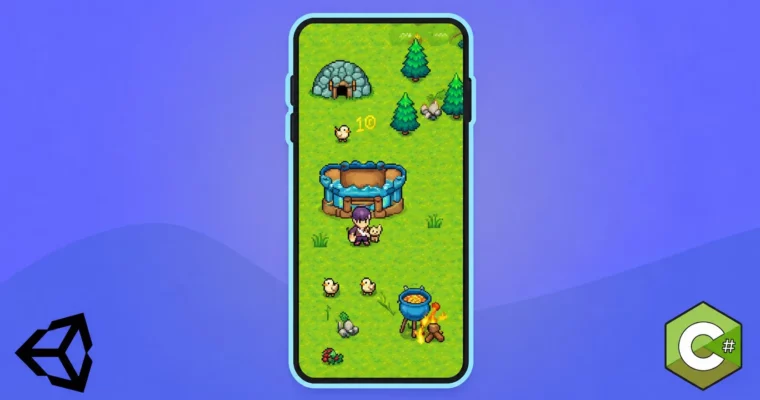
Mobile RTS Game in Unity 2D – From Scratch to App Store by Eincode by Filip Jerga

Mobile RTS Game in Unity 2D – From Scratch to App Store by Eincode by Filip Jerga

/

Author:Filip Jerga

Duration:36.5 hours on-demand video

Actual Duration:36h 24m

Release date:2025

Publisher:Udemy

Skill level:Beginner

Language:English

Exercise files:Yes

Software:Unity, Unity 6, C#

Course URL:https://www.udemy.com/course/mobile-rts-game-in-unity-2d-from-scratch-to-app-store

Build a complete 2D mobile RTS in Unity and ship it to iOS and Android — no shortcuts, no asset packs.

You build one full game from empty project to live on the stores. A 2D mobile RTS with gathering, building, combat and enemy waves — all coded by hand in C# with Unity 6.

🎯 What you’ll learn

  • Develop and launch a mobile game from initial setup to app store publishing
  • Design engaging game mechanics and manage resources effectively
  • Build practical skills in coding, animation, and user interface design
  • Code your own A* pathfinding, combat AI, and resource economy from scratch

✅ Requirements

  • Skills: Basic Unity fundamentals, familiarity with C# basics and 2D concepts
  • Tools: Unity 6 (works with older versions), 3-button mouse for editor work
  • Hardware: PC or Mac capable of running Unity, Android / iOS device for on-device testing recommended

📝 Description

This one is built in Unity 6 with Unity 2D and plain C#. No third-party RTS kits. You code every system yourself so you actually get why it works.

You start with an empty project. You set up tilemaps, animated tiles, water and rocks, and lay out a map that plays well on touch. Then you add builders and warriors, hook up Animator controllers, selection outlines, click-to-move and click effects. It feels small at first, then it stacks up fast.

The middle chunk is pure gameplay. You build an action bar with build actions, placement ghost with grid snapping, blocked-tile checks, and a confirmation bar with resource costs. Workers get tasks and states — walk to site, build, chop wood, mine gold, haul it back to storage. You wire up wood and gold economy, resource UI, training units, towers, projectiles, rangers, dynamite throwers, and a king unit to defend.

Then the hard stuff, explained step by step. You write your own A* pathfinding on a node grid, with walkability updates, path smoothing and separation so units don’t pile up. Enemies run on state machines — patrol, detect, chase, attack, die — with attack ranges, stances for your soldiers, damage popups, flash effects and death cleanup.

At the end you polish and ship. Audio pooling for attacks, footsteps, chopping and UI, camera controller with lock, menu scene, game-over flow and restart fixes. Then you make builds, balance stats, create a preview page, and walk through App Store and Google Play listings, guidelines and submission until the game is live.

🧑‍🎓 Who this course is for

  • Aspiring game developers eager to build and publish their first mobile game
  • Unity users looking to expand into 2D game development
  • Developers interested in hands-on, project-based learning for RTS games
  • Anyone wanting to learn the full process of creating and releasing a game on mobile platforms

🧑‍🏫 About the Author

Filip Jerga is the developer behind Eincode, teaching Unity and full-stack development through long, build-it-all projects. He focuses on practical C# and real shipping workflows, not just editor tricks.

He has released multiple project-based courses where students code systems from zero — movement, AI, economy, UI and deployment. This RTS course follows that same style: one game, start to finish, with an actual mobile release at the end.

🏁 Final Result

  • A fully playable 2D mobile RTS with resource gathering, base building, unit training, tower defense combat and enemy waves — tested and ready for iOS and Android submission.
Curriculum

📋 Course content

  1. Module 1:  Setup and Tilemap Worldbuilding
    • Course Preview1:39
    • Troubleshooting7:57
    • Setup Project10:11
    • Tilemaps16:34
    • More tilemaps10:35
    • Animated Tile8:53
    • Rocks and water tilemap10:28
  2. Module 2:  Units, Animation and Selection
    • Builder and Warrior12:51
    • Create Unit class and move15:43
    • Builder and Warrior Animations11:36
    • Check if unit is moving8:08
    • Apply speed to animator9:25
    • Create Game Manager9:00
    • Singleton4:15
    • Get Input Position8:22
    • Prevent touch and mouse slides4:52
    • Move the active unit6:03
    • Select active unit9:34
    • Flip the unit4:24
    • Outline material6:46
    • Display highlight on Selection7:26
    • Load material from Resources3:50
    • Point to click effect11:15
    • Fadeout effect10:09
    • Animation Curve13:48
    • Check for humanoid unit3:21
    • Change build target3:27
    • Deselect active unit4:37
  3. Module 3:  Action Bar and Building Placement
    • Action Bar Start16:37
    • Action Bar Background6:47
    • Clear and display actions11:57
    • Detect UI clicks + new getters8:52
    • Clear bar on Deselect2:12
    • Build Tower Action18:22
    • Register actions4:42
    • Pass image to button7:52
    • Hook function to button6:41
    • Placement Process9:21
    • Show Placement Outline6:48
    • Move placement outline6:55
    • HvoUtils7:31
    • Code refactor13:08
    • Snap To Grid6:35
  4. Module 4:  Grid Validation and Confirmation UI
    • Store highlight tiles20:16
    • Set tile color6:04
    • Offset the position6:06
    • Overlay tilemap11:32
    • Clear Highlights3:10
    • Display blocked tiles6:57
    • Unreachable tilemaps6:39
    • Check for blocked gameobjects18:02
    • Confirmation Bar10:19
    • Import new font5:58
    • Resource requirements display8:12
    • Show confirmation bar4:53
    • Setup Hooks9:35
    • Cancel build placement3:00
    • Try finalize placement5:59
    • Finalize placement process2:44
    • Try deduct resources15:08
    • Display required resources12:10
  5. Module 5:  Construction and Worker Tasks
    • Start building process7:06
    • Move to structure5:48
    • Structure unit prefab7:19
    • Building process update5:31
    • Proximity Detection9:54
    • Task and State14:19
    • Set unit target11:01
    • Reset worker state5:41
    • Add and remove worker from building process10:46
    • Reassign worker to building8:35
    • Check for construction5:01
    • Building animation11:41
    • Finish Construction12:54
    • Construction Effect25:39
    • Display click build effect10:31
  6. Module 6:  Custom A-Star Pathfinding
    • Pathfiding start18:12
    • Tilemap Manager10:19
    • Initialize Node Grid21:18
    • Check if tile is walkable13:05
    • Keep center position separate6:51
    • Find Node14:28
    • Manhattan Distance21:14
    • A* Theory59:14
    • Open and Close List10:46
    • Get all neighbors12:12
    • Complete Closed List11:23
    • Retrace path6:06
    • Get path with click5:24
    • Follow the path11:03
    • Check for the same end node6:44
    • Fix abrupt movements8:51
    • Reset Nodes3:50
    • Smoothing Speed9:26
    • Can walk at building tile10:52
    • Update Node Walkability11:35
    • Move to closest node5:43
    • Turn to new position7:17
    • Camera Controller13:27
    • Lock Camera3:57
  7. Module 7:  Enemy AI Foundation
    • Enemy Unit8:26
    • Change Layers12:43
    • Keep units in lists9:01
    • Detect Foe14:40
    • Detection check rate6:45
    • Enemy state machine17:12
    • Try attack target7:18
    • Stop movement3:14
    • Attack Triggers12:21
    • Attack commitment time4:13
    • Delay damage11:45
  8. Module 8:  Combat Feedback, Damage and Death
    • Textpopup prefab6:59
    • Spawn text popup13:07
    • Floating text curves22:01
    • Playing with anim curves8:52
    • Randomize X Direction4:16
    • Floating text size update1:53
    • Handle dead scenario8:55
    • Destroy unit and cleanup4:21
    • Dead Animation8:14
    • Unregister unit correctly7:44
    • Stop attacking when unit is dead2:25
    • Damage flash effect5:21
    • Multiple damage flash effect5:59
  9. Module 9:  Soldier AI, Stances and Separation
    • Handle click on enemy & soldier8:04
    • React to attack task2:45
    • Simple soldier AI5:22
    • Auto Engage in fight4:49
    • Retreat from battle8:26
    • Unit Stances7:56
    • Expose stance to unit4:12
    • Apply stances to soldier7:00
    • Destination source6:02
    • Fix issue with none task2:23
    • Stop moving in defensive stance7:15
    • Fix Ai Pawn and Attack Range9:29
    • Focus action9:02
    • Focus action on click3:17
    • Focus action initialy4:21
    • Fix flash coroutine2:58
    • Fix player attack time4:16
    • Apply separation start14:33
    • Separation Vector19:35
    • Fix turn to target and action bar3:36
    • Fix attack ranges8:45
  10. Module 10:  Towers, Projectiles and Ranged Units
    • Spawn Projectile9:27
    • Tower detects enemy5:24
    • Move and rotate projectile7:11
    • Deal damage with Projectile10:28
    • Apply cooldowns to tower attack6:41
    • Handle tower dead6:21
    • Tower attack optimization4:43
    • Ranger Unit14:46
    • Shoot arrows6:07
    • Enemy ranger unit9:12
    • Throw dynamites6:17
    • Dynamite rotation & unit prefabs6:56
  11. Module 11:  Wood Economy and Resource UI
    • Trees and Wood Storage11:46
    • Detect click on tree4:26
    • Display chop icon6:47
    • Set task to chop tree7:05
    • Unoccupy tree3:20
    • Release tree after dead3:55
    • Detect assigned tree7:33
    • Chopping animation3:28
    • Collect Wood9:20
    • Tree Hit Animation13:09
    • Display Wood Resource7:42
    • Holding Resource Animation5:59
    • Find closest wood storage9:48
    • Return lumber9:31
    • Go back to chopping10:47
    • Handle click on wood storage9:59
    • Increase wood globaly4:56
    • Add Resource Display UI8:01
    • Update Resources in UI6:50
  12. Module 12:  Gold Economy, Map Polish and Unit Training
    • Keep and Gold Mine6:10
    • Handle Clicks on Gold Mine8:51
    • Refactor try get resource4:46
    • Handle minning task5:07
    • Try to enter mine16:59
    • Release the worker6:58
    • Store gold8:24
    • Refactor return resources6:03
    • Return gold when clicking on gold storage3:09
    • Refactor build click checks5:46
    • Display gold mine as active6:17
    • Work on new map10:31
    • Map Decoration11:46
    • Unbuildable tilemap5:37
    • Train Unit Actions9:16
    • Setup training hooks7:11
    • Train Unit17:48
    • Train units improvements13:51
    • King Unit5:33
    • Enemy spawner config14:52
    • Startup spawner8:21
    • Core Spawn Functionality10:01
    • Spawn Enemies8:14
    • Attack king unit8:19
  13. Module 13:  Audio, Menu and Game Over
    • Audio Manager Start3:33
    • Audio Setting15:45
    • Audio Source14:20
    • Play sound beginnings16:39
    • Get Audio Source8:04
    • Play Attack Sound8:33
    • Return source to pool6:28
    • Play interaction sound10:14
    • More Interaction Sounds8:06
    • Archer and Tower Attack Sounds4:54
    • Enemy Attack Sounds4:47
    • Termination sound9:37
    • Chopping sound7:27
    • Footstep sound8:43
    • Placement and Build Sound8:33
    • Castle Interaction Sound2:09
    • Background theme music6:11
    • Menu Scene15:58
    • Menu scene controls7:20
    • Stop the game – game over13:21
    • Game over layout8:42
    • Game over script7:54
    • Handle restart with errors7:28
    • Fix game restart11:36
    • Fix issues with building targeting9:28
    • Ui button clicks11:44
    • Final Test9:29
  14. Module 14:  Preview Page and App Store Publishing
    • Init Preview Web Page11:46
    • Deploy preview page to vercel7:51
    • Customizing the preview page26:26
    • Setup build details6:58
    • Setup game on Apple Store8:04
    • Prepare the ios build12:59
    • Balancing the game7:39
    • Distribute the IOS Build6:17
    • Submit your game (ios)20:27
    • Create Google Play App5:15
    • Fill up the app listing10:10
    • Building the game10:26
    • Balancing the game7:39
    • Test the game again3:45
    • Providing game information22:09
    • Wrap Up1:17
Watch online or Download for Free
Mobile RTS Game in Unity 2D – From Scratch to App Store by Eincode by Filip Jerga
NAME
SIZEDURATION
1 – Introduction
36.6 MB9m
2 – Setup the Map
100.8 MB56m
16 – Camera Setup
46.1 MB17m
30 – Map Design
82.6 MB27m
31 – Train new Units
104.4 MB48m
38 – Wrap Up
1.4 MB1m

Download all Videos (243)
4.1 GB36h 24m


Download all

Join us on
  Channel    and      Group

Leave a Comment

Your email address will not be published. Required fields are marked *