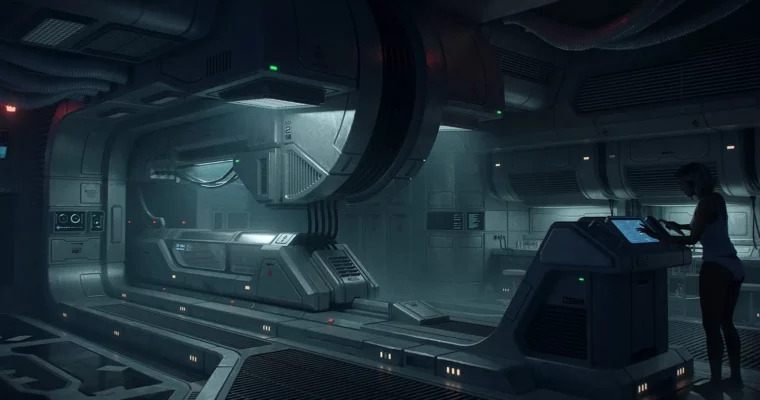
SCI-FI Interior Concept Art Tutorial by Nick Stath (Blender)

Duration:over 4 hours
Actual Duration:4h 14m
Release date:2023, December
Publisher:Gumroad
Skill level:Advanced
Language:English
Exercise files:Yes
Software:Blender, Procreate, Photoshop
Course URL:https://nickstath.gumroad.com/l/scifitutorial
Nick spent 3 years refining this workflow on real film and TV jobs, and now he shows the whole thing. You get a full sci-fi interior built from nothing — brief, sketch, 3D blockout, detail, render, and paintover — with all the messy middle included.
🎯 What you’ll learn
- How to form a clear brief with references and quick sketches
- How to block out a sci-fi interior fast in Blender
- Eevee setup for fast concept lighting and viewport renders
- Sketching over 3D to fix design before you commit
- Detailing techniques for hard-surface panels and structures
- Materials and set dressing to make the space feel lived-in
- Render passes workflow for paintover in Photoshop / Procreate
- How to change the mood of your scene without rebuilding it
✅ Requirements
- Skills: Basic understanding of Blender modeling and familiarity with Photoshop or Procreate for paintover
- Tools: Blender 3.4, Photoshop or Procreate for sketching and paintover
- Hardware: PC capable of running Blender Eevee, drawing tablet recommended for sketching and paintover
📝 Description
This is not a button-pushing tutorial. Nick walks you through how he actually thinks on a job — how to read references, lock a brief, and get a solid idea down before you waste time in 3D.
You start loose. Thumbnails, refs, what is this space for, who uses it. Then you jump into Blender and block the whole interior with simple forms. No detail yet. Just scale, composition, and flow. He shows his go-to modeling commands and Eevee setup so you can move fast and see light early.
Once the blockout reads well, you sketch right over it. That back-and-forth is the core of the course. You fix proportions and design problems in 2D, then push the 3D further. From there it is all about selling believability — breaking up big shapes, adding paneling and greebles with intent, then using materials and set dressing to tell a story. Pipes, lights, clutter, wear. Stuff that makes it feel used.
For the finish, you render out render passes and take it into Photoshop / Procreate. Nick covers paintover, edge cleanup, light tweaks, atmosphere, and final touches. He even shows how to flip the mood of the same scene with color and light. If you follow along, you will have a repeatable process you can drop straight into production work.
🧑🎓 Who this course is for
- Intermediate Blender users who want a cleaner concept workflow for interiors
- Advanced artists and designers who want extra film-production tips for speed and presentation
🧑🏫 About the Author
Nick Stath is a concept artist working in feature films and television. Over the past 3 years he has developed a practical Blender-based workflow for sci-fi interiors built around fast blockouts, paintover, and clear design thinking. He teaches the exact process he uses on real shows, focused on getting to a strong final image without getting stuck.
🏁 Final Result
- A finished portfolio-ready sci-fi interior concept — fully blocked, detailed, lit in Blender, and polished with professional paintover and mood variations.
 Channel