Unreal Generalist Houdini Procedural Environment by Alex Tjagnirjadko

Duration:13 hours on-demand video
Actual Duration:12h 49m
Release date:2026, April 19
Publisher:Udemy
Skill level:Intermediate
Language:English
Exercise files:Yes
Software:Houdini, Unreal Engine, ZBrush, SpeedTree, Gaea, Substance Painter
Course URL:https://www.udemy.com/course/unreal-generalist-houdini-procedural-environment
Ready to build jaw-dropping game environments? This course dives deep into creating fully procedural assets like cliffs, terrain, and trees using Houdini, then seamlessly integrating them into Unreal Engine 5. You’ll learn to craft flexible, reusable systems perfect for both professional production and quick prototyping.
🎯 What you’ll learn
- Create fully procedural meshes for cliffs, terrain, landscapes, trees, crystal clusters, and embankments
- Polish Houdini-generated meshes in ZBrush for enhanced detail
- Problem-solve Houdini procedural content and adapt workflows
- Re-use and modify Houdini graphs for completely different results
- Integrate Houdini, ZBrush, and SpeedTree effectively in your environment workflow
✅ Requirements
- Skills: Comfortable with node-based workflows in Houdini, Familiarity with Unreal Engine interface
- Tools: ZBrush, SpeedTree, Gaea
- Hardware: [INFERRED] A capable PC for running Houdini, Unreal Engine, and ZBrush simultaneously.
📝 Description
Hey there! I’m Alex Tjagnirjadko, an Unreal Engine Generalist at Moonraker VFX. In this course, I’m going to walk you through building completely procedural environments using Houdini and getting them into Unreal Engine 5 smoothly. We’ll focus on creating systems that are not only flexible and reusable but also scale well, making them perfect for real production work or just for quickly testing out ideas.
You’ll learn how to generate all sorts of meshes procedurally – think cliffs, terrains, landscapes, trees, even crystal clusters and embankments. We’ll then take those Houdini meshes and give them extra polish and detail in ZBrush. A big part of this is learning to troubleshoot your Houdini setups and adapt workflows to your needs. You’ll also discover how to tweak and reuse Houdini graphs to get totally different results, saving you tons of time. Plus, we’ll cover how to effectively combine Houdini, ZBrush, and SpeedTree in your environment pipeline.
This tutorial is geared towards environment artists, technical artists, and generalists who are already comfortable with Houdini, Gaea, and Unreal Engine. A basic grasp of ZBrush and SpeedTree will definitely help, but don’t worry if you’re not an expert – we’ll cover what you need. Just a heads-up, this isn’t for absolute beginners; it might be a bit challenging if you’re just starting out. We’ll be using Houdini 20.5.278 and Unreal Engine 5.7, along with ZBrush, SpeedTree, Gaea, and Substance Painter. You’ll get the finished Unreal Engine project, all the wrangle codes, and ZBrush brushes. Note that the Houdini files themselves aren’t included. We won’t be covering Houdini Engine or HDA asset creation in this course.
🧑🎓 Who this course is for
- Environment artists, technical artists, and generalists looking to streamline their workflow.
- Users who are already comfortable with Houdini, Gaea, and Unreal Engine and want to deepen their procedural environment skills.
- Artists who want to learn how to integrate ZBrush and SpeedTree into a Houdini-centric environment pipeline.
🧑🏫 About the Author
Alex Tjagnirjadko is a Lead Environment Artist and Generalist with over 11 years of experience across games, film, and virtual production. He’s worked on major projects for giants like Electronic Arts, Apple, Sky, and Netflix, including titles like Need for Speed: Hot Pursuit Remaster and virtual production shows such as Avatar: The Last Airbender and Masters of the Air. Alex also led art for VR projects like the Nissan Ariya VR ad and developed real-time content for various immersive experiences. He’s independently developed two games, Lost in Red Valley and We Must Dig: An Underground Odyssey, pushing his skills in Unreal Engine Blueprints and full production pipelines. Alex specializes in Unreal Engine 5, with expertise in environment creation, 3D modeling, texturing, shader development, VFX, and Blueprint scripting. His goal is to share practical, real-world techniques learned from years of production to help other artists grow.
🏁 Final Result
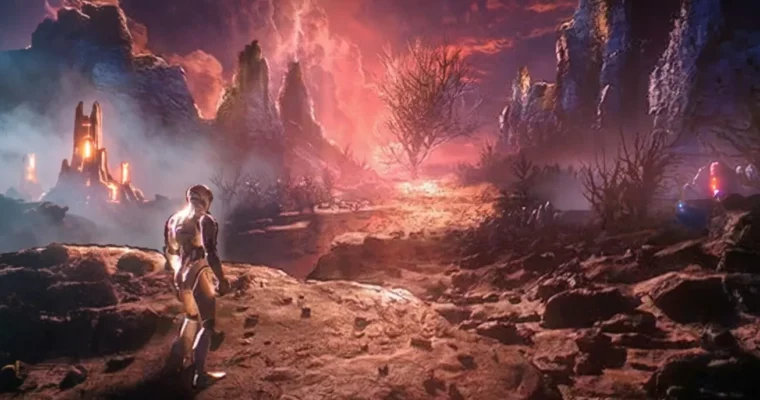
- You’ll complete a fully procedural landscape in Unreal Engine 5, featuring detailed cliffs, terrain meshes, scattered rocks, and a large hero tree. The course also covers lighting and basic post-processing to bring your scene to life.
 Channel