Cityscape Set Design, Volume 2 Texturing, Lighting & Rendering by Tony Ianiro

Duration:4h 23m
Actual Duration:4h 23m
Release date:2025, July
Publisher:Gnomon
Skill level:Intermediate
Language:English
Exercise files:Yes
Software:Photoshop, Maya, Materialize, Arnold
Course URL:https://www.thegnomonworkshop.com/workshops/cityscape-set-design-volume-2-texturing-lighting-rendering
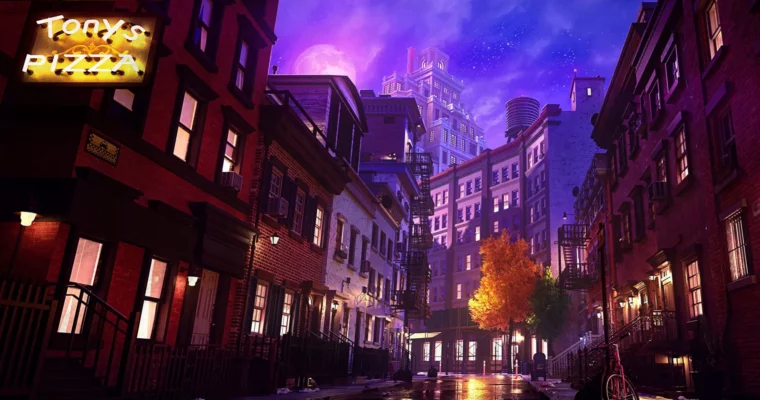
Ready to take your 3D cityscapes to the next level? This workshop dives deep into the crucial steps of texturing, lighting, and rendering, showing you how to create professional-level Photoshop composites from your 3D renders. It’s all about bridging that gap between traditional illustration and modern 3D workflows, drawing on years of industry experience.
🎯 What you’ll learn
- Transition grayscale 3D models to fully textured, colored scenes.
- Create custom skyboxes using Photoshop and Materialize.
- Build and optimize Maya shaders for Arnold rendering.
- Set up professional lighting with fog and strategic camera placement.
- Render essential passes in Arnold and prepare files for compositing.
- Composite 3D renders into polished Photoshop illustrations.
✅ Requirements
- Skills: Familiarity with 3D modeling principles, basic understanding of texturing and lighting concepts.
- Tools: Maya, Photoshop, Materialize, Arnold.
- Hardware: A computer capable of running Maya, Photoshop, and Arnold smoothly.
📝 Description
This workshop picks up right where Volume 1 left off, focusing on bringing your 3D cityscape models to life with color, light, and atmosphere. You’ll learn how to move from a grayscale 3D model to a fully textured, vibrant scene, exploring the nuances between digital painting and 3D texturing. We’ll cover creating custom skyboxes with Photoshop and Materialize, then dive into Maya for shader creation and scene prep.
The course emphasizes an optimized workflow for high-resolution rendering using Arnold. You’ll get hands-on with complete scene texturing, setting up lighting, integrating fog, and choosing the best camera angles. Plus, you’ll learn the professional practice of cleaning up 3D files and rendering essential passes. The final section is all about compositing your renders in Photoshop, blending 2D illustration techniques with your 3D output to create a polished, professional final image. This is essential training for anyone aiming for visual development roles in games or animation.
🧑🎓 Who this course is for
- Intermediate to advanced 3D artists who have completed Volume 1 or have similar modeling skills.
- Visual development artists, concept artists, and 3D generalists looking to boost their texturing, lighting, and compositing skills for professional production.
- Game developers, animation professionals, and freelance artists interested in hybrid 2D/3D workflows.
- Artists aspiring to visual development roles in the entertainment industry.
🧑🏫 About the Author
Tony Ianiro is a highly experienced Visual Development artist with over 25 years in animation, video games, and filmmaking. He’s worn many hats, including Concept Artist, Previs Modeler, Set/Background Designer, and Art Director. Tony has contributed to major animated films like Spider-Man: Into the Spider-Verse and Teenage Mutant Ninja Turtles: Mutant Mayhem, and worked on TV series with studios like Sony, Disney, and Warner Bros. Animation. In gaming, he shipped five AAA titles with Electronic Arts. His extensive background makes him uniquely qualified to teach these advanced 3D and 2D integration techniques.
🏁 Final Result
- A portfolio-ready, professional-quality Photoshop composite of a cityscape, created by integrating your 3D renders with 2D illustration techniques. You’ll have a complete understanding of the pipeline from textured 3D models to a polished final image.
 Channel