Blender in Practice: Creating a 3D Factory 2025 by Aliaksandr Kapianiak

Duration:7 hours
Actual Duration:6h 58m
Release date:2025, November
Publisher:Udemy
Skill level:Beginner
Language:English
Exercise files:Yes
Software:Blender
Course URL:https://www.udemy.com/course/blender-in-practice-creating-a-3d-factory-2025
Step into the role of a 3D artist and build a complex, animated factory scene from scratch. This course walks you through the entire pipeline—modeling, texturing, animation, and rendering—so you end up with a solid portfolio project and real confidence in Blender.
🎯 What you’ll learn
- Navigate the Blender interface with confidence
- Model complex objects like conveyor belts, machinery, and banknotes
- Use modifiers (Mirror, Array, Bevel, Boolean) to speed up your workflow
- Animate objects and the camera for a dynamic scene
- Set up realistic lighting and render in Cycles
✅ Requirements
- Skills: A basic understanding of 3D space is helpful but not required
- Tools: A 3-button mouse
- Hardware: A moderately powerful computer (for faster rendering)
📝 Description
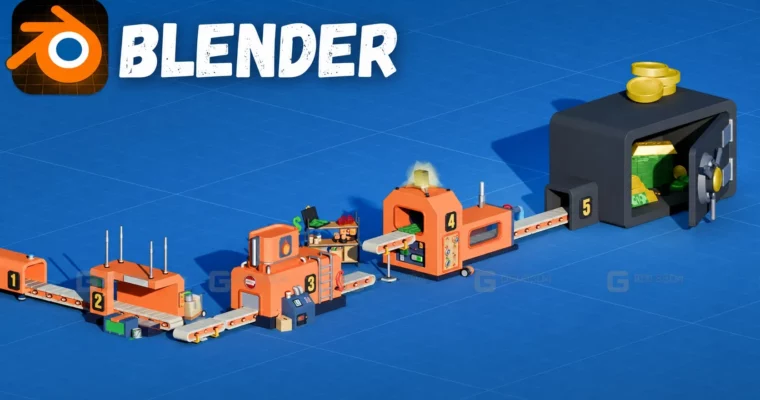
This isn’t just another “make a donut” tutorial. You’re building a full-on money printing factory with conveyor belts, rotating gears, and animated banknotes. The course is structured so you learn by doing—each module adds a new piece to the puzzle.
You’ll start by modeling the individual machinery modules, using modifiers like Mirror and Array to keep things efficient. Then you’ll texture everything, from realistic metal surfaces to the printed banknotes. The animation section is where it gets fun: you’ll bring the whole production line to life, animate the camera for a cinematic fly-through, and finally set up Cycles lighting to nail that industrial mood.
The instructor focuses on practical shortcuts and methods that actually speed up your workflow. No fluff, just the steps you need to get from an empty scene to a finished render.
🧑🎓 Who this course is for
- Aspiring 3D artists who want a real project for their portfolio
- Motion graphics enthusiasts looking to add mechanical animation skills
- Game dev hobbyists who need to model and animate complex scenes
- Anyone who’s comfortable with Blender basics and wants to level up
🧑🏫 About the Author
Aliaksandr Kapianiak has been modeling in Blender and developing games in Unity for years. He’s made plenty of mistakes along the way, and now he’s sharing what actually works. With a focus on practical, hands-on learning, he’s helped students build real skills they can use in game development, motion design, and advertising.
🏁 Final Result
- A fully animated 3D factory scene with moving conveyor belts, rotating gears, and dynamic camera movement
- A portfolio-ready render showcasing your ability to model, texture, animate, and light a complex industrial environment
 Channel