Ad Clicks : Ad Views : Ad Clicks : Ad Views : Ad Clicks : Ad Views : Ad Clicks : Ad Views :
Oh Snap!

It looks like you're using an adblocker. Adblockers make us sad. We use ads to keep our content happy and free. If you like what we are doing please consider supporting us by whitelisting our website. You can report badly-behaved ads by clicking/tapping the nearby 'Advertisement' X text.

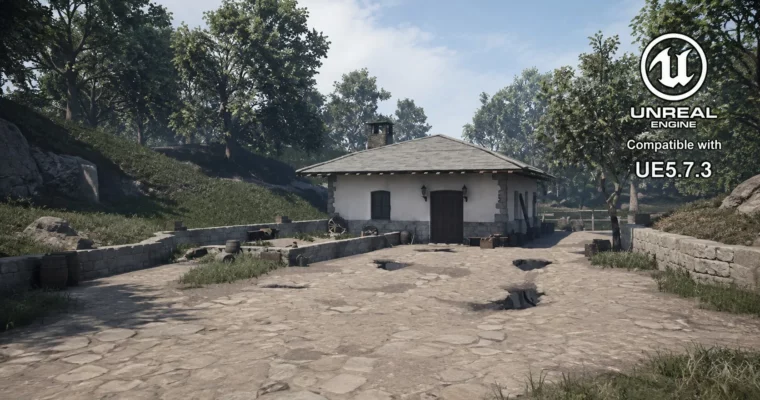
Unreal Engine 5 – Learn Environment Art for Video Games by Nicolas Bucco

Unreal Engine 5 – Learn Environment Art for Video Games by Nicolas Bucco

Author:Nicolas Bucco

Duration:40 hours on-demand video

Actual Duration:39h 54m

Release date:2026, June

Publisher:Udemy

Skill level:Beginner

Language:English

Exercise files:Yes

Software:Unreal Engine 5, 3Ds Max, Substance Painter, Photoshop

Course URL:https://www.udemy.com/course/unreal-engine-5-learn-environment-art-for-video-games/

Build a complete AAA-quality game environment from scratch using modular kits, trim sheets, and professional studio workflows in Unreal Engine 5.

This course is a full production pipeline for environment art, taught by someone who’s actually shipped games at Ubisoft. You’ll plan, model, texture, and assemble a complete medieval environment in Unreal Engine 5, using modular building kits and trim sheets the same way AAA studios do. No fluff, no wasted time—just a portfolio-ready piece by the end.

🎯 What you’ll learn

  • Plan and organize environment projects like a professional
  • Create reusable modular building kits and trim sheets
  • Maintain consistent texel density across all assets
  • Build basic and advanced shaders in UE5, including glass and height blending
  • Sculpt custom terrain using the UE5 Landscape Tool
  • Use the Foliage tool for organic exterior compositions
  • Set up lighting, post-process, and composition for cinematic renders
  • Create a professional breakdown document for your portfolio

✅ Requirements

  • Skills: Basic understanding of Unreal Engine 5 is helpful but not required
  • Tools: DCC package (3Ds Max, Maya, or Blender), 2D editing software (Photoshop or Canva), Substance Painter
  • Hardware: Computer capable of running Unreal Engine 5

📝 Description

This isn’t another tutorial that shows you pretty renders without explaining the process. Nicolas Bucco walks you through every single step of creating a game-ready environment, from the first reference board to the final Artstation post. You’ll start by planning your modular kit on paper, then move into 3Ds Max to build the actual pieces, and finally assemble everything in Unreal Engine 5.

The course is built around a real production mindset. You’ll learn how to maintain proper texel density, organize your project structure cleanly, and integrate assets incrementally so you catch problems early. The modular approach means you’re not just building one house—you’re building a system that lets you create entire villages efficiently.

Shaders get their own deep dive. You’ll create glass materials, set up vertex painting for variation, and build a height blending shader that makes your terrain transitions look natural. Lighting and post-processing are covered in detail, so you can present your work in the best possible way.

The final section is all about career. You’ll learn how to create a professional breakdown document that clearly communicates your work to recruiters, and how to publish it effectively on Artstation. This is the stuff they don’t teach in school but absolutely matter when you’re applying for jobs.

🧑‍🎓 Who this course is for

  • Beginner 3D artists (school students or self-taught) who want to focus on the most relevant skills
  • Intermediate 3D artists who are tired of long projects that produce average portfolio results
  • Junior 3D artists working in the industry who want to level up their workflow and production quality

🧑‍🏫 About the Author

Nicolas Bucco is a professional environment artist who has worked on shipped titles including Splinter Cell Remake, Rainbow Six Siege X, and Postal 4 No Regerts. His experience spans both AAA studios like Ubisoft and indie production, giving him a well-rounded perspective on different production pipelines. He’s condensed years of industry knowledge into this course, focusing on the techniques and workflows that actually matter in a professional setting.

🏁 Final Result

  • A complete AAA-quality medieval environment built from scratch in Unreal Engine 5
  • A portfolio-ready breakdown document that clearly showcases your work to potential employers
  • Practical knowledge of studio workflows used in both AAA and indie productions
Curriculum

📋 Course content

  1. Module 1: Planning and Preparation
    • Instructor Introduction1:02
    • What to expect from this course?9:37
    • Research and Gathering References4:39
    • Planning the Modular Building Kit – Pure Ref10:51
    • Planning the Modular Building Kit using Photoshop26:40
    • Planning the Modular Building Kit using Photoshop Continued19:49
  2. Module 2: Modular Building Kit Creation
    • Modular Building Kit: Wall_Corner_0124:53
    • Modular Building Kit: Wall_Window_0114:47
    • Modular Building Kit: Wall_Window_01 continued18:47
    • Modular Building Kit: Wall_Door_0137:30
    • Modular Building Kit: Roof Part 115:52
    • Modular Building Kit: Roof Part 225:26
    • Modular Building Kit: Blockout in Unreal Engine 5 Part 139:59
    • Modular Building Kit: Blockout in Unreal Engine 5 Part 213:53
  3. Module 3: Trim Sheets
    • Planning Trim Sheets Part 118:07
    • Planning Trim Sheets Part 228:42
    • Planning Trim Sheets Part 320:31
    • Creating Trim Sheets Part 135:41
    • Creating Trim Sheets Part 249:56
    • Creating Trim Sheets Part 333:55
    • Creating Trim Sheets Part 447:41
    • Creating Trim Sheets Part 533:41
    • Creating Trim Sheets Part 635:44
    • Creating Trim Sheets Part 735:46
    • Creating Trim Sheets Part 821:45
  4. Module 4: Asset Refinement
    • Tessellation Setup Part 11:12:11
    • Tessellation Setup Part 235:46
    • Improving the Roof Part 11:21:50
    • Improving the Roof Part 235:52
    • Improving the Roof Part 354:50
    • Improving the Window42:13
    • Improving the Door52:53
    • Creating the Chimney_01 and Fixing the Trim Sheet1:13:57
    • Improving the Roof Part 11:02:28
    • Improving the Roof Part 252:00
    • Improving the Roof Part 348:44
    • Improving the Roof Part 41:03:55
    • Improving the Roof Part 542:21
    • Creating the Corner_Stones_0151:51
  5. Module 5: Shaders and Materials
    • Glass Shader Part 151:06
    • Glass Shader Part 250:36
    • Vertex Painting Part 150:59
    • Vertex Painting Part 21:06:39
    • Roof Fixes39:44
    • Height Blending Shader Part 141:52
    • Height Blending Shader Part 229:02
    • Height Blending Shader Improvements28:10
  6. Module 6: Environment Integration
    • Adding Decals Part 11:00:21
    • Adding Decals Part 250:13
    • Adding Decals Part 356:53
    • Fixes and Landscape Creation57:58
    • Foliage Part 135:54
    • Foliage Part 213:09
    • Composition and Set Dressing Part 139:44
    • Composition and Set Dressing Part 234:16
  7. Module 7: Lighting, Rendering, and Portfolio
    • Lighting Part 123:04
    • Lighting Part 222:24
    • Lighting Part 326:31
    • Final Render Part 133:19
    • Final Render Part 230:16
    • Creating the Breakdown Part 143:59
    • Creating the Breakdown Part 255:03
    • Publishing the Project on Artstation26:37
    • Conclusion16:59
    • Final Fixes13:14
Watch online or Download for Free
Unreal Engine 5 – Learn Environment Art for Video Games by Nicolas Bucco
NAME
SIZEDURATION
6 – Creating the Breakdown and Publishing the Project on Artstation
157.6 MB2h 5m
7 – Conclusion
159.4 MB30m
1 -Conclusion
91.5 MB16m
2 -Final Fixes
67.9 MB13m

Download all Videos (63)
5.1 GB39h 54m


Download all

Join us on
  Channel    and      Group

Leave a Comment

Your email address will not be published. Required fields are marked *