Ad Clicks : Ad Views : Ad Clicks : Ad Views : Ad Clicks : Ad Views : Ad Clicks : Ad Views :
Oh Snap!

It looks like you're using an adblocker. Adblockers make us sad. We use ads to keep our content happy and free. If you like what we are doing please consider supporting us by whitelisting our website. You can report badly-behaved ads by clicking/tapping the nearby 'Advertisement' X text.

Unreal Engine 5 Blueprints – The Ultimate Developer Course by Stephen Ulibarri

Unreal Engine 5 Blueprints – The Ultimate Developer Course by Stephen Ulibarri

/

Author:Stephen Ulibarri

Duration:41.5 hours

Actual Duration:15h 58m

Release date:2026, May

Publisher:Udemy

Skill level:Beginner

Language:English

Exercise files:Yes

Software:Unreal Engine 5

Course URL:https://www.udemy.com/course/ue5-ultimate-bp-course/

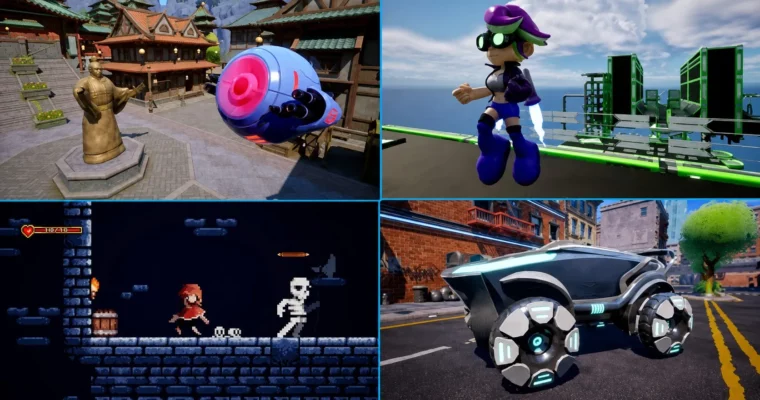
Build four complete games in Unreal Engine 5 using Blueprints, from a drone shooter to a 2D dungeon crawler, without writing a single line of code.

This course takes you from zero experience to building four complete, playable games in Unreal Engine 5. You’ll learn Blueprint visual scripting by doing, not just watching. Each project introduces new systems and mechanics, so you’re constantly applying what you just learned. By the end, you’ll have a solid grasp of Unreal’s architecture and the confidence to start your own projects.

🎯 What you’ll learn

  • Create complete games of different genres including flying shooters, 3D platformers, 2D side scrollers, and vehicles
  • Program gameplay with Blueprints, without needing to write code
  • Get free, high quality assets for levels, characters, props and effects into your game projects
  • Blueprint best practices for development, including optimization, speed, memory, and project structure
  • Unreal Engine’s modeling and rigging tools
  • Create effects with Niagara Systems and MetaSounds
  • Understand Unreal Engine Materials and create Materials from pro texture maps
  • Manage dependencies, the impacts of Tick and Casting, async loading of assets, soft object references and soft class references

✅ Requirements

  • Skills: No experience necessary. Start as an absolute beginner.
  • Tools: A computer with internet access.
  • Hardware: Must meet the minimum system requirements to run Unreal Engine 5.

📝 Description

This is the ultimate Blueprint course for Unreal Engine 5. You start with zero experience and by the end you’ll have four small game projects under your belt, ranging from 2D to 3D. The course doesn’t just show you how to click buttons — it explains the underlying principles so you can build anything you imagine.

The first project, Bad Bot, is a drone flying shooter. You’ll learn Unreal’s class hierarchy — the Actor, the Pawn, the Game Mode, and the Controller — and how they work together. You’ll bind inputs using the Enhanced Input System, spawn enemy bots, fire projectiles, and add sound and visual effects. The section wraps up with a boss fight.

Before moving on, there’s a dedicated section on Unreal’s collision framework. This is where most beginners get stuck, and this course demystifies it completely. You’ll learn the difference between physics and query systems, collision complexity, sweeping versus physics collisions, and how to set up custom collision channels and profiles for performance.

The second project, Jetpack Journey, is a third-person platformer. You’ll move from the Pawn class to the Character class and implement a fully-functional jetpack with blendspaces for smooth animation blending. This section covers important concepts like movement modes, skeletal mesh sockets, UMG for UI, and the impact of casting on runtime performance. You’ll also learn about texture compression and async loading of assets using soft references.

The third project introduces Unreal’s 2D capabilities with the Paper2D plugin and PaperZD. You’ll build a dungeon-crawling side-scroller with melee combat, enemy AI using Behavior Trees and Blackboards, combo attacks, and floating damage numbers. This section covers sprites, flipbooks, tile sets, and 2D level creation.

The final section covers Chaos Vehicles — Unreal’s physics-based vehicle system. You’ll import a sci-fi car, rig and skin it, and create a fully-functional vehicle with keyboard and controller input. Then you’ll migrate it into the Jetpack Journey project so Kix can enter and leave the car.

Throughout the course, you’ll get access to the Druid Mechanics Discord community with over 23,000 students. If you’re aiming to move on to Unreal’s C++ system later, this course prepares you with a solid understanding of the engine’s architecture.

🧑‍🎓 Who this course is for

  • Complete beginners to game development
  • Those interested in making games in Unreal Engine
  • Those interested in game animation, visual effects, sound effects, and materials
  • Those interested in programming gameplay without writing code — Blueprints only!

🧑‍🏫 About the Author

Stephen Ulibarri is an experienced game developer and educator who runs Druid Mechanics, a studio focused on Unreal Engine education. He has created original characters, assets, and game projects specifically for this course, including the Kix character and the sci-fi vehicle. His teaching approach emphasizes both hands-on practice and theoretical understanding, making complex systems like collision and async loading accessible to beginners. He maintains an active community of over 23,000 students on Discord, where learners of all skill levels help each other through their game development journeys.

🏁 Final Result

  • Four complete, playable game projects: a drone flying shooter (Bad Bot), a 3D platformer with jetpack mechanics (Jetpack Journey), a 2D dungeon-crawling side-scroller with enemy AI (Red Hood), and a physics-based vehicle system integrated into the platformer
  • A solid understanding of Unreal Engine’s architecture, class hierarchy, and Blueprint best practices
  • The skills to create your own game projects independently, with knowledge of optimization, memory management, and project structure
Curriculum

📋 Course content

  1. Module 1: Introduction to Unreal Engine 5
    • Introduction to Unreal Engine 55:22
    • Assets for the Course0:24
    • Your First Challenge3:13
    • Installing the Engine13:23
    • Our First Project18:00
    • Editor Layout13:52
    • Play In Editor15:16
    • Manipulating Objects23:49
    • Perspective7:07
    • File Types15:31
    • Mesh Scale6:03
    • Materials21:49
    • Drone Material19:53
    • Assets on FAB1:57
    • Marketplace Assets15:27
    • Migrating Assets12:10
  2. Module 2: Blueprint Fundamentals
    • What is Blueprint3:38
    • The Level Blueprint12:55
    • Creating a Blueprint Class5:38
    • Components8:27
    • Append String13:10
    • Coordinates5:08
    • Debug Shapes7:52
    • Local vs Global Space9:05
  3. Module 3: Math for Game Developers
    • Vectors8:55
    • Vector Examples6:38
    • Vector Examples Practice21:55
    • Vector Operations8:21
    • Vector Operations Examples7:42
    • Vector Operations Practice26:17
    • Vector Magnitude11:07
    • Vector Magnitude Examples2:33
    • Vector Magnitude Practice17:25
    • Booleans and Branches13:45
    • Vector Normalization7:24
    • Vector Normalization Practice23:20
    • Delta Seconds10:16
    • Rotators6:05
    • Rotators Practice15:55
  4. Module 4: Project 1 – Bad Bot (Drone Flying Shooter)
    • Get the assets for this course in Lecture 200:10
    • Multiple Materials Per Mesh11:19
    • Getting a Reference to the Pawn17:27
    • Interpolation10:19
    • Static Mesh Sockets7:29
    • Blaster Beam Mesh7:33
    • Spawning Actors8:21
    • Projectile Movement7:54
    • Blueprint Functions12:32
    • Niagara Systems18:22
    • Spawning Effects20:51
    • Meta Sounds25:11
    • Timers17:03
    • Hit Events18:33
    • Expose on Spawn7:27
    • Floating Spheres12:46
    • Rotating the Spheres8:20
    • Timelines with Float Curves16:20
    • Timelines with Vector Curves18:02
    • Sphere Spawner13:18
    • Overlap Events24:33
    • Game Mode20:11
    • Bad Bot Level13:48
  5. Module 5: Enhanced Input and Pawn Control
    • The Pawn Class11:02
    • Creating a Custom Pawn Class5:07
    • Adding Components to the Bot Pawn7:07
    • The Enhanced Input System23:16
    • Firing the Rifle13:11
    • Mouse Movement9:27
    • Floating Pawn Movement Component17:40
    • Camera Lag7:03
  6. Module 6: Collision Framework
    • Unreal Engine’s Collision Framework22:18
    • Collision Complexity13:10
    • Queries17:31
    • Sweeping Collisions16:30
    • Set Actor Location with Sweeping11:05
    • Collisions with Physics8:37
    • Collision with Movement Components6:19
    • Collision Callbacks16:39
    • Custom Collision Presets12:03
    • Custom Collision Object Types13:42
  7. Module 7: Advanced Bad Bot Systems
    • Material Instances6:11
    • Blueprint Interfaces21:03
    • Widget Blueprints12:05
    • Line Trace for Aiming41:26
    • Level Assets4:57
    • Bot Spawn Volume13:16
    • Spawning Bots14:06
    • Boss Bot21:44
    • Boss Challenge9:01
    • Boss Challenge Part 212:15
  8. Module 8: Project 2 – Jetpack Journey (3D Platformer)
    • The Character Class12:29
    • Creating the Kix Character9:26
    • Kix Game Mode3:38
    • Camera and SpringArm2:09
    • Look Input Action4:15
    • Kix Player Controller13:48
    • WASD Movement22:30
    • Clean Nodes7:50
    • Jumping6:42
    • Console Controllers11:06
    • Animations16:33
    • Blendspaces15:46
    • State Machines19:09
    • Movement Parameters10:30
    • State Alias5:32
    • Skeletal Mesh Sockets10:07
    • Thruster Effect Components4:44
    • Activating Thrusters11:33
    • Thruster Sounds17:07
    • Flying Mode14:41
    • Thruster Movement Input6:29
    • Flying Blendspace22:13
    • Blend Poses vs State Machines8:39
    • Sound Notifies10:28
    • Jet Fuel8:55
    • Enforcing Jet Fuel17:28
    • Fuel Assets8:00
    • Jet Fuel Actor9:19
    • Refilling Jet Fuel6:50
    • Juicing it Up9:35
    • Widget Blueprints17:29
    • Fuel Bar20:02
    • Class Dependencies9:10
    • Updating the Fuel Bar5:12
    • Casting and Memory17:38
    • Texture Compression20:41
    • Soft References20:20
  9. Module 9: Platforming Mechanics
    • Platforms10:18
    • Pressure Plate7:00
    • Moving the Plate9:31
    • Interact Interface13:26
    • Floating Platform10:59
    • Ping Pong Platform18:52
    • Placing Items10:06
    • Packed Level Actors16:17
    • Win and Lose14:22
    • End Game Menu26:07
    • Menu Functionality17:49
    • Event Dispatchers11:47
    • Data Types8:10
    • The Construction Script9:33
  10. Module 10: Project 3 – Red Hood (2D Side Scroller)
    • Free 2D Assets4:55
    • Project Creation9:05
    • Sprites13:33
    • Flipbooks13:03
    • Paper Character8:39
    • Camera Settings11:20
    • Input13:20
    • PaperZD12:28
    • Locomotion8:26
    • Transitional Animations13:14
    • Sound Notifies9:12
    • Jump Sounds5:01
    • State Events2:44
    • Tilesets9:53
    • Tileset Layers7:26
    • Sort Priority5:19
    • 2D Level1:53
    • Level and Adjustments6:09
    • Enemy Class16:34
    • Behavior Tree22:21
    • Behavior Tree Tasks20:36
    • Decorators10:49
    • Patrol Box Overlaps18:20
    • Services13:56
    • Custom Decorators23:09
    • Attack Task11:48
    • Skeleton Sounds15:20
    • Box Trace17:19
    • Anim Notifies7:10
    • Trace for Objects3:52
    • Hit React10:51
    • Disable Movement5:50
    • Hit React Effects13:25
    • Damage and Health5:47
    • Player Health Bar14:42
    • Updating the Health Bar9:01
    • Damage Numbers33:07
    • Attack Input Action5:14
    • Throttling Attacks6:43
    • Attack Combo13:29
    • Attack Count10:23
    • Attack Anim Array7:15
    • Structures – Attack Anim Data11:13
    • Reset Attack Variables4:25
    • RedHood Hit Boxes17:51
    • Skeletons Getting Hit12:28
    • Combat Effects7:21
    • Damage Numbers on Skellies3:24
    • Enemy Health Bars12:41
    • Enemy Death20:14
  11. Module 11: Project 4 – Chaos Vehicles
    • Assets5:31
    • Combining Static Meshes7:49
    • Adding a Skeleton9:44
    • Skinning the Mesh10:16
    • Vehicle Physics Asset4:48
    • Wheel Blueprints6:53
    • Torque Curve4:40
    • Animation Blueprint2:26
    • Vehicle Blueprint8:51
    • Vehicle Inputs7:29
    • Moving the Vehicle15:44
    • Migrating the Vehicle4:31
    • Interact Widget6:48
    • Interactables7:01
    • Interact4:54
    • Possessing the Vehicle22:12
    • Edge Cases10:54
    • Exiting the Vehicle15:05
    • Bonus Lecture – Continuing your Journey!0:56
Watch online or Download for Free
Unreal Engine 5 Blueprints – The Ultimate Developer Course by Stephen Ulibarri
NAME
SIZEDURATION
02 – The Blueprint Visual Scripting System
105.9 MB1h 5m
Archive
745.1 MB21m
25 Vectors
159.1 MB
38 Rotators
127.8 MB
52 Timers
258.6 MB
73 Queries
349.5 MB
88 Boss Bot
343.1 MB
144 Sprites
158.2 MB
149 PaperZD
136.3 MB

Download all Videos (416)
72.6 GB15h 58m


Download all

Join us on
  Channel    and      Group

Leave a Comment

Your email address will not be published. Required fields are marked *