It looks like you're using an adblocker.
Adblockers make us sad. We use ads to keep our content happy and free. If you like what we are doing please consider supporting us by whitelisting our website. You can report badly-behaved ads by clicking/tapping the nearby 'Advertisement' X text.
Unreal Engine 5 Blueprints – Build a Moon Base Survival Game by Adam M.
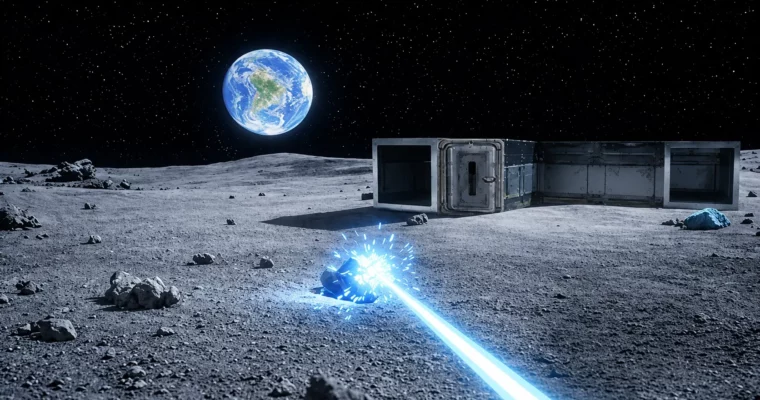
Build a complete, playable Moon Base survival game in Unreal Engine 5 using Blueprints—no coding required.
This course walks you through building a complete survival game in Unreal Engine 5 using Blueprints—no C++ required. You’ll start with an empty scene and end with a playable Moon Base game featuring building, crafting, resource harvesting, and survival mechanics. Perfect for beginners who want to see a full project from start to finish.
🎯 What you’ll learn
Create a complete Moon Base survival game in Unreal Engine 5
Structure full game systems using Blueprints
Implement building mechanics with snapping and validation
Build a resource harvesting system with biomes and laser effects
Design a lunar environment with dynamic lighting and day/night cycle
Connect UI to gameplay logic with reusable Blueprint architectures
Track player stats like health, oxygen, and hydration
✅ Requirements
Skills: No prior Unreal Engine or programming experience required—everything is explained step by step
Tools: Unreal Engine 5 installed
Hardware: A computer capable of running Unreal Engine 5 comfortably
📝 Description
This course is built around one goal: finishing a real project from start to end. You begin with an empty scene and slowly turn it into a complete, playable survival game while learning how the systems work and connect.
First, you’ll shape the lunar environment. You’ll create the landscape, generate rocks with PCG, add lighting, and set up a day and night cycle with Earth in the sky. Then you’ll bring the game to life with survival systems: a modular building system with snapping and validation, resource generation with biomes, harvesting mechanics, an inventory and crafting system, furniture placement, and player stats like health and oxygen—all connected with interactive UI.
Everything is done step by step in Blueprints. Each step is explained clearly for beginners. You’ll learn not just individual features, but how to connect them into a working game system. The course is UE 5.8 compatible, with bonus content covering the update.
By the end, you’ll have a complete, playable Moon Base survival game, a clear understanding of how to structure Blueprint systems, and reusable mechanics you can apply to your own projects.
🧑🎓 Who this course is for
Aspiring game developers who want to learn Unreal Engine 5 using Blueprints—from complete beginners to intermediate developers exploring survival gameplay and building systems
Anyone inspired by games like Planet Crafter who wants to create their own lunar-themed survival game prototype
🧑🏫 About the Author
Adam M. is a game developer and instructor focused on Unreal Engine 5 education. With a practical, project-based teaching style, Adam specializes in breaking down complex game systems into manageable, step-by-step lessons. His courses emphasize building complete, functional projects rather than isolated tutorials, giving students the confidence to create their own games independently.
🏁 Final Result
A complete, playable Moon Base survival game with building, crafting, harvesting, and survival mechanics
A clear understanding of how to structure Blueprint systems for future projects
Reusable mechanics and systems you can adapt and expand for your own game ideas
Curriculum
📋 Course content
Module 1:Environment Setup
Create project1:48
Create landscape7:42
Adding big rocks with PCG19:00
Adding small rocks with PCG4:48
Adding rock formation with PCG14:49
Adding post processing5:55
Adjusting rock colors4:49
Adding craters4:42
Removing rocks from craters16:00
Module 2:Sky and Lighting
Adding Earth to the sky16:51
Adding stars6:12
Creating a lunar time tracker11:11
Displaying lunar time with widgets25:07
Adding sun7:41
Adding sun rotation for day/night cycle24:37
Improving landscape lighting16:41
Module 3:Interaction Basics
Adding a crosshair3:09
Adding object selection32:29
Adding object interaction10:10
Replacing mesh with lamp8:13
Module 4:Building System
Implementing PlayerMode and displaying active mode40:04
Creating basics of the building mechanic25:12
Placing objects6:03
Building placement validation16:00
Importing building assets from Fab13:08
Adding snapping system – Part 18:14
Adding snapping system – Part 225:49
Hiding inner walls in a building22:43
Creating a struct to support spawning multiple buildings18:50
Module 5:Building Customization
Adding doors13:53
Switching between buildings21:32
Adding functionality to replace walls with doors27:20
Adding window7:07
Adding live preview for wall replacements13:02
Polishing up the little things7:35
Module 6:Destruction and Furniture
Adding destruction mechanism26:19
Highlighting destructible element14:03
Adding furniture8:08
Implementing furniture placement28:40
Module 7:UI and Building Selection
Creating building selection widgets10:28
Connecting UI to building logic29:50
Populating widgets with building data26:46
Selecting building types from the UI15:33
Module 8:Resource Generation
Creating resource blueprints12:15
Creating biome system43:25
Improving resource generation logic16:52
Adding different resource zones4:31
Module 9:Harvesting Mechanics
Implementing core harvesting mechanism35:24
Adding scale and rotation effects7:44
Displaying resource names11:17
Adding a Niagara beam effect15:25
Fixing bugs in the harvesting system9:39
Respawning resources25:46
Module 10:Inventory System
Creating inventory widgets21:43
Populating the inventory with data24:57
Adding harvested resource to the inventory10:51
Removing items from the inventory17:31
Adding tooltips14:52
Dropping and collecting items25:15
Adding a tooltip to the building menu39:51
Checking required items for building22:34
Salvaging resources from destroyed buildings13:42
Adding consumable items16:24
Module 11:Survival Stats
Creating player survival widgets (health, hydration, oxygen)15:38
Draining player stats over time and updating the UI28:57
Consuming items to restore player survival stats11:48
Oxygen zones and building safety14:02
Player death logic20:56
Module 12:Crafting System
Crafting system data setup9:54
Refactoring menu input and window behavior10:14
Creating the crafting UI and populating it with data34:07
Implementing crafting interactions and logic20:42
Module 13:Final Polish
Project showcase, summary & next steps1:30
Credits & Asset Licenses0:28
Updating the project to UE 5.83:27
Watch online or Download for Free
Unreal Engine 5 Blueprints – Build a Moon Base Survival Game by Adam M.




 Channel