Mining Cart – Full Tutorial by Milad Kambari

Duration:+9 Hours
Actual Duration:9h 27m
Release date:2025, April
Publisher:Artstation
Skill level:Intermediate
Language:English
Exercise files:Yes
Software:Blender, Rizom UV, Substance Painter, Marmoset Toolbag 4
Course URL:https://www.artstation.com/artwork/lD4oqk
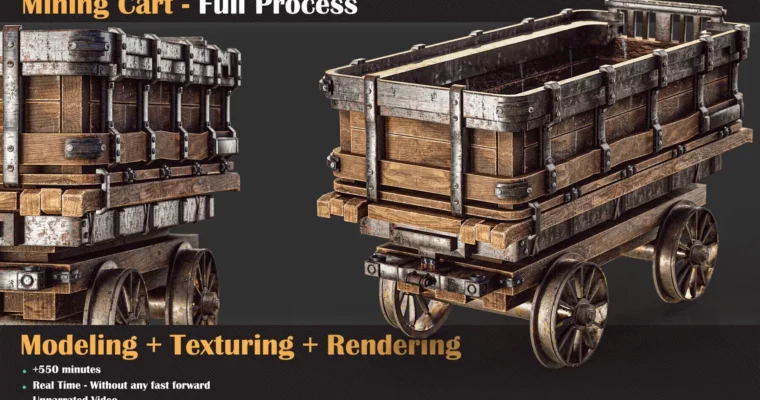
A complete walkthrough for building a mining cart from start to finish. You’ll go through modeling in Blender, UV unwrapping in Rizom UV, texturing in Substance Painter, and final rendering in Marmoset Toolbag 4. No voice-over, just raw process and practical techniques.
🎯 What you’ll learn
- Model a hard-surface asset using box modeling and object-mode techniques
- Create clean UVs with UDIMs and overlap methods for large objects
- Texture a multi-material asset with wear and tear in Substance Painter
- Set up lighting and render a portfolio-ready shot in Marmoset Toolbag 4
✅ Requirements
- Skills: Basic knowledge of navigating and using primary functions in Blender, Rizom UV, Substance Painter, and Marmoset Toolbag 4
- Tools: 3-button mouse, drawing tablet recommended
- Hardware: Minimum 16GB RAM, dedicated GPU
📝 Description
This tutorial skips the fluff and gets straight to the pipeline. Over nine hours of unnarrated video, you’ll watch Milad build a mining cart from a simple proxy mesh to a fully rendered asset. The modeling phase focuses on object-mode workflows and understanding form rather than getting lost in modifiers. For UVs, you’ll learn how to handle large objects with UDIMs and overlapping techniques to keep texture resolution high. Texturing in Substance Painter covers multi-material setups with realistic wear, and the final render in Marmoset Toolbag 4 shows how to present your work professionally. No voice-over means you can focus entirely on the screen and the steps being taken.
🧑🎓 Who this course is for
- Intermediate 3D artists who know the basics of the software used
- Artists looking to improve their hard-surface modeling and texturing pipeline
- Anyone who prefers watching the process without voice-over commentary
🧑🏫 About the Author
Milad Kambari is a 3D artist specializing in hard-surface modeling and texturing. He focuses on creating game-ready assets with clean topology and efficient UVs, sharing his workflow through detailed video tutorials on Artstation.
🏁 Final Result
- A fully textured and rendered mining cart asset, ready for a portfolio or game engine.
 Channel