Ad Clicks : Ad Views : Ad Clicks : Ad Views : Ad Clicks : Ad Views : Ad Clicks : Ad Views :
Oh Snap!

It looks like you're using an adblocker. Adblockers make us sad. We use ads to keep our content happy and free. If you like what we are doing please consider supporting us by whitelisting our website. You can report badly-behaved ads by clicking/tapping the nearby 'Advertisement' X text.

Mastering 3D Modeling in Maya by Elementza

Mastering 3D Modeling in Maya by Elementza

/

Author:Elementza

Actual Duration:33h 30m

Release date:2018, July

Publisher:Elementza

Skill level:Intermediate

Language:English

Exercise files:Yes

Software:Maya, Arnold, Redshift

Course URL:https://elementza.com/maya-masterclass/

Learn clean hard-surface modeling in Maya from interface basics to a production-ready motorbike.

If you always wanted to model properly in Maya instead of just pushing verts around, this is your starting point. You go from interface and basic tools to clean topology, simple props, then a helmet and a full motorbike you can actually put in your portfolio.

🎯 What you’ll learn

  • Navigate the Maya interface and use core modeling tools with confidence
  • Understand topology rules, edge flow and edge redirection
  • Work with SubD and Non-SubD modeling techniques
  • Break down concepts, block out shapes and plan when to add detail
  • Model simple assets like a switch concept with clean mesh
  • Tackle complex shapes like a helmet with production-ready edge flow
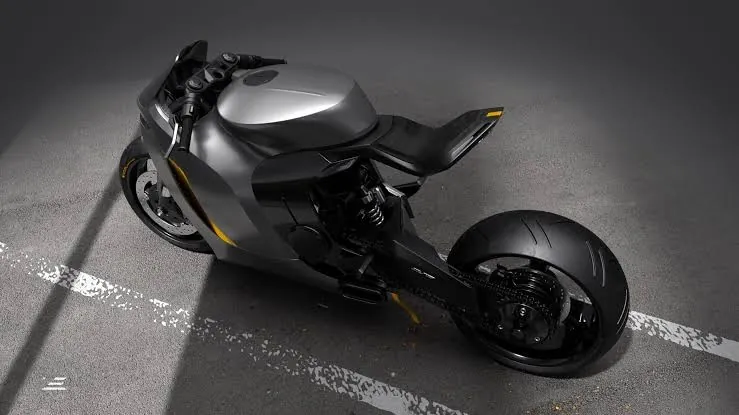
  • Build a complete motorbike from start to finish and clean up heavy topology
  • Render your models in Arnold and Redshift for presentation

βœ… Requirements

  • Skills: No prior 3D modeling experience needed, basic computer skills are enough
  • Tools: Autodesk Maya, Arnold and Redshift for rendering chapters
  • Hardware: PC capable of running Maya, dedicated GPU recommended for Redshift

πŸ“ Description

This training is linear on purpose. Classes 1-4 open in week one, class 5 opens in week two, so you don’t jump into a motorbike before you get edge flow right. Everything is step by step, real-time with live narration.

You start with the Maya interface and basic modeling tools, then you get into the stuff that actually matters: topology rules, SubD modeling, and how to redirect edges without wrecking your mesh. No theory for theory’s sake β€” you apply it right away on a simple switch concept.

Then it scales up. You block out a helmet, refine the forms, and learn how to keep the mesh clean when shapes get complicated. The final class is the big one: a full motorbike workflow from start to finish, dealing with messy designs and heavy cleanup like you would in production.

Rendering is covered too, not just modeling. You’ll present your work with Arnold and Redshift, so your final images look portfolio-ready and not like grey viewport screenshots.

πŸ§‘β€πŸŽ“ Who this course is for

  • Complete beginners who want a solid, step-by-step start in Maya modeling
  • Blender users or hobbyists who know basic tools and want stronger topology and hard-surface skills for portfolio pieces

πŸ§‘β€πŸ« About the Author

Elementza is a training studio focused on practical hard-surface modeling and production workflows. Their classes are known for real-time, narrated builds with zero shortcuts β€” blocking, cleanup, and rendering included. This Maya masterclass follows that same hands-on approach they use across their concept and production courses.

🏁 Final Result

  • A portfolio-ready hard-surface motorbike modeled from scratch in Maya with clean, production-ready topology, plus supporting props like a switch concept and helmet, rendered in Arnold / Redshift.
Curriculum

πŸ“‹ Course content

  1. Module 1:  Intro to 3D Modeling in Maya
    • Maya interface in detail
    • How to use basic modeling tools
    • Basics of Topology rules
    • How to model simple assets
  2. Module 2:  Understanding Topology in 3D Modeling
    • SubD and Non SubD Modeling techniques
    • How to understand Topology
    • How to do proper edge flow & edge redirection
    • How to achieve clean mesh and topology
  3. Module 3:  3D Modeling Simple Objects
    • How to model a simple Switch concept
    • How to do breakdown of a project
    • When to add details & subdivision
    • How to organise and clean the topology
  4. Module 4:  3D Modeling Complex Shapes
    • Blocking the helmet
    • How to refine the shapes
    • How to get clean topology on complex objects
    • How to establish proper edge flow for production
  5. Module 5:  3D Modeling Workflow for Complex Objects
    • How to make a Motorbike from start to finish
    • How to deal with complex designs
    • How to work with complex topology and cleanup
Watch online or Download for Free
Mastering 3D Modeling in Maya by Elementza
NAME
SIZEDURATION
[01] Modeling Tools Intro
365.7 MB2h 50m
[02] Modeling Overview
426.9 MB1h 52m
[03] Pen & Tablet Modeling
540.4 MB2h 35m
[03] Switch Modeling
634.4 MB1h 59m
1. Intro
11.2 MB1m
2. Setup
7.9 MB3m
3. Switch 01
46.5 MB12m
4. Switch 02
70.2 MB12m
5. Switch 03
73.8 MB12m
6. Switch 04
42.1 MB9m
7. Switch 05
137.5 MB22m
8. Switch 06
123.6 MB16m
9. Switch 07
61.2 MB11m
10. Final Part
60.6 MB15m
[04] Helmet Modeling
503.4 MB1h 25m
[05] DSG Moto Mechanical Parts
1 GB2h 25m
[05] DSG Moto Modeling Polish
2.4 GB4h 20m
[06] Review Feedback Videos
4.9 GB14h 5m
Review 01
121.9 MB23m
Review 02
94.7 MB16m
Review 03
155.9 MB18m
Review 04
88.9 MB24m
Review 05
163.4 MB34m
Review 06
139.7 MB26m
Review 09
167.5 MB22m
Review 8
92.1 MB19m
Review 10
203.4 MB26m
Review 11
187 MB40m
Review 12
144.8 MB39m
Review 13
95.9 MB15m
Review 14
129 MB19m
Review 15
260.5 MB35m
Review 16
433.2 MB58m
Review 17
349.6 MB42m
Review 18
326.4 MB42m
Review 19
304.2 MB36m
Review 20
221 MB28m
Review 21
211.5 MB25m
Review 22
185 MB41m
Review 23
78.6 MB21m
Review24
54.5 MB16m
Review 25
126.9 MB28m
Review26
89.9 MB27m
Review 27
242.6 MB57m
Review 28
194.7 MB32m
Review_7
109.9 MB24m

Download all Videos (117)
11.1 GB33h 30m

Project Files (Assets, Resources)
43.5 MB

Download all

Join us on
  Channel    and      Group

Leave a Comment

Your email address will not be published. Required fields are marked *