Introduction to Marvelous Designer by Abraham Leal (Abe Leal 3D)

Duration:7 hours
Actual Duration:6h 59m
Release date:2026, June
Publisher:Abe Leal 3D
Skill level:Intermediate
Language:English
Exercise files:Yes
Software:Marvelous Designer, ZBrush
Course URL:https://www.abeleal3d.com/courses/marvelous-designer-guide
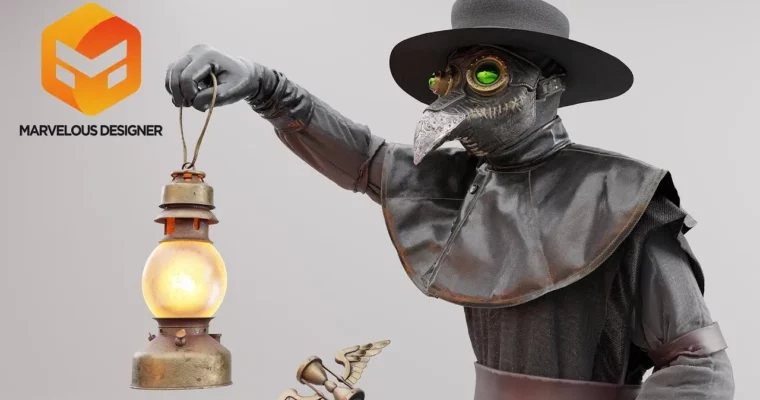
This course walks you through the entire process of creating custom clothing and props in Marvelous Designer. You’ll start with the interface basics, then jump straight into building a complete plague doctor outfit. By the end, you’ll know how to simulate realistic fabric, construct accessories like gloves and a top hat, and export your work for rendering.
🎯 What you’ll learn
- Navigate the Marvelous Designer interface and set up your workspace
- Create and tailor garments like tunics, pants, and capes
- Simulate realistic fabric folds, pressure, and thickness
- Build props such as gloves, masks, and hats
- Export your models and set up textures for final renders
✅ Requirements
- Skills: Basic understanding of 3D software navigation
- Tools: A 3-button mouse, drawing tablet recommended
- Hardware: Minimum 8GB RAM, dedicated GPU
📝 Description
This isn’t just a button-pushing tutorial. Abe Leal breaks down the logic behind Marvelous Designer‘s tools, so you understand why things work. You’ll learn how to control fabric properties like pressure and fold strength to get realistic results, not just random drapes.
The main project is a full plague doctor costume. You’ll build the tunic, pants, mask, cape, and even accessories like gloves and a top hat. Along the way, you’ll pick up practical tricks for topstitching, creating pleats, and handling retopology. The final chapters cover exporting your work and setting up a clean render, so your finished model looks portfolio-ready.
🧑🎓 Who this course is for
- 3D artists who want to add realistic clothing to their characters
- Hobbyists and professionals looking to learn Marvelous Designer from the ground up
- Anyone who wants to move past basic tutorials and build a complete, production-ready garment
🧑🏫 About the Author
Abraham Leal (Abe Leal 3D) is a 3D artist and educator known for his practical, no-nonsense teaching style. He runs a popular YouTube channel and Twitch stream where he shares workflows for Marvelous Designer, ZBrush, and other industry tools. His focus is on giving artists the skills they need to create professional-quality assets for games, film, and personal projects.
🏁 Final Result
- A fully simulated and textured plague doctor outfit, including tunic, pants, mask, cape, gloves, and top hat
- A clean render of your character ready for your portfolio
 Channel