Ad Clicks : Ad Views : Ad Clicks : Ad Views : Ad Clicks : Ad Views : Ad Clicks : Ad Views :
Oh Snap!

It looks like you're using an adblocker. Adblockers make us sad. We use ads to keep our content happy and free. If you like what we are doing please consider supporting us by whitelisting our website. You can report badly-behaved ads by clicking/tapping the nearby 'Advertisement' X text.

Blender Character Creator for Video Games by GameDev.tv Team, Rick Davidson, Grant Abbitt

Blender Character Creator for Video Games by GameDev.tv Team, Rick Davidson, Grant Abbitt

Author:GameDev.tv Team, Rick Davidson, Grant Abbitt

Duration:34.5 hours

Actual Duration:26h 2m

Release date:2026, March

Publisher:Udemy

Skill level:Beginner

Language:English

Exercise files:Yes

Software:Blender

Course URL:https://www.udemy.com/course/blendercharacters

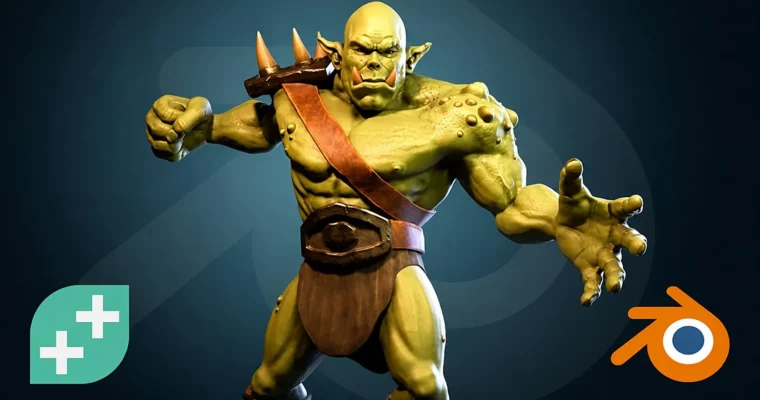
Build game-ready characters from scratch in Blender, from mechs to orcs, with a complete pipeline covering modeling, sculpting, texturing, and rigging.

This course is a hands-on, project-based journey into 3D character creation using Blender. You’ll start by building a simple mech to learn the interface, then move on to a full orc character, covering the entire pipeline: blocking out, sculpting, retopology, UV unwrapping, baking, texture painting, rigging, and posing. It’s built for beginners but packed with enough depth to level up intermediate artists.

🎯 What you’ll learn

  • Model and sculpt a complete game-ready character from scratch.
  • Master retopology and UV unwrapping for clean, animatable meshes.
  • Create PBR textures using Blender’s built-in painting tools.
  • Rig, pose, and render your character for a professional portfolio.

✅ Requirements

  • Skills: Basic computer literacy.
  • Tools: A 3-button mouse with a scroll wheel is recommended.
  • Hardware: A PC capable of running Blender.

📝 Description

This isn’t a “watch and repeat” tutorial. It’s a project-based course where you build a portfolio-ready character from the ground up. You’ll start with a simple mech to get comfortable with Blender’s interface, then tackle a full orc character. The instructors walk you through blocking out, sculpting, retopology, and UV unwrapping—the boring but essential stuff that makes your model actually work in a game engine.

The real magic happens in the texture painting section. You’ll learn to use Blender’s built-in tools to create PBR materials—metallic maps, roughness maps, and cavity maps—without ever leaving the software. No external painting apps required. Then you’ll rig the character, set up a pose, and render it for your portfolio.

The course includes a massive bonus section with the original Blender 2.8 content, covering modular vehicle creation, animation basics, and even exporting to Unity. It’s a lot of material, but it’s structured so you can work through it at your own pace. The instructors are active in the Q&A, and there’s a community site for sharing your work.

🧑‍🎓 Who this course is for

  • Beginners who want to learn 3D character modeling from scratch.
  • Artists looking to build a portfolio-ready character asset.
  • Game developers who need to create their own characters for Unity or Unreal.

🧑‍🏫 About the Author

The GameDev.tv Team is a group of experienced instructors who have taught over 1 million students worldwide. Rick Davidson is a veteran game developer and the founder of GameDev.tv, known for his clear, project-based teaching style. Grant Abbitt is a popular Blender artist and YouTuber, specializing in character modeling and sculpting tutorials. Together, they bring decades of industry experience to this course.

🏁 Final Result

  • A fully textured, rigged, and posed orc character model, ready for your portfolio or game engine.
Curriculum

📋 Course content

  1. Module 1: Introduction & Blender Basics
    • Introduction to the course1:51
    • Content Now in Blender 4.2!0:28
    • Download & Setup2:27
    • The Interface10:47
    • Block Man6:49
    • Community & Support1:33
    • Loop Cuts10:51
    • Extrude7:00
    • The Mirror Modifier10:51
    • Transform options7:49
    • Shading & Materials7:30
    • Textures & Viewport Rendering8:32
    • Rendering8:59
  2. Module 2: Mech Master
    • Section Intro – Mech Master0:28
    • The Cockpit10:56
    • The Undercarriage9:00
    • The Legs12:18
    • The Guns6:45
    • Adjustments & Pose7:24
    • Materials & Slots12:58
    • Rendering Cycles9:29
    • Rendering Animation10:02
  3. Module 3: Blocking Out the Orc
    • Section Intro – Blocking out0:22
    • Reference Images3:46
    • Background Images5:40
    • Blocking out the body8:52
    • Blocking out the Hand7:12
    • The Sculpting Workspace Blender 4.34:55
    • Intro to Sculpt Mode6:20
    • Symmetry7:20
    • Remesh5:12
    • Blocking Out the Upper Body13:15
    • Lower Body Block out11:09
    • Joining & Remeshing6:00
    • Box modelling the boots13:32
    • Blocking out the hand12:49
  4. Module 4: Sculpting the Base Level
    • Section Intro – Sculpting Base Level0:39
    • The Beginning Face Shape10:34
    • Positioning the eyes7:52
    • Eyes & Nose Shape11:47
    • Mouth and Teeth15:35
    • Quick face sculpts9:06
    • Fingers & Thumb11:41
    • Hand Beginning Shape8:23
    • Sculpting the Torso14:30
    • Back & Arms8:19
    • Legs6:03
  5. Module 5: Clothing & Armour
    • Section Intro – Clothing & Armour0:22
    • Reshaping the Boots, Sole, & Toecaps8:38
    • Reshaping with Shrinkwrap5:23
    • Boots Extra Armour9:47
    • The Belt8:21
    • The Loincloth9:00
    • The Shoulder Plate10:33
    • Strap Challenge4:45
  6. Module 6: Retopology
    • Section Intro – Retopology1:00
    • Automatic Retopology6:45
    • Finger Retopology12:25
    • Hand Retopo11:45
    • Arm Retopo5:59
    • Body Retopo10:04
    • Body Retopo Tidy-up15:24
    • Waist Retopo front9:35
    • Waist Retopo back4:34
    • Waist Retopo tidy-up5:52
    • Leg Retopo10:04
    • Face Retopo 1 – Edge Flow10:14
    • Face Retopo 2 – Connecting loops13:05
    • Face Retopo 3 – Filling in15:53
    • Face Retopo 4 – Nose, Mouth & Eyes5:52
    • Face Retopo 5 – Back of the Head6:16
    • Ear Retopo11:19
    • Join the sculpt12:44
    • Join the Retopology4:03
  7. Module 7: Detailed Sculpt
    • Section Intro – Detailed Sculpt0:30
    • Adding the Multiresolution modifier4:37
    • Unwrap13:16
    • Hand & Fingers9:39
    • Arm & Torso8:56
    • Legs4:41
    • The Head11:03
    • Adding Texture Brushes to the Body9:58
    • Head Details8:05
    • Asymmetry5:55
    • Preparing the Shoulder Plate6:39
    • Sculpting the Shoulder Plate6:13
    • Sculpting the Horns8:43
    • Preparing the Boots5:51
    • Sculpting the Boots6:45
    • The Belt Plate6:15
    • The Loin Cloth & Straps12:02
  8. Module 8: Unwrap & Bake
    • Section Intro – Unwrap & Bake0:33
    • Unwrapping the Orcs Body9:27
    • Unwrapping the Armour13:35
    • Baking Normal Maps – Multires10:12
    • Baking Ambient Occlusion & Cavity Maps13:53
    • Baking Selected to Active9:02
    • Baking the Armour Normals13:01
    • Baking the Armour Cavity Maps10:02
    • Baking the Armour Ambient Occlusion Maps7:12
    • Simpler Texture Options6:26
  9. Module 9: Texture Painting
    • Section Intro – Texture Painting0:45
    • Texture Painting the Orc17:17
    • dealing with Brush Lag1:03
    • Metallic Maps8:52
    • Roughness Maps6:12
    • Using Texture Brushes10:18
    • Using Stencil Brushes4:44
    • Brush Blend Modes8:31
    • PBR Workflow Options11:22
    • Painting the Belts13:17
    • Completing the straps6:10
    • Joining Our Materials8:26
    • Fill Brush & Blend Modes4:14
    • Adjusting Roughnes Maps9:04
    • Adjusting Roughness Maps – Straps7:44
    • Cleaning the Cavity Map5:29
    • Cavity Map to Roughness9:36
    • Material Options – the Eyes4:41
  10. Module 10: Posing, Lighting & Rendering
    • Section Intro – Posing Lighting & Rendering0:23
    • Setting Up the Rig9:12
    • Parenting the Rig7:46
    • Weight Painting7:24
    • Shoulder Armour4:55
    • Lighting9:54
    • Posing & Rendering11:53
    • Final Message0:29
  11. Module 11: Original Blender 2.8 Content (Bonus)
    • Original Blender 2.8 Content0:23
    • Welcome To The Course0:50
    • Download & Install Blender3:26
    • Blender Interface Introduction10:00
    • Introduction To Edit Mode8:05
    • Using Loop Cuts9:05
    • Mirror Modifier17:18
    • Extrude14:28
    • Shader Editor9:02
    • Community & Resources3:51
    • Section Intro – Mech Masters0:57
    • Creating the Cockpit11:19
    • Creating the Body11:38
    • Creating the Legs12:12
    • Creating Weapons11:23
    • Posing the Mech3:51
    • Smooth & Flat Shading4:27
    • Adding Materials11:55
    • Camera & Background3:46
    • Rotating camera5:40
    • How to Render and Save Images in Blender 3D (Rendering the Mech)4:54
    • Instructor Hangout – Mech Masters2:42
    • Section Intro – Modular Vehicles1:48
    • Intro to Modules1:52
    • Building the Base11:13
    • Building the Vehicle top7:17
    • Building the Wheels9:48
    • Creating Car Bases13:20
    • Tank Tracks12:06
    • Creating the Tank Base12:13
    • Making the tank top13:27
    • Rocket Launcher Top12:39
    • Making the Triple Gun Top12:57
    • Making the Laser Cannon Top9:18
    • The Tripod Base13:50
    • Texturing the Vehicles10:12
    • Material Slots11:26
    • Instructor Hangout – Modular Vehicles4:05
    • Section Intro – Blocking Out1:10
    • Reference & Background Images5:01
    • How to Insert Background images into Blender 3D7:34
    • Blocking out the shape12:39
    • Subdivision Surface Modifier7:33
    • Sculpting the Blocks15:02
    • Dyntopo Sculpting8:24
    • Dyntopo Sculpting – Body 18:36
    • Dyntopo Sculpting Body 28:48
    • Sculpting the Head4:29
    • Combining Objects9:06
    • Instructor Hangout#19:41
    • Section Intro – Detailed Sculpting1:31
    • Mid Level Details – Body11:34
    • Mid Level Details – Head10:49
    • Mid Level Details – Horns14:25
    • Using Alphas12:59
    • Fine Details13:43
    • Clothing & Armour – Belt8:20
    • Clothing & Armour – Loin Cloth8:35
    • Clothing & Armour – Buckle7:17
    • Clothing & Armour – Shackle12:05
    • Clothing & Armour – Sculpting 113:11
    • Clothing & Armour – Sculpting 210:22
    • Instructor Hangout – Detailed Sculpting5:15
    • Section Intro – Retopology1:06
    • Understanding Retopology2:57
    • Manual Retopology Demonstration13:33
    • Automatic Retopology5:32
    • Automatic Retopology 26:33
    • Automatic Retopology 3 – Tidy Up7:07
    • Retopology – Small Items7:27
    • Retopology – Decimate10:09
    • Instructor Hangout – Retopology9:22
    • Section Intro – Unwrapping1:18
    • Understanding UV Unwrapping14:25
    • Marking Seams12:22
    • Marking Seams 212:52
    • Unwrapping The Body15:20
    • Repair Stretching Problems3:50
    • Unwrapping All Objects Together12:48
    • Instructor Hangout – Unwrapping5:51
    • Section Intro – Baking1:21
    • Understanding baking & PBR9:33
    • Baking the orcs body10:47
    • Baking the orcs body – cavity10:47
    • Baking the horns & teeth 17:07
    • Baking the teeth & horns 212:01
    • Baking multiresolution objects9:51
    • Instructor Hangout – Baking4:21
    • Section Intro – Painting1:09
    • Blocking out colours15:00
    • Orc Body Painting Basics11:05
    • Different Stroke Methods7:56
    • Metallic maps5:52
    • Painting with stencils7:55
    • Painting With Blend Brushes12:32
    • Painting The Metal4:50
    • Painting the Horns & Teeth10:11
    • Painting the roughness map16:41
    • Painting the roughness map small items14:02
    • Other blend brushes8:51
    • Painting The Eyes8:28
    • Section Intro – Animation1:12
    • The Basics Of Keyframes9:52
    • Rendering Animations8:57
    • Understanding Armatures (Bones)12:10
    • Animating A Snake5:23
    • File Organisation5:39
    • Basic Human Rig9:17
    • Parenting the Basic Rig6:41
    • The Rigify Rig15:13
    • Blender to Mixamo10:36
    • Weight Painting14:05
    • Exporting the Character1:27
    • Exporting the Textures6:12
    • Import Blender To Unity16:42
    • Unity Animator Controller12:56
    • Basics of Lighting in Blender11:28
    • Basics of Rendering11:12
    • Course Wrap Up2:18
    • Coupon For Original Course Content0:33
    • Bonus Lecture: Something Just for You0:47
Watch online or Download for Free
Blender Character Creator for Video Games by GameDev.tv Team, Rick Davidson, Grant Abbitt
NAME
SIZEDURATION
01 – Introduction & Setup – New Blender 4.2 Content
158.2 MB1h 24m
02 – Mech Master – New Blender 4.2 Content
124.5 MB1h 19m
10 – Posing & Rendering – New Blender 4.2 Content
119.2 MB51m
22 – Rendering – Blender 2.8 Content
445.4 MB

Download all Videos (244)
9.5 GB26h 2m


Download all

Join us on
  Channel    and      Group

Leave a Comment

Your email address will not be published. Required fields are marked *