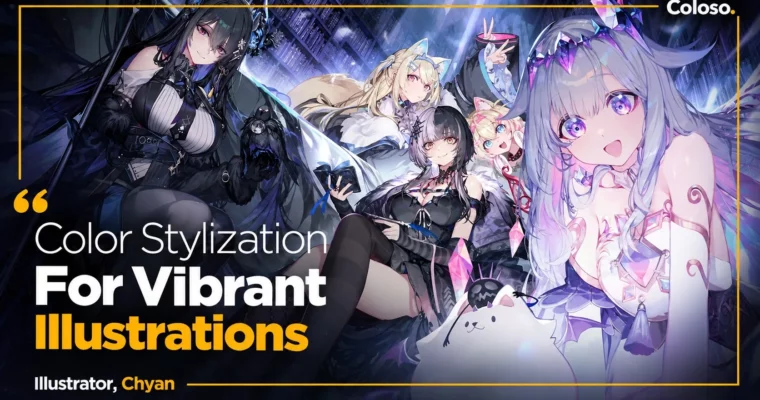
Color Stylization For Vibrant Illustrations by Chyan2

Duration:18 Hours
Actual Duration:36h 0m
Release date:2024, June 25
Publisher:Coloso
Skill level:Advanced
Language:Korean
Exercise files:Yes
Software:Adobe Photoshop CC
Course URL:https://group-buy.club/threads/color-stylization-for-vibrant-illustrations-%EB%A7%91%EA%B3%A0-%ED%99%94%EC%82%AC%ED%95%9C-%EC%9D%BC%EB%9F%AC%EC%8A%A4%ED%8A%B8%EB%A5%BC-%EC%9C%84%ED%95%9C-%EC%83%89-%EB%8D%B0%ED%8F%AC%EB%A5%B4%EB%A9%94%EC%99%80-%EC%B1%84%EC%83%89-%ED%85%8C%ED%81%AC%EB%8B%89-coloso-chyan-%EC%9D%BC%EB%9F%AC%EC%8A%A4%ED%8A%B8%EB%A0%88%EC%9D%B4%ED%84%B0-%EC%B1%A4.922/
Stop guessing colors. This class gives you a repeatable system for bright, transparent anime-style illustration that actually looks current — from eyes and skin to mood and light.
🎯 What you’ll learn
- Stylize real-world colors into clean anime palettes in 2-3 steps
- Paint pure, innocent eyes and clear, transparent skin
- Control brushstrokes and pen pressure for smooth coloring with no streaks
- Use color wheel, complementary colors, tone, and optical illusions correctly
- Adjust color intensity to make characters pop without muddy layering
- Balance character vs. atmosphere with light and mood
- Analyze 6 coloring styles to find what fits your art
- Self-evaluate your work to fix weaknesses fast
✅ Requirements
- Skills: Basic drawing skills, familiarity with Photoshop interface
- Tools: Adobe Photoshop CC, mouse works fine, drawing tablet recommended
- Hardware: Standard PC or laptop capable of running Photoshop CC smoothly
📝 Description
If you paint exactly what you see in real life, anime art looks dull and old. Chyan shows you how to break that habit. You take a reference image, pull the feeling from it, then rebuild the colors in 2 to 3 stylization passes. That is how you get that clean, bright, transparent look.
This is not theory for theory’s sake. You start with how eyes actually see color — complementary colors, brightness, advance/retreat colors, and the traps caused by surrounding colors. Then you learn color stylization as a roadmap: from image reference to palette setup to intensity control. Short sentences, clear demos, lots of comparison.
The middle of the class is super practical. Chyan breaks down brush techniques from the ground up: pressure settings, stroke direction, how to get smooth skin without leaving marks, even how to do clean drafts with just a mouse. You also get his breakdown of 6 different coloring directions — character-focused, mood-focused, drawing-focused, coloring-focused, flat, and deep — with pros, cons, and when to use each.
Then you put it to work. Nine stage-by-stage exercises with PSD files and color samples cover face, eyes, hair, skin detailing, lighting, and mood combination. You finish with two full real-work illustrations with multiple characters, from color coordination to final polish, plus his method for self-checking your own art.
🧑🎓 Who this course is for
- Beginners who want smooth coloring without leaving brush strokes
- Beginners who can draw okay but get stuck every time they start coloring
- Intermediate artists whose layered coloring looks thick, dark, and drab and want a cleaner system
🧑🏫 About the Author
Hey, I’m Chyan — illustrator and 2D concept artist at Manjuu, former instructor at Propic Academy. I have spent 5+ years teaching coloring as a system, not just feeling, and over 22K learners joined my first Coloso class.
I work in games and character IP, including Azur Lane, Eternal Return, Neural Cloud, and promo art for hololive English, plus a ton of commissioned game and novel illustrations. In this second class I packed in everything I have tested since then on transparent skin, expressive eyes, and bright stylized color.
🏁 Final Result
- Two finished anime-style portfolio illustrations with multiple characters, showing bright stylized color, transparent skin, expressive eyes, and controlled lighting and mood — built from draft to final polish using Chyan’s workflow.
📢 Guys, this is a Group Buy campaign, check the GBC forum thread to get access
You can find the course preview in the download section below.
 Channel