Ad Clicks : Ad Views : Ad Clicks : Ad Views : Ad Clicks : Ad Views : Ad Clicks : Ad Views :
Oh Snap!

It looks like you're using an adblocker. Adblockers make us sad. We use ads to keep our content happy and free. If you like what we are doing please consider supporting us by whitelisting our website. You can report badly-behaved ads by clicking/tapping the nearby 'Advertisement' X text.

Master Lighting in Unity by Eduardo Roa

Master Lighting in Unity by Eduardo Roa

/

Author:Eduardo Roa

Duration:23 hours

Actual Duration:14h 0m

Release date:2026, April

Publisher:Udemy

Skill level:Intermediate

Language:English

Exercise files:Yes

Software:Unity, HDRP, URP, Photoshop, DaVinci Resolve

Course URL:https://www.udemy.com/course/master-lighting-in-unity

A complete lighting course for Unity that covers both HDRP and URP, from direct and indirect light fundamentals to advanced GI, ray tracing, and production-ready re-lighting workflows.

This course is a deep dive into Unity lighting, covering both major render pipelines—HDRP and URP—in a way that actually makes sense. You’ll start with the fundamentals of direct and indirect light, then work your way through Global Illumination, ray tracing, exposure, and post-processing. The teaching style is practical and grounded: simple scenes for each concept, then full re-lighting breakdowns of complex environments you can download for free.

🎯 What you’ll learn

  • Understand the fundamentals of Unity’s lighting system
  • Apply lighting techniques to enhance visual quality
  • Optimize lighting for performance in real-time engines
  • Design and implement advanced lighting scenarios
  • Understand both render systems: HDRP and URP

✅ Requirements

  • Skills: Unity experience is required. No lighting experience needed.
  • Tools: Unity 6+ (a big part of the content is compatible with previous versions)

📝 Description

Lighting is one of those fields that can make or break a scene. Get it right, and you guide the player’s eye, define the mood, and turn a flat environment into something memorable. Get it wrong, and even the best 3D models look amateur. This course treats lighting as both an artistic and technical discipline, and it does so across both of Unity’s modern render pipelines.

The curriculum is structured to build understanding step by step. You’ll start with direct lights—directional, point, spot, and area—and then move into reflections and Global Illumination. The course covers baked lightmaps, light probes, and the newer Adaptive Probe Volume (APV) system in detail, including debugging and solving common issues. You’ll also get hands-on with Screen Space Global Illumination (SSGI), ray-traced lighting, and exposure control.

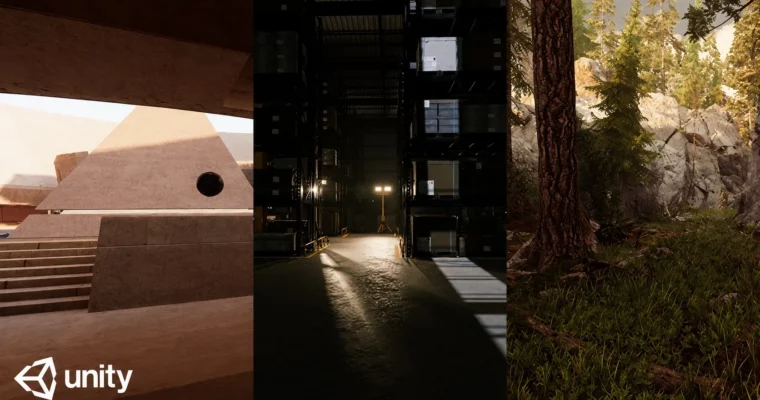
What sets this course apart is the practical re-lighting projects. You’ll take three downloadable environments—a courtyard, a warehouse, and the famous “Book of the Dead” scene—and re-light them from scratch. This means porting scenes between HDRP and URP, setting up day and night lighting scenarios, and working with practical lights for interior shots. It’s the closest thing to a real production lighting task you’ll find in a course.

The instructor uses simple, focused scenes to teach each concept in isolation, then shows you how to combine everything in a complex environment. You’ll also learn how to create custom LUTs for color grading using Photoshop or DaVinci Resolve, and how to edit HDRI images to avoid double-light issues. By the end, you’ll have a solid grasp of the entire lighting pipeline in Unity, from technical setup to final artistic polish.

🧑‍🎓 Who this course is for

  • Unity beginners who want to understand lighting
  • Intermediate users who want to improve the quality of their scenes
  • Technical artists, environment artists, and game developers

🧑‍🏫 About the Author

Eduardo Roa is a Unity developer and technical artist with a strong focus on rendering and lighting. He has extensive experience working with both HDRP and URP, and his teaching style is direct and practical—no fluff, just the tools and techniques you need to get production-ready results. His courses are known for their clear explanations and real-world project breakdowns.

🏁 Final Result

By the end of this course, you will have re-lit three complete environments (a courtyard, a warehouse, and the Book of the Dead scene) in both HDRP and URP, demonstrating your ability to handle complex lighting scenarios for day, night, and interior settings.

Curriculum

📋 Course content

  1. Module 1:  Introduction to Lighting
    • Introduction to Lighting4:42
    • Type of Direct Lights6:00
    • Directional Light15:25
    • Point Light10:25
    • Spot and Area Light13:02
    • IBL (Image based lighting)13:54
    • Light Features23:19
    • Lighting – StillLife25:51
  2. Module 2:  Reflections
    • Reflection – Understanding Reflection Probes15:19
    • Reflection – Refining Reflection Probes17:39
    • Reflection – Planar Reflection10:45
    • Reflection – Screen Space Reflection17:27
    • Volumen Profile21:36
  3. Module 3:  Global Illumination
    • Introduction to Global Illumination8:41
    • Indirect Lighting – Lightmaps: Setup14:16
    • Indirect Lighting – Advanced Lightmap Settings19:04
    • Indirect Lighting – Light Probes14:15
    • Indirect Lighting – Troubleshooting Light Probe Artifacts11:46
    • Indirect Lighting – Applying Light Probes to the Lightmapped Scene10:22
    • Indirect Lighting – Introduction to Adaptive Probe Volume (APV)7:28
    • Indirect Lighting – Configuring APV in HDRP9:17
    • Indirect Lighting – Debugging APV15:50
    • Indirect Lighting – Solving APV Specific Issues12:24
    • Indirect Lighting – APV for Static and Dynamic Objects29:19
    • Indirect Lighting – Introduction to Exposure10:24
    • Indirect Lighting – Configuring Exposure in HDRP16:22
    • Indirect Lighting – Exposure Debugging and Additional Modes12:22
    • Indirect Lighting – Adjusting Exposure for different Light Conditions22:09
    • Indirect Lighting – Emissive Objects16:29
    • Indirect Lighting – Still Life scene with GI19:29
    • Indirect Lighting – Still Life – Enhancing Quality with Post Processing20:10
    • Indirect Lighting – Light Modes – Understanding and Optimizing Shadows19:33
    • Indirect Lighting – Light Modes – Combining Real Time and Baked Shadows21:21
  4. Module 4:  Realtime Indirect Lighting
    • Introduction – Realtime Indirect Lighting6:26
    • Screen Space Global Illumination (SSGI) – Fundamentals – Scenario 115:45
    • Screen Space Global Illumination (SSGI) – Dynamic Lighting – Scenario 112:18
    • Realtime Indirect Lighting – Scenario 124:34
    • Screen Space Global Illumination (SSGI) – Ray Tracing – Scenario 115:46
    • Realtime Indirect Lighting – Dynamic Sunlight – Scenario 217:50
    • Screen Space Global Illumination (SSGI) – Hybrid Techniques – Scenario 221:57
    • Adaptive Probe Volume – Rendering Mask – Scenario 223:15
    • Adaptive Probe Volume – Light Scenarios – Scenario 213:23
  5. Module 5:  URP Lighting
    • Introduction to URP13:08
    • Porting HDRP to URP – Initial Setup12:13
    • Porting HDRP to URP – Finalizing the Conversion3:03
    • URP – ShadowMask Workflow18:36
    • URP – Exposure13:02
    • URP – Exposure via Post‑Processing11:14
    • URP – Realtime Indirect Light13:07
  6. Module 6:  HDRI and Color Grading
    • HDRI – Double Light Issues in HDRP10:23
    • HDRI – Editing HDRI Images for Clean GI16:04
    • HDRI – Double Light Fix in URP13:08
    • LUT – Introduction to Color Grading LUTs5:12
    • LUT – Creating LUTs for HDRP with Photoshop13:16
    • LUT – Creating LUTs for HDRP with DaVinci Resolve9:40
    • LUT – Creating LUTs for URP9:06
  7. Module 7:  Re-lighting Project: Courtyard
    • Introduction5:08
    • Port to HDRP – Part 19:52
    • Port to HDRP – Part 211:48
    • Port to HDRP – Part 313:26
    • Port to HDRP – Part 416:25
    • Re-Lighting – Courtyard – Sunset – HDRP – Part 117:31
    • Re-Lighting – Courtyard – Sunset – HDRP – Part 218:36
    • Re-Lighting – Courtyard – Sunset – HDRP – Part 315:27
    • Re-Lighting – Courtyard – Sunset – HDRP – Part 411:36
    • Re-Lighting – Courtyard – Sunset – HDRP – Part 511:46
    • Re-Lighting – Courtyard – Sunset – HDRP – Part 613:36
    • Re-Lighting – Courtyard – Sunset – HDRP – Part 716:03
    • Re-Lighting – Courtyard – Night – HDRP – Part 113:47
    • Re-Lighting – Courtyard – Night – HDRP – Part 217:24
    • Re-Lighting – Courtyard – Night – HDRP – Part 319:29
    • Re-Lighting – Courtyard – Night – HDRP – Part 412:10
    • Re-Lighting – Courtyard – Night – HDRP – Part 516:00
    • Re-Lighting – Courtyard – Night – HDRP – Part 612:01
    • Re-Lighting – Courtyard – Night – HDRP – Part 710:21
    • Re-Lighting – Courtyard – Night – HDRP – Part 815:08
    • Re-Lighting – Courtyard – Screenshots0:02
  8. Module 8:  Re-lighting Project: Warehouse
    • Re-Lighting – Warehouse – Day Light – HDRP – Part 112:30
    • Re-Lighting – Warehouse – Day Light – HDRP – Part 219:31
    • Re-Lighting – Warehouse – Day Light – HDRP – Part 311:00
    • Re-Lighting – Warehouse – Day Light – HDRP – Part 417:50
    • Re-Lighting – Warehouse – Day Light – HDRP – Part 58:32
    • Re-Lighting – Warehouse – Day Light – HDRP – Part 610:37
    • Re-Lighting – Warehouse – Practical Lights – HDRP – Part 111:14
    • Re-Lighting – Warehouse – Practical Lights – HDRP – Part 28:32
    • Re-Lighting – Warehouse – Practical Lights – HDRP – Part 39:16
    • Re-Lighting – Warehouse – Practical Lights – HDRP – Part 47:29
    • Re-Lighting – Warehouse – Light Interior – URP – Part 19:01
    • Re-Lighting – Warehouse – Light Interior – URP – Part 28:01
    • Re-Lighting – Warehouse – Light Interior – URP – Part 38:20
    • Re-Lighting – Warehouse – Light Interior – URP – Part 48:12
    • Re-Lighting – Warehouse – Screenshots0:02
  9. Module 9:  Re-lighting Project: Book of the Dead
    • Port to HDRP – Part 114:43
    • Port to HDRP – Part 216:46
    • Re-Lighting – Book of the Dead – Dynamic Day Light – HDRP – Part 19:16
    • Re-Lighting – Book of the Dead – Dynamic Day Light – HDRP – Part 214:33
    • Re-Lighting – Book of the Dead – Dynamic Day Light – HDRP – Part 39:11
    • Re-Lighting – Book of the Dead – Dynamic Day Light – HDRP – Part 416:31
    • Re-Lighting – Book of the Dead – Dynamic Day Light – HDRP – Part 515:05
    • Re-Lighting – Book of the Dead – Dynamic Day Light – HDRP – Part 614:34
    • Re-Lighting – Book of the Dead – Dynamic Day Light – HDRP – Part 714:28
    • Re-Lighting – Book of the Dead – Screenshots0:02
Watch online or Download for Free
Master Lighting in Unity by Eduardo Roa
NAME
SIZEDURATION

Download all Videos (99)
15.1 GB14h 0m


Download all

Join us on
  Channel    and      Group

Leave a Comment

Your email address will not be published. Required fields are marked *