Master Lighting in Unity by Eduardo Roa

Duration:23 hours
Actual Duration:22h 51m
Release date:2026, April
Publisher:Udemy
Skill level:Intermediate
Language:English
Exercise files:Yes
Software:Unity, HDRP, URP, Photoshop, DaVinci Resolve
Course URL:https://www.udemy.com/course/master-lighting-in-unity
This course is a deep dive into Unity lighting, covering both major render pipelines—HDRP and URP—in a way that actually makes sense. You’ll start with the fundamentals of direct and indirect light, then work your way through Global Illumination, ray tracing, exposure, and post-processing. The teaching style is practical and grounded: simple scenes for each concept, then full re-lighting breakdowns of complex environments you can download for free.
🎯 What you’ll learn
- Understand the fundamentals of Unity’s lighting system
- Apply lighting techniques to enhance visual quality
- Optimize lighting for performance in real-time engines
- Design and implement advanced lighting scenarios
- Understand both render systems: HDRP and URP
✅ Requirements
- Skills: Unity experience is required. No lighting experience needed.
- Tools: Unity 6+ (a big part of the content is compatible with previous versions)
📝 Description
Lighting is one of those fields that can make or break a scene. Get it right, and you guide the player’s eye, define the mood, and turn a flat environment into something memorable. Get it wrong, and even the best 3D models look amateur. This course treats lighting as both an artistic and technical discipline, and it does so across both of Unity’s modern render pipelines.
The curriculum is structured to build understanding step by step. You’ll start with direct lights—directional, point, spot, and area—and then move into reflections and Global Illumination. The course covers baked lightmaps, light probes, and the newer Adaptive Probe Volume (APV) system in detail, including debugging and solving common issues. You’ll also get hands-on with Screen Space Global Illumination (SSGI), ray-traced lighting, and exposure control.
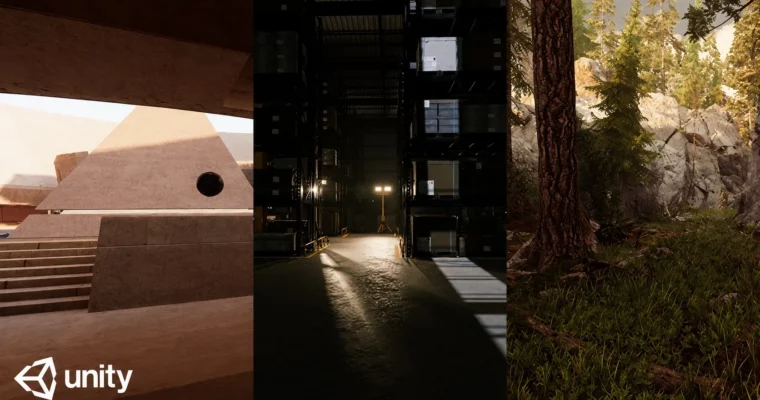
What sets this course apart is the practical re-lighting projects. You’ll take three downloadable environments—a courtyard, a warehouse, and the famous “Book of the Dead” scene—and re-light them from scratch. This means porting scenes between HDRP and URP, setting up day and night lighting scenarios, and working with practical lights for interior shots. It’s the closest thing to a real production lighting task you’ll find in a course.
The instructor uses simple, focused scenes to teach each concept in isolation, then shows you how to combine everything in a complex environment. You’ll also learn how to create custom LUTs for color grading using Photoshop or DaVinci Resolve, and how to edit HDRI images to avoid double-light issues. By the end, you’ll have a solid grasp of the entire lighting pipeline in Unity, from technical setup to final artistic polish.
🧑🎓 Who this course is for
- Unity beginners who want to understand lighting
- Intermediate users who want to improve the quality of their scenes
- Technical artists, environment artists, and game developers
🧑🏫 About the Author
Eduardo Roa is a Unity developer and technical artist with a strong focus on rendering and lighting. He has extensive experience working with both HDRP and URP, and his teaching style is direct and practical—no fluff, just the tools and techniques you need to get production-ready results. His courses are known for their clear explanations and real-world project breakdowns.
🏁 Final Result
By the end of this course, you will have re-lit three complete environments (a courtyard, a warehouse, and the Book of the Dead scene) in both HDRP and URP, demonstrating your ability to handle complex lighting scenarios for day, night, and interior settings.
 Channel