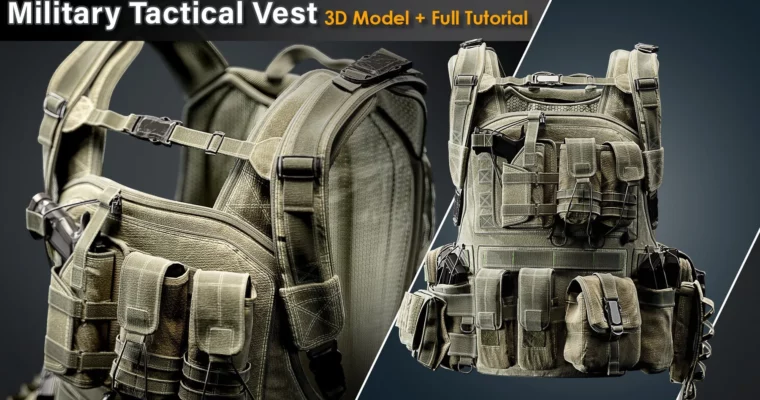
Military Tactical Vest – Full Tutorial + 3D Model by Ahmad Oloumi

Duration:+10 hours
Actual Duration:11h 15m
Release date:2024
Publisher:Artstation
Skill level:Intermediate
Language:English
Exercise files:Yes
Software:Marvelous Designer, Blender, Rizom UV, ZBrush, 3ds Max, Substance Painter, Marmoset Toolbag
Course URL:https://www.artstation.com/marketplace/p/6NAyK/military-tactical-vest-full-tutorial-3d-model
This course walks you through the entire production of a game-ready military tactical vest. You’ll start with a base mesh in Marvelous Designer, then move through retopology, UV unwrapping, high-poly sculpting, and PBR texturing, finishing with a professional render in Marmoset Toolbag. It’s a straight-up, no-nonsense look at a real prop pipeline.
🎯 What you’ll learn
- Create a base garment simulation in Marvelous Designer.
- Retopologize and build clean quad topology for games.
- Unwrap complex hard-surface and cloth assets using UDIMs.
- Sculpt high-frequency details in ZBrush.
- Texture a full PBR asset in Substance Painter.
- Light and render a portfolio-ready shot in Marmoset Toolbag.
✅ Requirements
- Skills: Basic familiarity with 3D modeling software and the concept of a game art pipeline.
- Tools: A 3-button mouse and a drawing tablet are strongly recommended for sculpting.
- Hardware: A PC capable of running the listed software (16GB+ RAM recommended).
📝 Description
This isn’t a narrated tutorial, but it’s a detailed, real-time walkthrough of a professional workflow. You’ll see every click and decision as Ahmad builds a game-ready asset from scratch. The course is split into logical parts, so you can follow along at your own pace.
The process starts in Marvelous Designer to get the base shape and drape of the vest right. From there, you’ll jump into Rizom UV for initial packing, then move to ZBrush and 3ds Max for a clean retopology. A key part of the course is the return to Blender to add specific hard-surface details like buckles, tapes, and sewing lines, before going back to ZBrush for high-poly sculpting.
The texturing phase covers both ZBrush for micro-detail and Substance Painter for the final PBR materials. Finally, you’ll set up a studio-style render in Marmoset Toolbag to show off your work. The final mesh is clean, quad-based, and unwrapped using a UDIM workflow, making it ready for any game engine.
🧑🎓 Who this course is for
- Intermediate 3D artists who want to see a complete, professional prop pipeline.
- Game artists looking to improve their hard-surface and cloth modeling skills.
- Anyone wanting to add a realistic military asset to their portfolio.
🧑🏫 About the Author
Ahmad Oloumi is a seasoned 3D artist specializing in military and hard-surface assets. He has a strong presence on ArtStation, where his work is known for its high quality and attention to realistic detail. This tutorial is built from his direct production experience.
🏁 Final Result
- A fully textured, game-ready military tactical vest model in FBX and OBJ formats.
- A high-quality portfolio render of the final asset.
- 4K PBR textures (16-bit PNG) using a UDIM workflow.
 Channel