Cinema 4D & Redshift- Looping Animation Mastery by Ag Motion Designs

Duration:6.5 hours
Actual Duration:6h 34m
Release date:2025
Publisher:Udemy
Skill level:Beginner
Language:English
Exercise files:Yes
Software:Cinema 4D, Redshift
Course URL:https://www.udemy.com/course/cinema-4d-redshift-looping-animation-mastery
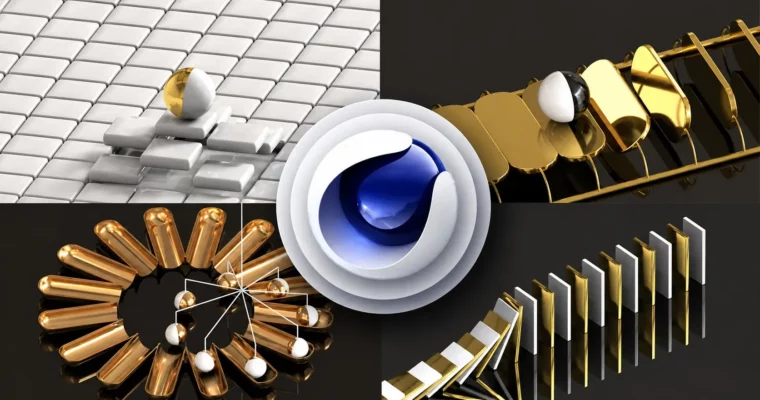
This course is a straight shot into making looping animations that actually loop perfectly. No fluff, just practical workflows in Cinema 4D and Redshift. You’ll start with the basics—bouncing balls and graph editors—and work your way up to complex, physics-driven loops that look great on social media or in a client’s portfolio.
🎯 What you’ll learn
- Master the fundamentals of looping animations in Cinema 4D.
- Create seamless and professional-quality animation loops.
- Leverage Redshift for high-quality rendering of looping animations.
- Understand the principles of timing and motion for perfect loops.
- Work efficiently with Cinema 4D’s tools and features for looping workflows.
- Apply advanced techniques like cloners, deformers, and effectors.
- Use materials and lighting in Redshift to enhance your loops.
- Export looping animations in optimal formats for different platforms.
- Build a portfolio of stunning looping animations for clients or personal projects.
- Troubleshoot common issues in looping animations and rendering.
✅ Requirements
- Skills: No previous knowledge of Cinema 4D and Redshift is required. You will learn everything from scratch.
- Tools: A 3-button mouse is recommended for navigating the 3D viewport.
- Hardware: A dedicated GPU is recommended for rendering with Redshift.
📝 Description
This course skips the theory and gets you building loops from the first lesson. You’ll start with a simple rotating ball to understand the core concept of a seamless loop, then quickly move into the Mograph toolset. The instructor, Aditya Gawde, shows you exactly how to use cloners, effectors, and deformers to create repeating patterns that feel organic and polished.
The real meat is in the later sections. You’ll tackle physics-based loops using Cinema 4D’s dynamics engine, then push into abstract and complex designs. Each project is a self-contained lesson in timing, motion, and Redshift rendering. You’ll learn how to set up materials and lighting that make your loops pop, and how to export them for Instagram, TikTok, or a client reel. The workflow is practical—you’ll even touch up your renders in After Effects.
🧑🎓 Who this course is for
- Beginner as well as advanced users of Cinema 4D and Redshift.
- Motion designers looking to add looping animation to their skillset.
- Anyone wanting to create shareable, high-quality 3D loops for social media or advertising.
🧑🏫 About the Author
Ag Motion Designs is run by Aditya Gawde, a motion designer with 6 years of experience in the industry. He has a broad skillset covering motion graphics, video editing, 2D and 3D animation, and graphic design. He is proficient in Photoshop, Illustrator, After Effects, Blender, Cinema 4D, and Premiere Pro, and has taught over 1,100 students across 23 courses.
🏁 Final Result
- A portfolio of multiple looping animations, from simple Mograph loops to complex, physics-driven abstract designs.
- A solid understanding of how to create seamless loops in Cinema 4D and render them professionally in Redshift.
 Channel