


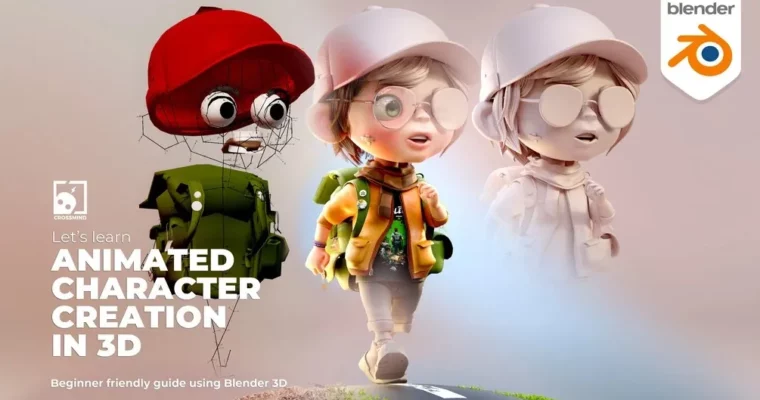
Crossmind Studio – Let’s learn ANIMATED CHARACTER CREATION IN 3D by Ram@Crossmind

Duration:Over 10 hours
Actual Duration:13h 0m
Release date:2023, December
Publisher:Gumroad
Skill level:Beginner
Language:English
Exercise files:Yes
Software:Blender
Course URL:https://crossmindstudio.gumroad.com/l/animatedcharacter
Ready to jump into making your own animated characters? This course takes you from zero to hero in Blender, covering the whole pipeline from modeling and texturing to rigging and finally, animating your creation. It’s perfect if you’ve got the basics down and want to start building characters for your stories, animations, or even just for fun.
🎯 What you’ll learn
- Master character topology for animation-ready models.
- Model heads, torsos, and limbs with clean geometry.
- Create and texture clothing, props, and accessories.
- Understand UV mapping and hand-painted texturing.
- Learn Rigify for character rigging and weight painting.
- Animate walk cycles and secondary motions.
- Set up lighting, rendering, and compositing for final scenes.
✅ Requirements
- Skills: Familiarity with Blender basics or completion of an introductory series.
- Tools: A computer capable of running Blender.
- Hardware: A standard computer setup; no specialized hardware is strictly required beyond what’s needed to run Blender smoothly.
📝 Description
This course is your all-in-one guide to creating animated characters in Blender. We break down the entire process, from understanding topology for animation to building out a complete character, rigging it with Rigify, and bringing it to life with animation. You’ll learn practical techniques for modeling, texturing, and shading, ensuring your characters look great. The rigging section covers everything from setting up the armature to fine-tuning with weight painting and creating custom rigs for props. Finally, you’ll dive into animation, creating realistic walk cycles and secondary actions, and wrap it all up with lighting and rendering. The premium edition includes over 10 hours of video, all project files, and bonus content.
🧑🎓 Who this course is for
- Beginners who have a grasp of Blender fundamentals.
- Aspiring animators looking to create their own characters.
- Artists who want to expand their 3D skillset into character animation.
- Anyone interested in making characters for animations, illustrations, or motion graphics.
🧑🏫 About the Author
Ram, the driving force behind Crossmind Studios, is an Animation Film Designer with two decades of industry experience. He’s worked with major clients like National Geographic, Samsung, and Sony, and his work has earned accolades, including a Promax Asia award for best ident design. Ram is passionate about sharing his extensive knowledge and guiding new artists through the complexities of animation film design.
🏁 Final Result
- A fully rigged and animated 3D character, ready for your portfolio or personal projects.
- The ability to create characters for various media, including animations, illustrations, and motion graphics.
- Completed project files and animated scenes from the course.
 Channel



Hi, it’s missing CH 11, please update sir