It looks like you're using an adblocker.
Adblockers make us sad. We use ads to keep our content happy and free. If you like what we are doing please consider supporting us by whitelisting our website. You can report badly-behaved ads by clicking/tapping the nearby 'Advertisement' X text.
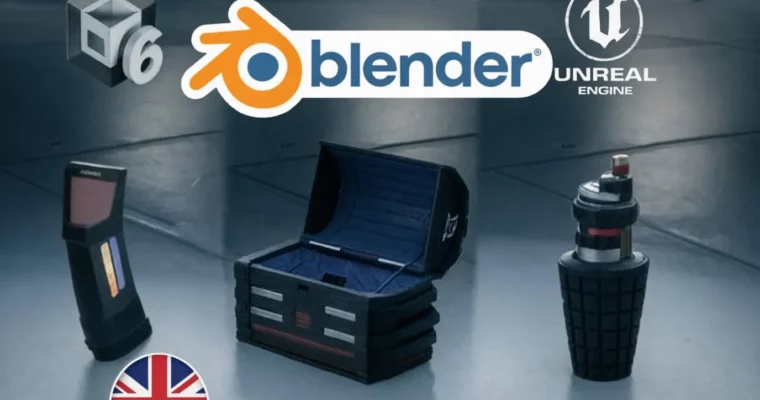
Blender 3D – Create Props and Assets for Games Step by Step by Sergio Rodríguez
Learn to model, texture, rig, and export game-ready 3D assets using Blender's professional and procedural techniques.
Ready to build awesome 3D assets for your games? This course walks you through creating props and game-ready models in Blender, covering everything from initial blocking to final export for Unity and Unreal Engine. You’ll learn professional techniques to make your assets look great and perform well.
🎯 What you’ll learn
Model semi-realistic props and assets optimized for video games.
Use procedural texturing to speed up your workflow.
Create PBR materials from the textures you generate.
Build a reusable edge-detection node similar to EdgeWear in Substance Painter.
Apply basic rigging and animation to your models.
Export your assets seamlessly to Unity and Unreal Engine.
✅ Requirements
A computer with Blender installed.
Basic Blender knowledge is recommended but not required.
📝 Description
This course incorporates artificial intelligence tools to enhance asset creation. You’ll master the process of building 3D game-ready assets with a practical, hands-on approach. The course guides you through creating three progressively complex assets, reinforcing each stage of the workflow to boost your skills and efficiency.
You’ll cover everything from gathering references and modeling to advanced materials, rigging, animation, and exporting to popular game engines like Unity and Unreal Engine.
What you’ll do in this course:
* References & Planning: Get ready before you start any model.
* Blocking: Create accurate base shapes for your assets.
* Detailing: Add complexity using Boolean tools and other techniques.
* Geometry Cleanup: Optimize your models for smooth game performance.
* UV Mapping: Prepare your models perfectly for texturing.
* Edge Smoothing: Achieve flawless shading with bevel nodes.
* PBR Materials: Create realistic and optimized textures.
* Reusable Nodes: Build your own edge wear detection shader for quick reuse.
* Advanced Texturing: Add dirt, decals, and fine details to your models.
* Rigging & Animation: Animate one of your assets for in-game use.
* Exporting: Prepare and send your models to Unity and Unreal.
By the end of this course, you’ll have a solid workflow for producing professional for real-time engines.
* Creators looking to improve their Blender skills and learn professional asset creation workflows.
🧑🏫 About the Author
Sergio Rodríguez is an instructor with a solid background in arts and over five years of combined experience in 3D design and game development. He’s dedicated to teaching creators how to bring their ideas to life in virtual worlds.
For the past three years, Sergio has been working with Unity, developing immersive and optimized projects for various platforms. Simultaneously, he’s honed his skills in Blender, specializing in modeling, retopology, and animation, including creating game-ready characters with advanced systems like Rigify.
He’s also an experienced user of Adobe Photoshop, a key tool for integrating textures and designing high-quality visual materials. His focus is on teaching not just practical techniques but also optimization strategies to make your projects shine in any game engine. If you’re looking to learn with a professional yet accessible approach, Sergio’s courses are the ideal place to level up your skills.
🏁 Final Result
A portfolio-ready collection of game-ready 3D assets, including props with optimized geometry, professional PBR textures, and potentially basic rigging and animation, ready for import into game engines like Unity and Unreal Engine.
Curriculum
📋 Course content
Welcome and Introduction to the Course
Welcome and Introduction to the Course3:03
Installing and Activating Add-ons4:09
Preparing the Blender Scene5:28
Section Introduction
Section Introduction0:45
References and Planning7:04
Blocking Basic Shapes10:15
Details with Bool Tool11:40
Applying Bool Tool to Our Model10:16
Finalizing Modeling13:36
Cleaning Geometry, Part I12:31
Cleaning Geometry, Part II18:48
UV Map for Our Model15:22
Energy Level Detail11:57
Edge Smoothing via Shader13:59
Creating a Color Mask10:48
Base Colors and Ambient Occlusion10:19
Metallic Tint and Roughness8:16
Emission Map6:29
Edge Detection, Part I10:00
Edge Detection, Part II11:07
Adding Surface Dirt6:29
Decal-like Details with Stencil13:44
Baking the Rest of the Textures11:01
Wrapping Up the First Section3:19
Section Introduction
Section Introduction0:36
References and Planning5:04
Blocking Basic Shapes – Body8:00
Blocking Basic Shapes – Mechanism10:18
Detailing the Body, Part I8:40
Detailing the Body, Part II16:12
Detailing the Mechanism4:13
Cleaning Geometry, Part I6:15
Cleaning Geometry, Part II5:33
UVs for the Grenade – Body10:21
UVs for the Grenade – Mechanism9:57
Edge Smoothing via Shader14:06
Painting Details with Alphas20:25
Creating Color Mask – Mechanism19:27
Creating Color Mask – Body4:42
Base Colors for the Grenade5:04
Metallic Tint for the Grenade3:18
Roughness Map4:56
Emission Map4:01
Edge Detection for Wear6:56
Adding Surface Dirt6:47
Decal-like Details with Stencil12:52
Baking Remaining Textures, Part I11:06
Baking Remaining Textures, Part II4:30
Section 3 Conclusion3:16
Section Introduction
Section Introduction0:46
References and Planning4:39
Blocking Basic Shapes13:00
Detailing the Body, Part I12:15
Detailing the Body, Part II10:11
Finalizing Body Detailing14:26
Detailing the Lid, Part I13:43
Detailing the Lid, Part II11:53
Finalizing Lid Detailing16:42
Last Pieces of the Box18:49
Cleaning Geometry14:33
UV Map for the Body, Part I19:42
UV Map for the Body, Part II7:12
Finalizing UV Map for the Body12:29
UV Map for the Lid, Part I8:29
UV Map for the Lid, Part II14:43
Joining and Packing UVs9:39
Edge Smoothing via Shader21:27
Creating a Color Mask17:15
Applying Base Colors4:20
Metallic Tint for the Box7:16
Roughness for the Box4:58
Edge Detection and Wear6:09
Adding Surface Dirt5:53
Decal-like Details with Stencil19:55
Creating Interior Material – Body10:27
Creating Interior Material – Lid9:31
Baking Textures, Part I8:22
Baking Textures, Part II9:52
Finalizing Texture Baking11:09
Conclusion4:12
Introduction
Introduction0:39
Basic Rigging for the Chest12:29
Adding More Bones7:17
Parenting Bones8:50
Restricting Bone Movement5:53
Adding Constraints to Bones6:59
Brief Introduction to Animation in Blender7:55
Planning Chest Animation10:03
Adjusting Chest Animation5:58
Conclusion4:55
Introduction
Introduction0:50
Adding Grenade Holder Piece12:19
Cleaning Grenade Holder4:44
Adding Details to Grenade Holder3:09
Adding Material to Grenade Holder10:56
Baking Grenade Holder Textures6:19
Preparing Models for Export6:46
Preparing Unity to Import Models10:50
Importing Models into Unity6:57
Placing Models in the Unity Scene7:16
Fixing Emission with ORM Texture16:14
Exporting for Unreal7:17
Importing and Placing Chest in Unreal Engine8:59
Conclusion3:44
Course Farewell — Goodbye
Course Farewell — Goodbye0:40
Watch online or Download for Free
Blender 3D – Create Props and Assets for Games Step by Step by Sergio Rodríguez




 Channel