Ad Clicks : Ad Views : Ad Clicks : Ad Views : Ad Clicks : Ad Views : Ad Clicks : Ad Views :
Oh Snap!

It looks like you're using an adblocker. Adblockers make us sad. We use ads to keep our content happy and free. If you like what we are doing please consider supporting us by whitelisting our website. You can report badly-behaved ads by clicking/tapping the nearby 'Advertisement' X text.

Unreal Engine 5 C++ – Advanced Action RPG by Vince Petrelli

Unreal Engine 5 C++ – Advanced Action RPG by Vince Petrelli

/

Author:Vince Petrelli

Duration:44 hours on-demand video

Release date:2026

Publisher:Udemy

Skill level:Advanced

Language:English

Exercise files:Yes

Software:Unreal Engine 5

Course URL:https://www.udemy.com/course/unreal-engine-5-advanced-action-rpg

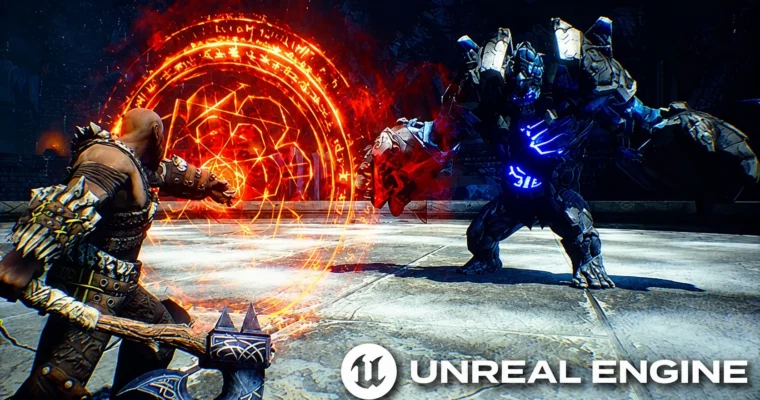
Build a complete AAA-style action RPG combat system in Unreal Engine 5 using C++ and the Gameplay Ability System, from melee combos to boss fights.

This is the real deal for anyone who wants to build a proper action RPG combat system in Unreal Engine 5. No fluff, no half-baked blueprints. You’ll be writing C++ from day one, using the Gameplay Ability System to create everything from a snappy melee combo system to a full boss fight with summoned minions. It’s a massive course, clocking in at over 44 hours, and it’s packed with industry-standard practices that’ll make your codebase something you’re actually proud to extend.

🎯 What you’ll learn

  • Build a powerful melee combo system with light and heavy attacks
  • Use the Gameplay Ability System (GAS) to create engaging RPG combat
  • Implement advanced enemy AI with custom Behavior Tree tasks, decorators, and services
  • Use the Environment Query System for smarter AI positioning and strafing
  • Create directional hit reactions, rolling, blocking, and parrying mechanics
  • Develop a robust target lock system for focused combat
  • Design a survival game mode with wave-based enemy spawning
  • Implement a full UI suite including main menu, pause menu, and win/lose screens
  • Apply data-oriented design for combat stats and attributes
  • Write clean, extendable C++ code following industry best practices

βœ… Requirements

  • Skills: Some basic C++ experience with Unreal Engine is required.

πŸ“ Description

This course is a deep dive into building a full action RPG combat system, and it doesn’t pull any punches. You’re going to be writing a lot of C++, and you’ll be using the Gameplay Ability System as the backbone for everything. The instructor, Vince Petrelli, structures the whole thing like a real production pipeline, starting with a solid hero character setup and then layering on complexity piece by piece.

The first chunk is all about getting your hero moving and ready for combat. You’ll set up input binding with native gameplay tags and data assets, which is a clean, data-driven way to handle controls. Then you’ll jump straight into the melee combo system, combining GAS with linked animation layers to get those satisfying light and heavy attack chains. It’s not just about making the character swing an axe; you’re building a system that’s modular and easy to extend.

Once the hero can fight, the course shifts to the enemies. You’ll build out AI that doesn’t just stand there and take hits. We’re talking custom behavior tree tasks, decorators, and services, plus the Environment Query System for smarter positioning. Enemies will strafe, avoid crowds, and react to your attacks with directional hit reactions. You’ll even build a ranged enemy that keeps its distance and a boss that can summon minions mid-fight.

The later sections are where everything comes together. You’ll add special abilities with cooldowns, a rage mechanic, and a target lock system that’s handled mostly in C++. Then you’ll wrap it all up in a survival game mode with wave-based spawning, a full UI suite (main menu, pause, win/lose screens), and a loading screen. The course also covers important topics like asynchronous loading and data-oriented design, so you’re not just learning how to make a game, but how to make a game that’s performant and maintainable.

πŸ§‘β€πŸŽ“ Who this course is for

  • Learners who want to build an action RPG project from scratch
  • Learners who want to level up their C++ skills in Unreal Engine
  • Learners who want to write clean, professional, and extendable code

πŸ§‘β€πŸ« About the Author

Vince Petrelli is an experienced game developer and educator who specializes in Unreal Engine and C++. He’s known for creating comprehensive, code-heavy courses that focus on industry-standard practices. His teaching style is direct and practical, emphasizing clean architecture and data-driven design over quick fixes. With a focus on the Gameplay Ability System, his courses are a go-to resource for developers looking to build complex, scalable combat systems.

🏁 Final Result

  • A complete, playable action RPG combat system with a hero character, multiple enemy types, and a boss fight
  • A survival game mode with wave-based enemy spawning and a full game loop
  • A polished UI suite including main menu, pause menu, win/lose screens, and a loading screen
  • A portfolio-ready project demonstrating advanced C++ and GAS implementation in Unreal Engine 5
Curriculum

πŸ“‹ Course content

  1. Module 1: Introduction & Setup
    • Introduction5:57
    • Some Common Questions You May Have…0:44
    • Create a New C++ Project3:30
    • Set Up Test Map3:23
    • How to get help?0:21
    • Hard and Soft Reference10:32
  2. Module 2: Hero Character Setup
    • Set Up Hero Character Section Overview0:45
    • Basic Class Structure7:09
    • Debug Helper4:53
    • Set Up Hero Camera9:51
    • Native Gameplay Tags9:36
    • Input Config Data Asset10:29
    • Custom Enhanced Input Component7:23
    • Binding Input15:42
    • Character Anim Instance12:56
    • Hero AnimBP4:41
    • Hero Anim Instance9:30
    • Gameplay Ability System17:00
    • Ability Activation Policy11:07
    • Set Up Weapon Class8:48
    • Set Up Hero Weapon8:33
    • Start Up Data12:14
    • Synchronous Loading13:09
    • Share Task: Share Your Progress0:09
    • Section Wrap Up1:41
  3. Module 3: Melee Combo System
    • Melee Combo System Section Overview1:49
    • Challenges Ahead3:42
    • Pawn Extension Component10:27
    • Register Spawned Weapon17:13
    • Hero Gameplay Ability10:34
    • Ability Input Action8:31
    • Hero Ability Set10:25
    • Binding Ability Input8:58
    • Play Montage and Wait7:29
    • Wait for Gameplay Event12:00
    • Animation Layer Interface10:56
    • Master Anim Layer9:05
    • Link Anim Layer10:36
    • Default Weapon Ability18:15
    • Grant Weapon Ability12:56
    • Handle Unequip Axe14:29
    • Light Attack Ability7:33
    • Combo Logic14:08
    • Heavy Attack Ability5:54
    • Heavy Attack Logic8:28
    • Warrior Function Library17:14
    • Jump To Finisher8:13
    • Slow Motion and Sound FX14:30
    • Share Task: Share Your Combo System0:11
    • Section Wrap Up3:49
  4. Module 4: Hero Combat & Enemy Setup
    • Hero Combat Section Overview2:05
    • Challenges Ahead2:18
    • Set Up Enemy Character11:55
    • Gruntling Guardian10:28
    • Asynchronous Loading14:37
    • Spawn Enemy Weapon7:50
    • Attribute Set7:07
    • Gameplay Effect9:53
    • Apply Gameplay Effect To Self5:48
    • Init Enemy Attributes9:24
    • Pawn Combat Interface19:57
    • Toggle Weapon Collision8:11
    • On Weapon Begin Overlap10:11
    • On Target Interacted8:34
    • Notify Melee Hit11:17
    • Set Up Attack Montages8:24
    • Make Gameplay Effect Spec Handle10:15
    • Hero Damage Info12:03
    • Apply Effect Spec Handle To Target9:16
    • Capture Relevant Attributes9:14
    • Retrieve Hero Damage Info11:37
    • Calculate Final Damage Done15:05
    • Set Up Heavy Attacks For Damage5:59
    • Modify Health Attribute9:59
    • Hit React Ability12:49
    • Trigger Hit React Ability5:50
    • Material Hit FX10:31
    • Hit Pause7:35
    • Camera Shake7:15
    • Hit React Sound5:46
    • Gameplay Cues10:02
    • Enemy Death Ability16:30
    • BP Death Interface7:10
    • Dissolve Material FX11:52
    • Dissolve Niagara FX11:00
    • Share Task: Share Your Progress0:08
    • Pawn UI Component12:41
    • Broadcast Value Change13:09
    • Listen For Broadcasting12:56
    • Enemy Init Created Widget8:59
    • Template Widgets11:55
    • Set Status Bar Fill Color9:18
    • Template Icon Slot Widget9:36
    • Hero Overlay Widget13:09
    • Enemy Health Widget Component12:42
    • Hide Enemy Health Bar6:48
    • Update Weapon Icon8:45
    • Final Tweaking14:10
    • Share Task: Share Your Combat0:08
    • Section Wrap Up0:55
  5. Module 5: Enemy AI
    • Enemy AI Section Overview2:23
    • Preparing Enemy For Combat5:06
    • Crowd Following Component9:12
    • AI Perception8:55
    • Generic Team ID8:53
    • Behavior Tree10:00
    • Configure AI Avoidance18:47
    • Behavior Tree Node Types10:43
    • Observer Aborts11:34
    • Orient To Target Actor20:08
    • Environment Query System11:16
    • Custom Query Context19:53
    • Toggle Strafing State16:53
    • Calculate Direction9:12
    • Strafing Blend Space5:29
    • Compute Success Chance9:12
    • Dot Product Test8:27
    • Enemy Melee Ability5:57
    • Activate Ability By Tag11:14
    • Is Target Pawn Hostile10:32
    • Notify Melee Hit7:19
    • Make Enemy Damage Effect Spec Handle9:32
    • Apply Enemy Damage6:15
    • Motion Warping8:15
    • Update Motion Warp Target8:14
    • Construct Native BT Task12:59
    • Rotate Enemy In Task17:54
    • Melee Attack Branch9:00
    • Does Actor Have Tag Decorator8:54
    • Duration Gameplay Effect8:23
    • Should Abort All Logic9:16
    • Guardian Attack Sound FX7:15
    • Share Task: Share Your AI0:09
    • Section Wrap Up1:28
  6. Module 6: Hero Combat Abilities
    • Hero Combat Abilities Section Overview2:33
    • Planning Ahead1:46
    • Two-Key Input Action10:18
    • Get Last Movement Input10:24
    • Rolling Distance8:28
    • Get Value At Level6:43
    • Rolling Sound FX3:27
    • Hero Hit React Ability5:40
    • Trigger Hero Hit React4:38
    • Hero Hit FX6:24
    • Compute Hit React Direction10:44
    • Hit React Tags7:32
    • Switch On Gameplay Tags6:18
    • Hit React Sound FX2:26
    • Hero Block Ability12:48
    • Add Gameplay Cue To Owner13:59
    • Is Valid Block10:47
    • Notify Successful Block4:53
    • Handle Successful Block9:37
    • Is Perfect Block4:57
    • Notify Perfect Block8:30
    • Initiate Counterattack13:01
    • Share Task: Share Your Block Ability0:09
    • Set Up Target Lock Ability9:09
    • Toggle Target Lock6:16
    • Get Available Targets13:17
    • Get Nearest Target9:16
    • Draw Target Lock Widget9:39
    • Set Target Lock Widget Position11:13
    • Execute Task On Tick10:46
    • On Target Lock Tick6:25
    • Orient To Target While Target Lock8:42
    • Switch To Target Lock Poses9:25
    • Target Lock Walk Speed7:41
    • Switch Target Input Action6:44
    • Target Lock Mapping Context9:20
    • Notify Switch Target8:25
    • Handle Switch Target13:43
    • Hero Death13:25
    • Tweaking Target Lock5:06
    • Share Task: Share Your Target Lock Ability0:12
    • Section Wrap Up2:15
  7. Module 7: Ranged Enemy
    • Ranged Enemy Section Overview1:19
    • Ranged Enemy Starting Weapon7:38
    • Glacer Starting Stats4:27
    • Glacer Hit React8:37
    • Ranged Behavior Tree5:14
    • Find Shooting Position8:12
    • Projectile Ability8:28
    • Projectile Class12:55
    • Spawning Projectile7:54
    • On Projectile Hit9:13
    • Handle Projectile Hit12:38
    • Projectile Spec Handle10:57
    • Make Projectile Spec Handle2:59
    • Projectile Sound FX6:52
    • Glacer Melee Ability8:15
    • Unblockable Attack9:35
    • Share Task: Share Your Ranged Enemy0:09
    • Combat Test Map8:02
    • Section Wrap Up0:51
  8. Module 8: Boss Enemy
    • Boss Enemy Section Overview1:40
    • Set Up Boss Character7:13
    • Giant Starting Stats7:43
    • Boss Bar Widget6:27
    • Draw Boss Bar To Screen7:16
    • Giant Hit React7:35
    • Giant Death6:58
    • Remove Boss Bar7:11
    • Giant Behavior Tree3:17
    • Giant Melee Ability14:30
    • Hand Collision Box8:23
    • Post Edit Change Property9:21
    • Toggle Box Collision12:35
    • Giant Second Melee Ability10:18
    • Giant Combo14:35
    • Wait Spawn Enemies12:35
    • Summon Ability9:15
    • Listen For Gameplay Event11:28
    • Async Load And Spawn Enemies16:52
    • Fix Facing Rotation6:19
    • Stop Spawning Enemies5:16
    • Enemy Entry FX5:39
    • Enemy Entry Montage10:28
    • Check Current Health Percent16:43
    • Share Task: Share Your Boss Fight0:12
    • Section Wrap Up1:46
  9. Module 9: Hero Special Abilities
    • Hero Special Abilities Section Overview1:56
    • Challenges Ahead4:11
    • Rage Ability Tags5:24
    • Rage Ability Blueprint5:32
    • Rage Anim Montage8:50
    • Rage Gameplay Cue14:03
    • Activation Condition10:55
    • Consume Rgae8:36
    • Set Up Rage Slash5:07
    • Spawn Rage Slash12:47
    • On Rage Slash Begin Overlap6:22
    • Rage Slash For All Attacks7:57
    • Gain Rage6:22
    • Special Weapon Ability Tags8:28
    • Grant Special Weapon Ability11:07
    • Light Ability Montage8:47
    • Light Ability Damage7:25
    • Cooldown Gameplay Effect6:16
    • Ability Icon Widget8:36
    • On Ability Icon Updated8:04
    • Listen For Ability Icon Change9:04
    • Notify Ability Cooldown13:00
    • Custom Latent Action10:51
    • Count Down Action Class8:04
    • Construct Count Down Action9:01
    • Count Down Logic11:04
    • Update Cooldown6:55
    • Resume Cooldown10:18
    • Share Task: Share Your Ability Cooldown0:08
    • Heavy Ability6:46
    • Heavy Ability Montage9:24
    • Heavy Ability Damage8:47
    • Apply AOE Damage6:34
    • Commit Ability Cooldown4:31
    • Stone Class8:04
    • BP Stone4:15
    • Pick Up Ability6:05
    • On Stone Begin Overlap4:49
    • Collect Stones13:23
    • Consume Stone Input8:18
    • Consume Stones8:56
    • On Stone Consumed9:52
    • Input Key Widget6:44
    • Broadcast Display Input Key4:45
    • Listen For Display Input Key5:55
    • Spawn Stone Ability6:23
    • Spawn Stone Logic13:14
    • Glacer Spawn Stone Chance4:50
    • Share Task: Share Your Progress0:06
    • Section Wrap Up3:16
  10. Module 10: Survival Game Mode
    • Survival Game Mode Section Overview1:13
    • Game Mode Test Map6:10
    • Survival Game Mode Class9:30
    • Enemy Wave Spawner Table Row7:33
    • Wave Progression Logic11:35
    • Wave Count Down Widget9:55
    • Drawing Wave Count Down Widget7:12
    • Wave Info Widget10:15
    • Pre Load Next Wave Enemies15:45
    • Try Spawn Wave Enemies19:17
    • On Enemy Destoryed6:14
    • On Wave Completed8:03
    • Playtesting Game Mode9:05
    • Register Spawned Enemies6:07
    • Notify Last Wave7:38
    • On Player Died4:22
    • Game Difficulty9:35
    • Verify Game Difficulty7:52
    • Share Task: Share Your Survival Game Mode0:08
    • Section Wrap Up5:28
  11. Module 11: In-Game Widgets & UI
    • In-Game Widgets Section Overview1:48
    • Template Button Widget2:52
    • Pause Menu Template Button9:10
    • Lose Screen7:24
    • Lose Screen Animation7:51
    • Drawing Lose Screen5:08
    • Warrior Game Instance8:23
    • Get Game Level by Tag7:59
    • Open Level3:36
    • Toggle Input Mode6:48
    • Win Screen Widget3:36
    • Drawing Win Screen5:06
    • Pause Menu Widget5:24
    • Drawing Pause Menu3:36
    • Main Menu Map7:50
    • Main Menu Button Template2:00
    • Main Menu Widget10:03
    • Main Menu Animation and Logic11:56
    • Options Menu Widget8:19
    • Options Menu Logic9:28
    • Save Game Object4:16
    • Load and Save Game Difficulty12:09
    • Game Mode Load Difficulty6:07
    • Loading Screen10:35
    • Survival Game Map11:05
    • Background Music11:06
    • Share Task: Share Your Progress0:07
    • Section Wrap Up2:43
  12. Module 12: Conclusion & Next Steps
    • Where to go from here?2:01
    • Continue your C++ journey…0:08
Watch online or Download for Free
Unreal Engine 5 C++ – Advanced Action RPG by Vince Petrelli
NAME
SIZEDURATION
04 – Hero Combat
6.4 GB
09 – Hero Special Abilities
5.3 GB
12 – Congratulations
4.3 MB

Download all Videos (305)
38.5 GB

Project Files (Assets, Resources)
328.4 MB

Download all

Join us on
  Channel    and      Group

Leave a Comment

Your email address will not be published. Required fields are marked *