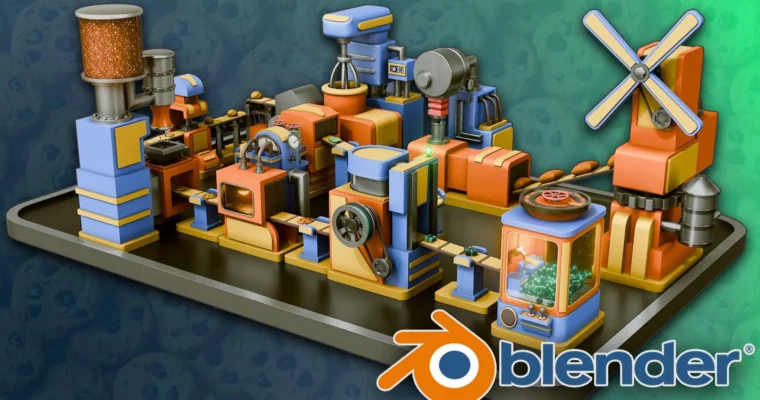
Blender Beginners Masterclass The Cookie Factory by 3D Tudor

Duration:19 hours on-demand video
Actual Duration:18h 59m
Release date:2026, August
Publisher:Udemy
Skill level:Beginner
Language:English
Exercise files:Yes
Software:Blender
Course URL:https://www.udemy.com/course/blender-beginners-masterclass-the-cookie-factory
If Blender always felt overwhelming, this one fixes that. You build a full cookie factory from scratch in Blender – 10 goofy machines that actually move – and pick up modeling, texturing, and animation without drowning in theory.
🎯 What you’ll learn
- Navigate Blender, set up viewports, and organize projects like a pro
- Model 10 factory machines from flour mill and mixer to stamper and oven
- Build conveyors with Geometry Nodes for flexible production lines
- UV unwrap and texture stylized metal, glass, batter, and cookie materials
- Light scenes with emission shaders, Sky Texture, and HDRI setups
- Use particle systems for chocolate chips, sprinkles, and liquids
- Animate machinery with keyframes, shape keys, timing, and cycles
- Render in Cycles and Eevee and polish with compositing
- Finish a portfolio-ready animated factory scene
✅ Requirements
- Skills: No prior Blender or 3D experience needed, just basic computer skills and creative curiosity
- Tools: Blender latest version installed, 3-button mouse recommended
- Hardware: Computer running Windows, macOS, or Linux, dedicated GPU recommended for Cycles
📝 Description
No boring donut tutorial here. You learn Blender by building something real – a full production line that takes flour to boxed cookies. Each machine is a small project on its own. Stack them together and you suddenly know modeling, shading, and keyframe animation.
You start with navigation and simple shapes, then move fast to the good stuff. Windmill with gears. Batter tank with pipes made from curves. Mixer, stamper, sprinkler, oven, box maker, packer, and a claw grabber. You wire it all with custom Geometry Nodes conveyors so the line actually reads as one factory.
Texturing stays practical. You do UV unwrapping when you need it, mix procedural shaders for metal, glass, batter, and dough, and fake liquid flow with animated textures instead of heavy sims. For sprinkles and chips you use particle systems – cheap, fast, and looks great in motion.
At the end you light it, shoot it, and finish it. Warm oven glow with emission shaders, camera setup and turntable, then render in Cycles and Eevee and clean it up in the compositor with denoising and color correction. You also get 3D Tudor’s Blend Craft tools and reusable node setups you can drop into your own scenes.
🧑🎓 Who this course is for
- Total beginners who opened Blender and closed it in panic
- Hobbyists who want one fun project that teaches the whole pipeline
- Aspiring animators and modelers building their first portfolio piece
- Indie game devs who need stylized props and animated machines
- Blender users who want to finally get Geometry Nodes, particles, and shape keys
- Teachers looking for classroom-friendly Blender material
🧑🏫 About the Author
Neil is the instructor behind 3D Tudor, known for beginner-friendly Blender courses that actually finish with something cool. He teaches modeling, animation, and procedural workflows with a focus on small studios, indie games, and portfolio work.
His classes lean heavily on practical builds, custom Geometry Nodes packs, and reusable shaders. Thousands of students use his Cookie Factory and stylized environment courses to go from zero to animated scenes they can show off.
🏁 Final Result
- Fully modeled, textured, lit, and animated stylized cookie factory with 10 working machines, moving conveyors, turntable camera render, and composited final shot ready for portfolio
 Channel