Blender Masterclass Camera Tracking & VFX Combined by Udit Gala

Duration:10 hours on-demand video
Release date:2025
Publisher:Udemy
Skill level:Intermediate
Language:English
Exercise files:Yes
Software:Blender, After Effects
Course URL:https://www.udemy.com/course/blender-masterclass-camera-tracking-vfx-combined/
If you have a camera and Blender, you can make shots that look straight out of a film. This combined masterclass walks you through the full deal – track live footage, drop in CGI, key out green screen, light it to match, and render a clean final shot.
🎯 What you’ll learn
- Use Blender’s camera tracker to solve shots and lock 3D objects to live-action footage
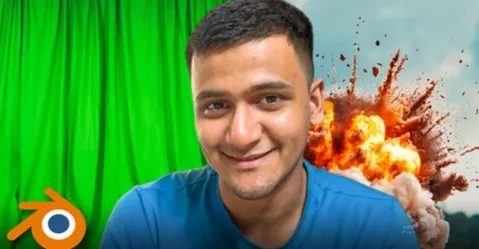
- Key out green screen in After Effects and composite actors into full 3D environments in Blender
- Match lighting, shadows and reflections with Shadow Catcher, HDRI and volumetrics
- Build cinematic scenes with modeling, particles, cloth, ocean and animation tools
- Finish shots with professional compositing and render settings for film and YouTube
✅ Requirements
- Skills: Basic familiarity with Blender is helpful but not required, step-by-step guidance included
- Tools: Blender (free), After Effects for green screen keying and rotoscoping
- Hardware: A computer capable of running Blender, mouse with middle-click
📝 Description
This is a project-first course. No long theory lectures. You open Blender, grab real footage, and build actual shots from day one. Each project covers the full loop: track, solve, set up the scene, add CGI, light it, and composite.
The first half is all about camera tracking. You will learn how to place markers, get a clean solve with low error, set up the floor and camera, and use the Shadow Catcher so your 3D objects sit in the footage with real contact shadows and reflections. Projects get progressively harder – from a simple object placement to a pirate ship on an animated ocean, a Mixamo character with a rifle, and outdoor scenes with grass and trees.
The second half switches to green screen compositing. You shoot (or reuse) green screen footage, key it in After Effects, then bring the actor into Blender. From there you build the world around them: a house interior with a TV screen, a grassy field with animated camera, a superhero shot with cloth-sim cape, a subway station with an animated metro. You will work with HDRI lighting, volumetrics, depth maps, and rotoscoping when keying alone is not enough.
What makes it work is the focus on realism tricks. Matching lighting and perspective, adding grain, fixing edges, balancing reflections – the small stuff that makes CGI stop looking like a sticker pasted on video. By the end you will have a repeatable workflow you can use for short films, commercials, and YouTube VFX.
🧑🎓 Who this course is for
- Filmmakers and YouTubers who want to add CGI to their own footage without expensive software
- Blender users who know the basics and want to get into VFX, matchmoving and compositing
- Aspiring VFX artists building portfolio shots for films, commercials and personal projects
🧑🏫 About the Author
Udit Gala is a Blender instructor focused on practical VFX production – camera tracking, green screen, and compositing. His teaching style is direct and project-based, built around recreating film-quality shots with free tools and clear step-by-step workflows.
He covers the full pipeline from shoot to final render, including After Effects keying, Mixamo integration, and Blender lighting setups, so students learn how shots are actually finished for clients and content.
🏁 Final Result
- 7+ finished camera-tracked VFX shots with integrated CGI, including ocean, character and environment work, plus 5 green screen composites and 2 cinematic animations ready for your reel
 Channel