An Unexpected Odyssey – EP.2 – Environment Texturing With Substance Painter by Alexandre Huyaux

Duration:+40 hours
Actual Duration:11h 56m
Release date:2024, September
Publisher:Artstation
Skill level:Intermediate
Language:English
Exercise files:Yes
Software:Autodesk Maya, Arnold, Substance Painter
Course URL:https://www.artstation.com/marketplace/p/9V1dV/an-unexpected-odyssey-ep-2-environment-texturing-with-substance-painter
EP.2 picks up where modeling stopped and gets into the messy part — turning a huge grey sci-fi hangar into a finished, lit environment. You’ll texture everything in Substance Painter with UDIMs, build reusable smart materials, set up ACES in Maya and Painter, and push it to final look with Arnold.
🎯 What you’ll learn
- Plan and organize a large environment project without losing motivation
- Prep UV’d assets in Maya for clean texturing in Substance Painter
- Use UDIM vs non-UDIM workflows and know when each makes sense
- Texture with PBR metallic workflow for consistent, render-ready results
- Set up and use ACES in Maya and Substance Painter
- Bridge Substance Painter to Maya with classic workflow and S2M
- Build a complex reusable smart material from scratch
- Automate repetitive tasks with Python scripts, including mesh lights setup
- Develop the full look in Arnold through practical look development
✅ Requirements
- Skills: Intermediate familiarity with Maya and Substance Painter, comfortable with UVs, materials and basic shading
- Tools: Autodesk Maya, Substance Painter, Arnold Renderer
- Hardware: PC capable of handling large UDIM environment scenes, minimum 16GB RAM, dedicated GPU recommended
📝 Description
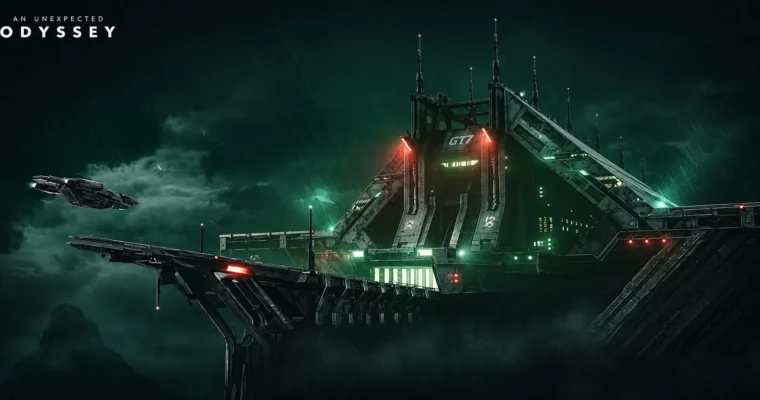
So you modeled a big environment. Now what? This EP.2 is all about making it look real. Alex walks you through how he textured his Unexpected Odyssey hangar — based on concept art by Sean Vo — from raw UV’d meshes to final Arnold render and look development.
You start with the boring-but-important stuff: planning, naming, and organizing thousands of assets. Then data prep in Maya so Substance Painter doesn’t choke. After that, theory that actually matters: when to use UDIMs vs non-UDIMs, how the PBR metallic workflow works, and what to watch for on a scene this size.
Then color. ACES sounds scary and most artists just guess. Here it’s broken down step by step — what it does, why to use it, how OpenColorIO works, how to install and configure it in Maya, how to set up LUTs in Painter, and how to export maps without washed-out results.
Then speed. You’ll build a complex reusable smart material from scratch, connect Painter to Maya with S2M, and write a small Python script to auto-setup mesh lights. Less clicking, more texturing. Perfect for dealing with a huge amount of data.
And the bulk of it? 40+ hours of realtime texturing with music, no commentary. You watch every pass, every dirt layer, every fix. You also get the 3D scene with UVs, Substance Painter lookdev shader-ball scene, 8K final, clay and wireframe renders, plus a bonus wallpaper.
🧑🎓 Who this course is for
- Intermediate environment and prop artists who already know Maya and Substance Painter basics and want a real production workflow for large scenes
- Sci-fi / hard-surface fans who want to see a full UDIM, PBR and ACES texturing process from start to finished portfolio render
🧑🏫 About the Author
Alexandre Huyaux is a 3D environment artist focused on large-scale sci-fi environments and cinematic look development. He created the Unexpected Odyssey series as a personal project trilogy — Modeling in EP.1, Texturing and LookDev in EP.2, and Compositing in EP.3 — to show a complete professional workflow from concept by Sean Vo to final image.
🏁 Final Result
- Fully textured sci-fi hangar environment with UDIM PBR materials, ACES lookdev and Arnold lighting, plus 8K final, clay and wireframe renders for portfolio.
 Channel