Ad Clicks : Ad Views : Ad Clicks : Ad Views : Ad Clicks : Ad Views : Ad Clicks : Ad Views :
Oh Snap!

It looks like you're using an adblocker. Adblockers make us sad. We use ads to keep our content happy and free. If you like what we are doing please consider supporting us by whitelisting our website. You can report badly-behaved ads by clicking/tapping the nearby 'Advertisement' X text.

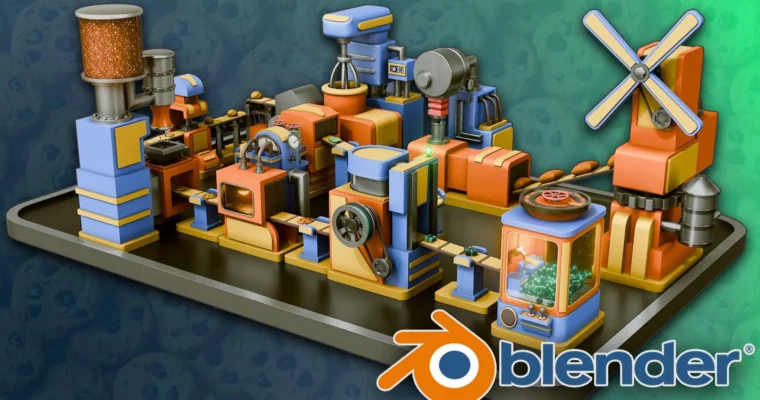
Blender Beginners Masterclass The Cookie Factory by 3D Tudor

Blender Beginners Masterclass The Cookie Factory by 3D Tudor

/

Author:3D Tudor

Duration:19 hours on-demand video

Actual Duration:18h 59m

Release date:2026, August

Publisher:Udemy

Skill level:Beginner

Language:English

Exercise files:Yes

Software:Blender

Course URL:https://www.udemy.com/course/blender-beginners-masterclass-the-cookie-factory

Build and animate a complete stylized cookie factory in Blender even if you have never opened the software before.

If Blender always felt overwhelming, this one fixes that. You build a full cookie factory from scratch in Blender – 10 goofy machines that actually move – and pick up modeling, texturing, and animation without drowning in theory.

🎯 What you’ll learn

  • Navigate Blender, set up viewports, and organize projects like a pro
  • Model 10 factory machines from flour mill and mixer to stamper and oven
  • Build conveyors with Geometry Nodes for flexible production lines
  • UV unwrap and texture stylized metal, glass, batter, and cookie materials
  • Light scenes with emission shaders, Sky Texture, and HDRI setups
  • Use particle systems for chocolate chips, sprinkles, and liquids
  • Animate machinery with keyframes, shape keys, timing, and cycles
  • Render in Cycles and Eevee and polish with compositing
  • Finish a portfolio-ready animated factory scene

βœ… Requirements

  • Skills: No prior Blender or 3D experience needed, just basic computer skills and creative curiosity
  • Tools: Blender latest version installed, 3-button mouse recommended
  • Hardware: Computer running Windows, macOS, or Linux, dedicated GPU recommended for Cycles

πŸ“ Description

No boring donut tutorial here. You learn Blender by building something real – a full production line that takes flour to boxed cookies. Each machine is a small project on its own. Stack them together and you suddenly know modeling, shading, and keyframe animation.

You start with navigation and simple shapes, then move fast to the good stuff. Windmill with gears. Batter tank with pipes made from curves. Mixer, stamper, sprinkler, oven, box maker, packer, and a claw grabber. You wire it all with custom Geometry Nodes conveyors so the line actually reads as one factory.

Texturing stays practical. You do UV unwrapping when you need it, mix procedural shaders for metal, glass, batter, and dough, and fake liquid flow with animated textures instead of heavy sims. For sprinkles and chips you use particle systems – cheap, fast, and looks great in motion.

At the end you light it, shoot it, and finish it. Warm oven glow with emission shaders, camera setup and turntable, then render in Cycles and Eevee and clean it up in the compositor with denoising and color correction. You also get 3D Tudor’s Blend Craft tools and reusable node setups you can drop into your own scenes.

πŸ§‘β€πŸŽ“ Who this course is for

  • Total beginners who opened Blender and closed it in panic
  • Hobbyists who want one fun project that teaches the whole pipeline
  • Aspiring animators and modelers building their first portfolio piece
  • Indie game devs who need stylized props and animated machines
  • Blender users who want to finally get Geometry Nodes, particles, and shape keys
  • Teachers looking for classroom-friendly Blender material

πŸ§‘β€πŸ« About the Author

Neil is the instructor behind 3D Tudor, known for beginner-friendly Blender courses that actually finish with something cool. He teaches modeling, animation, and procedural workflows with a focus on small studios, indie games, and portfolio work.

His classes lean heavily on practical builds, custom Geometry Nodes packs, and reusable shaders. Thousands of students use his Cookie Factory and stylized environment courses to go from zero to animated scenes they can show off.

🏁 Final Result

  • Fully modeled, textured, lit, and animated stylized cookie factory with 10 working machines, moving conveyors, turntable camera render, and composited final shot ready for portfolio
Curriculum

πŸ“‹ Course content

  1. Module 1:  Getting Started with Blender
    • Introduction4:03
    • Lesson 1 – Blender Introduction and Resource Pack Overview9:04
    • Lesson 2 – Blender Basics Navigation7:17
    • Lesson 3 – Blender Referencing Guide13:12
    • Lesson 4 – Bringing Our First Reference and Creative Process7:21
    • Lesson 5 – Blender Basics Modeling16:20
  2. Module 2:  Flour Mill Windmill Build
    • Lesson 6 – Starting Factory Parts with Windmill Machinery10:55
    • Lesson 7 – Attaching Gear to the Windmill10:39
    • Lesson 8 – Adding Cylindrical Tank to Windmill Side11:22
    • Lesson 9 – Creating Windmill Machine Vertical Extension11:26
    • Lesson 10 – Adding Detail to Windmill Blades11:08
    • Lesson 11 – Creating Gears and Belts for Windmill11:32
    • Lesson 12 – Adding Decorative Detail to Stylized Windmill11:08
    • Lesson 13 – Working on Windmill Attachments11:01
    • Lesson 14 – Blender Collections and Layers Basics9:07
    • Lesson 15 – Creating Exit Box for Flour12:14
  3. Module 3:  Materials, Lighting and Render Basics
    • Lesson 16 – Blender Rendering Cycles and Eevee Basics15:39
    • Lesson 17 – Setting Up Lighting and First Material for Windmill11:24
    • Lesson 18 – Working on Metal Parts of the Shader11:34
    • Lesson 19 – Tweaking Shader Coloring for Decorative Touch11:43
  4. Module 4:  Batter Maker and Liquids
    • Lesson 20 – Creating Another Device for Factory11:15
    • Lesson 21 – Creating Conveyor Locations for Batter Maker9:51
    • Lesson 22 – Creating Upper Tank for Batter Maker12:02
    • Lesson 23 – Continuing Upper Tank Modeling11:41
    • Lesson 24 – Creating Extension for Batter Maker Tank and Liquid11:07
    • Lesson 25 – Creating Pipes Using Curves and Pipe Joints13:02
    • Lesson 26 – Enhancing Batter Maker Detail with Pipe Ridges10:34
    • Lesson 27 – Batter Maker Materials and Shaders12:38
    • Lesson 28 – Adding Texture Map to Batter Shader2:44
    • Lesson 29 – Blender Basics UV Seams and Sharps9:05
    • Lesson 30 – Animating Batter Texture for Flow Motion12:51
    • Lesson 31 – Blender Basics Asset Manager Guide11:33
  5. Module 5:  Conveyors with Geometry Nodes and First Animation
    • Lesson 32 – Working and Customising Conveyor Track Geometry Nodes12:39
    • Lesson 33 – Creating Conveyor Track with Provided Geometry Nodes12:04
    • Lesson 34 – Animating Windmill and Gear Rotation11:15
    • Lesson 35 – Continuing Windmill Animation10:19
    • Lesson 36 – Stylized Animation with Shape Keys for Batter Nozzle10:29
  6. Module 6:  Mixer, Dough and Stamper
    • Lesson 37 – Modeling a Mixer Machine15:08
    • Lesson 38 – Continuing Mixer Machine Modeling11:41
    • Lesson 39 – Creating Mixer Hand with Radial Symmetry11:21
    • Lesson 40 – Modeling Mixer Gadget Panel10:41
    • Lesson 41 – Refining Mixer Detail and Mesh Fit12:37
    • Lesson 42 – Adding Material and Shader to Mixer9:52
    • Lesson 43 – Animating Mixer Lowering and Spinning10:34
    • Lesson 44 – Creating Custom Conveyor Belt with Gears and Supports11:25
    • Lesson 45 – Mixer Exit and Conveyor Position Adjustment12:54
    • Lesson 46 – Adding Detail to Exit Conveyor12:28
    • Lesson 47 – Modeling Dough Mix for Conveyor14:43
    • Lesson 48 – Animating Dough Stomp10:14
    • Lesson 49 – Creating Support for Stomper Machine13:29
    • Lesson 50 – Adding Decorative Detail to Stomper11:08
    • Lesson 51 – Timing Dough Switch for Stomp13:18
    • Lesson 52 – Creating Stomped Dough with Shape Keys13:01
  7. Module 7:  Chocolate Chips, Oven and Baking
    • Lesson 53 – Modeling Chocolate Chip Machine Base12:02
    • Lesson 54 – Chocolate Chip Tank at Top of Machine12:08
    • Lesson 55 – Decorative Detail on Chocolate Chip Machine12:09
    • Lesson 56 – Manual Conveyor Belt Detail and Supports10:37
    • Lesson 57 – Shader Material for Chocolate Chip Machine12:47
    • Lesson 58 – Chocolate Chip Detail with Rock Generator11:12
    • Lesson 59 – Particle System for Falling Chocolate Chips11:12
    • Lesson 60 – Modeling Baking Machine12:43
    • Lesson 61 – Decorative Detail for Baker and Side Machine12:49
    • Lesson 62 – Cables for Bakery System with Curves12:12
    • Lesson 63 – Creating Gas Tanks for Bakery Backside11:33
    • Lesson 64 – Gas Shader for Oven and Glass Bulb Shader13:15
    • Lesson 65 – Modeling Heat Measurement Arrow11:47
    • Lesson 66 – Animating Heat Gauge Arrows10:20
    • Lesson 67 – Texturing Chocolate Chip Cookies and Variations10:53
    • Lesson 68 – Blender Performance and Optimisation15:44
  8. Module 8:  Box Maker and Packaging Line
    • Lesson 69 – Camera Setup and Composition, Starting Box Maker12:51
    • Lesson 70 – Continuing Box Maker Modeling9:49
    • Lesson 71 – Small Detail for Box Maker Like Hinges11:48
    • Lesson 72 – Levers and Details for Box Maker11:20
    • Lesson 73 – Box Maker Back-and-Forth Animation11:54
    • Lesson 74 – Boxes and Packages Variations12:10
    • Lesson 75 – Modeling Cookie Packing Machine12:08
    • Lesson 76 – Packing Stomper for Top of Machine14:04
    • Lesson 77 – Attaching Stomper with Extra Detail9:40
    • Lesson 78 – Gears and Pulley System10:08
    • Lesson 79 – Gear Belts, Bulbs and Supports10:38
    • Lesson 80 – Shaders and Light Bulb Shader9:44
    • Lesson 81 – Boxing Machine Rotation Motion10:51
    • Lesson 82 – Green to Red Light Bulb Animation13:02
  9. Module 9:  Claw Grabber Machine
    • Lesson 83 – Modeling Machinery Supports12:25
    • Lesson 84 – Creating Frame for Claw Machine10:57
    • Lesson 85 – Vault Door for Claw Machine Top10:13
    • Lesson 86 – Entrance for Claw Machine and Box Flow12:19
    • Lesson 87 – Claw Controls with Crate Stacker Geometry Nodes10:31
    • Lesson 88 – Modeling Claw Hand with Gears11:27
    • Lesson 89 – Shaping Claw to Pick Up Present Boxes11:41
    • Lesson 90 – Believable Box Placement12:53
    • Lesson 91 – Shaders for the Claw11:05
    • Lesson 92 – Lighting Sources for Claw Machine8:56
    • Lesson 93 – Animating Claw Machine9:45
    • Lesson 94 – Claw Back-and-Forth Motion10:40
    • Lesson 95 – Glass for Claw Machine and Window Frame11:43
  10. Module 10:  Final Assembly, Cameras and Compositing
    • Lesson 96 – Final Placement of Cookie Factory11:08
    • Lesson 97 – Camera Turntable Basics14:00
    • Lesson 98 – Compositor Addon to Adjust Render10:13
    • Lesson 99 – Color Correction, Denoiser and Sharpening8:41
    • Course Outro: Your Learning Journey Continues2:18
Watch online or Download for Free
Blender Beginners Masterclass The Cookie Factory by 3D Tudor
NAME
SIZEDURATION
1 – Introduction
27.3 MB4m

Download all Videos (100)
2 GB18h 59m

Project Files (Assets, Resources)
641.4 MB

Download all

Join us on
  Channel    and      Group

Leave a Comment

Your email address will not be published. Required fields are marked *