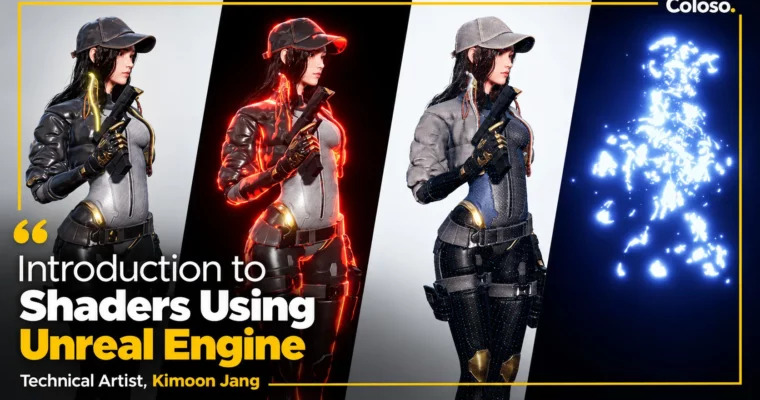
Introduction to Shaders Using Unreal Engine by Jang Kimoon

Duration:24 hours 46 minutes
Actual Duration:49h 22m
Release date:2024
Publisher:Coloso
Skill level:Beginner
Language:Chinese
Exercise files:Yes
Software:Unreal Engine 4.26, Photoshop, 3ds Max, Maya, Blender
Course URL:https://coloso.global/en/products/technicalartist-jangkimoon-us
Learn Unreal Engine shaders the artist-friendly way — with nodes, not code — guided by Kimoon Jang, a technical artist with experience at Nexon Mobile, Netmarble Games and NCSOFT. Across 28 videos and 24 hours 46 minutes you go from game-engine fundamentals and Epic’s free asset ecosystem to PBR materials, modular shader design and advanced character effects (glow, petrification, teleport), finishing with a UE5 tech-demo experience and a career roadmap for 3D artists and aspiring technical artists.
🎯 What you’ll learn
- Navigate Unreal Engine like a professional: interface, workflows, resource management and job-role-oriented features
- Understand what a game engine is, how Unreal differs from Unity, and why engine knowledge is a foothold into the industry
- Master PBR (physically based rendering) fundamentals: light–material interaction, metals/non-metals, Fresnel, textures and channels
- Build node-based shaders in Unreal: material domains, shading models, transparency, parameters, draw calls and shader complexity
- Use the most-used material formulas: interpolation, UV/math/vector functions, normals, offsets and HLSL-vs-nodes trade-offs
- Structure shaders professionally with parenting, material instances, references and material functions (modularization)
- Create advanced material effects: water, decals, depth-based tricks, vertex-color masks, noise, weathering and rusted bronze
- Analyze Unreal sample scenes and terrain, then recreate and adapt their shader effects
- Produce character variations with mask textures, vertex colors and shader-driven design
- Direct characters with FX: texture blending, state effects, teleport effects and Material Parameter Collections
- Complete 11 hands-on class exercises using provided shader sample files and free modeling resources
✅ Requirements
- Skills: No prior Unreal Engine experience required — the class starts from what a game engine is. Basic 3D knowledge is helpful; 3D character artists, non-game 3D practitioners moving into games, and aspiring technical artists are the core audience
- Tools: Unreal Engine 4.26 (free), Photoshop 2021 (CS4 or newer acceptable), 3ds Max 2020 — or Autodesk Maya / Blender (compatible FBX files provided, including 3ds Max 2018/2019 versions). Class perks included: shader sample files, modeling resources, 11 class exercises
- Hardware: PC meeting the recommended system specs for Unreal Engine (linked from the course page)
📝 Description
For 3D artists, portfolios often fall short of in-game quality — studying a game engine lets you bring your vision directly into a game and build genuinely industry-ready skills. Among game engines, Unreal stands out as a free tool capable of AAA-quality multi-platform games, and its node-based materials make it artist-friendly: once you understand how resources function, you can create a wide range of effects without intricate shader code and even cut overall production time.
The class is built in three arcs — Knowledge, Training, Converging. First you learn to maneuver Unreal professionally and to leverage Epic’s vast free resources (plus free character modeling resources from 3D character artist Rosa Lee) through hands-on exercises. Then you study shader creation itself, basic and advanced: PBR theory, material details and formulas, parenting/instances, material functions and modularization, water/decal/weathering effects. Finally you converge everything in a game-production context: sample-scene analysis, character variations, direction and FX (glow, petrification, teleport), and a UE5 tech-demo experience with a look at career and learning paths.
A tailored approach for shader beginners: the engine’s technical side is hard for many artists, so the class focuses on shaders specifically and teaches universality across engines — not just one tool — so unfamiliar features and documentation become far less intimidating afterwards. The stated goal is that this becomes a go-to AAA-quality technical-art reference you consult on every project deadline.
🧑🎓 Who this course is for
- Aspiring technical artists who want PBR/NPR fundamentals plus the theory and practice of essential TA skills
- 3D character artists and game-3D learners who want to bring portfolio work up to in-game quality with Unreal
- Artists with non-game 3D experience (or 3D beginners) who need engine knowledge explained simply for professional use
- Anyone preparing for a gaming-industry career who wants to master an industry-standard engine and Epic’s resource ecosystem
🧑🏫 About the Author
Kimoon Jang is a technical artist whose career began in program development in 2002 before transitioning into technical art. He has worked at multiple major studios, including Nexon Mobile, Netmarble Games as an art director, and NCSOFT as a technical artist; the course page additionally lists a current Technical Art Director role and prior lead-level TA work on large online projects. He structured this class around functional, real-world engine knowledge — purposes of different engines, professional workflows, collaboration with other roles — rather than surface overviews.
The class comes recommended by industry experts: Seonghee Kim (Art Director, Netmarble Nexus) praises the clarity and depth of the Unreal lessons; Seongwook Kim (Senior Environment Artist, NCSOFT) calls it an invaluable opportunity for Unreal beginners; Sehoon Kang (Principal Character Artist, X.D Network) describes it as an essential TA guide for every project deadline; Hyeonwoo Lim (Art Director, Joycity) calls the instructor the technical artist you must meet for development understanding.
🏁 Final Result
- A working command of Unreal Engine shaders: universal basic PBR shaders applied to a sample character, extended through parenting, instances and modular material functions
- Advanced material work in your portfolio: water, decals, vertex-color/noise weathering, character variations, and directed FX (glow, state and teleport effects) built on provided sample files and modeling resources
- 11 completed class exercises plus a UE5 tech-demo study and a concrete career/study roadmap as a 3D or technical artist
📢 Guys, this is a Group Buy campaign, check the GBC forum thread to get access
You can find the course preview in the download section below.
 Channel