Movie Poster Design with Adobe Photoshop by Martin Perhiniak

Duration:1.5 hours on-demand video
Release date:2024, October
Publisher:Udemy
Skill level:Beginner
Language:English
Exercise files:Yes
Software:Adobe Photoshop
Course URL:https://www.udemy.com/course/movie-poster-design-with-adobe-photoshop
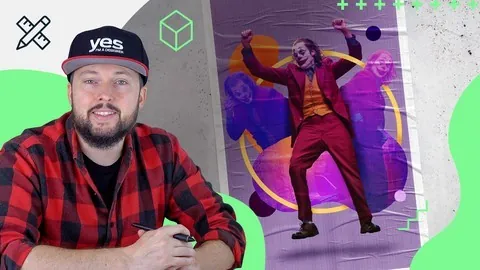
Want to make posters that actually look like real movies? This short, practical class walks you through the full process in Adobe Photoshop – from graphic design principles to type, color, and composition – using a Joker poster as the hands-on project.
🎯 What you’ll learn
- Apply Graphic Design principles to make posters look more professional and effective
- Create engaging posters for movies, events, and products in Adobe Photoshop or Photoshop on the iPad
- Integrate type, images, and shapes into a unified composition
- Use non-destructive editing with masking, adjustment layers, and Smart Objects
✅ Requirements
- Skills: No prior experience necessary, just the desire to make something awesome
- Tools: Adobe Creative Cloud with Adobe Photoshop desktop or Photoshop on the iPad
📝 Description
So many Photoshop tutorials just show you which buttons to click. This one starts with why a poster works. Martin breaks down real superhero posters, talks through what makes them strong or weak, and shows you how to use balance, contrast, harmony, and visual rhythm in your own layouts.
Then you get to build. The main project is a Joker-inspired movie poster, and you follow it from blank canvas to finished piece. You will cut out characters, add shapes for structure, fix selections so edges look clean, recolor with adjustment layers, and lock in your title with solid typography placement.
Everything is kept non-destructive. That means masking, Smart Objects, and editable adjustments instead of painting yourself into a corner. If a client – or you – wants to swap an image or change the headline later, you can do it in minutes.
It is short on purpose. No fluff, no 10-hour slog. Just under 1.5 hours of video you can watch in an evening and apply right away to movie posters, event flyers, or product promos.
🧑🎓 Who this course is for
- Anyone planning to become a Graphic Designer and wants a solid poster project for their portfolio
- Creatives who want to improve technical skills and get better at design theory in Photoshop
🧑🏫 About the Author
Martin Perhiniak is a Graphic Designer and Adobe Certified Instructor with over 20 years working as a creative pro. He has done client work for BBC, Mattel, IKEA, Google, Pixar, and Adobe, so he knows what holds up in production, not just in tutorials.
He teaches in a straight, no-hype way. You get his real workflow, best practices, and the small fixes that make a layout feel finished and professional.
🏁 Final Result
- A finished Joker-style movie poster built in Photoshop with integrated type, shaped composition, and cinematic color grading – ready to use as a portfolio piece and as a template for your own movie, event, or product posters.
 Channel