


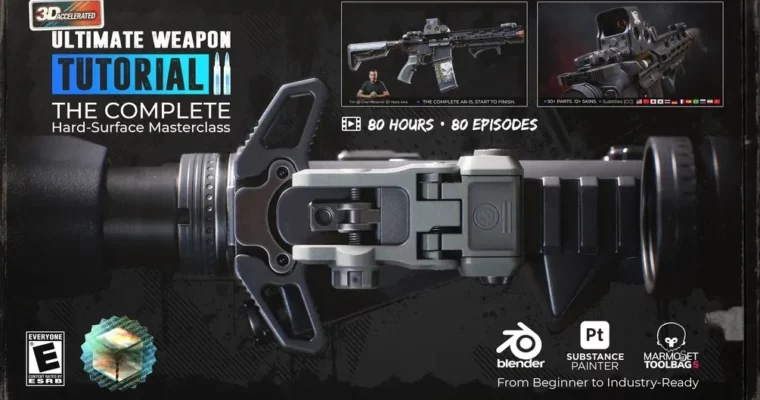
Ultimate Weapon Tutorial 2 – The Complete Hard-Surface Masterclass by Tim Bergholz

Duration:80+ hours
Actual Duration:80h 16m
Release date:2026, April 15
Publisher:Gumroad
Skill level:Advanced
Language:English
Exercise files:Yes
Software:Blender, Substance Painter, Marmoset Toolbag
Course URL:https://chamferzone.gumroad.com/l/ultimate-weapon-tutorial-2
Ready to build a killer weapon model for your game or portfolio? This masterclass dives deep into creating a full AR-15 weapon system, covering everything from the initial primitive in Blender to polished 4K textures in Substance Painter and Marmoset Toolbag. It’s the comprehensive AAA pipeline training you’ve been looking for, with over 80 hours of content.
🎯 What you’ll learn
- Create complex hard-surface models from basic shapes to detailed high-poly assets.
- Master boolean workflows and essential cleanup techniques.
- Efficiently handle UV unwrapping and manage texel density.
- Achieve professional baking results in Marmoset Toolbag.
- Craft realistic surface details using smart materials and wear layers in Substance Painter.
- Develop a personal texture library for future projects.
- Present your final model with stunning portfolio-ready renders.
✅ Requirements
- Skills: No prior modeling experience needed, just a willingness to learn and practice.
- Tools: Blender, Substance Painter, Marmoset Toolbag 5 (or 4).
- Hardware: A computer capable of running the specified software.
📝 Description
This isn’t just a tutorial; it’s a full-blown masterclass designed to take you through the entire AAA weapon creation pipeline. With over 80 hours of structured content, Tim Bergholz leaves no stone unturned. You’ll start with the absolute basics in Blender, learning hard-surface modeling from scratch, including crucial boolean workflow and cleanup techniques. The course emphasizes efficient UV unwrapping and texel density management, vital for game assets.
You’ll then move into Marmoset Toolbag for professional baking, followed by extensive training in Substance Painter. Here, you’ll dive deep into creating realistic surface details, mastering smart material creation, adding convincing wear and edge damage, and developing your own surface storytelling skills. The goal is to build a reusable texture library and achieve portfolio-ready results with high-quality 4K exports. Plus, you get dedicated chapters on creating a Holosight and SFP Scope, plus over a dozen different texture skins.
🧑🎓 Who this course is for
- Absolute beginners looking to learn the correct AAA workflow from the start.
- Experienced artists aiming to significantly improve their hard-surface modeling and texturing skills.
- Anyone who wants to witness and replicate the complete product development cycle of a complex asset without skipping any steps.
🧑🏫 About the Author
Tim Bergholz brings over 20 years of AAA industry experience, having worked with renowned studios like Crytek, Ubisoft Toronto, and Digital Extremes. His extensive background in game development means he teaches techniques that are not only cutting-edge but also practical and pipeline-tested. This tutorial is a culmination of his deep knowledge and passion for teaching.
🏁 Final Result
- A fully modeled, UV-unwrapped, baked, and textured AR-15 weapon system, complete with multiple texture variations, ready to be showcased in a professional portfolio or integrated into a game engine.
 Channel




goated content as always strawberry!
<3 ❤
Please add video number 33
“UWT2_AR15_EP032” is missing, please fix it 🙏
“UWT2_AR15_EP033” is missing, please fix it🙏
Video number 33 is missing
about episode 33 – user can’t download it, keeps erroring out. Tried every vid grab method out there – from screen record (with watermark) to other stuff from diff sites and players, but this ep fails every time. So yeah, not available rn. If he figures it out, he’ll upload and we’ll drop an update
OK Brother
Looks like part 33 is missing 🙁
Hello! Why the download all not working? Im glad you guys add that! really pain in the ass to download each file. I pay 2 times aready in the past. I want to get this one im going to pay again. Can you guys explain me how to donwload allt he files as one? i need to use jdownloader?
To load and execute a .crawljob file in JDownloader 2, you can either drag and drop it directly into the user interface or use the Folder Watch automation feature. JDownloader will instantly parse the instructions inside the file and add the targeted links into your download queue.
Method 1: The Quick Manual Way (No Setup Needed)
1. Open JDownloader 2.
2. Navigate to the LinkGrabber tab.
3. Locate your .crawljob file on your computer.
4. Drag and drop the file anywhere into the empty space of the LinkGrabber window.
5. JDownloader will read the text instructions within the file, crawl the intended links, and populate them in your list.
6. Right-click the newly parsed files and select Start Downloads.
Method 2: Automated Monitoring (Folder Watch)
If you are generating .crawljob files using automated tools like or custom scripts, you can have JDownloader dynamically monitor a folder:
1. In JDownloader 2, click on Settings -> Options -> Advanced Settings.
2. Search for FolderWatch in the filter box.
3. Locate the setting FolderWatch: Folder.
4. Set the path to the folder where your .crawljob files are automatically saved.
5. Ensure FolderWatch: Enabled is checked.
6. Move any .crawljob file into that designated folder. JDownloader will process it automatically and clear the file from the folder once done.
(just google “how to use jdownloader to download CRAWLJOB”)
Yeah i figure it out. The crawljob didnt work. Only when i copy the link work, and jdownloader is slow as hell. If i pay you guys can i have faster speed with the single link? You guys are linked to jdown?
can i get a link to the messing video ep 33
i deleted them from the mediafile. They take up way too much space and are corrupted anyway
Sure. Lol.
Hey, thank you for giving this premium course. Is there any status when and if the EP 33 be uploaded??
hey, can you tell when can we get ep 33 and is it possible or not?
no matter where I look, I can’t find part 33 anywhere
guys, pls, ffs, have some respect for people’s hard work. just scroll through the comments a bit. everything’s already answered, it literally says where part 33 is. are you fr
“`
about episode 33 – user can’t download it, keeps erroring out. Tried every vid grab method out there – from screen record (with watermark) to other stuff from diff sites and players, but this ep fails every time. So yeah, not available rn. If he figures it out, he’ll upload and we’ll drop an update
“`
any update?
So dont approve thiss comment as but see this https://cg***sia.com/2026/05/gumroad-ultimate-weapon-tutorial-2-the-complete-hard-surface-masterclass-203207.html they have the full tutorial if you could download and take the 33th episode from there it would be cool I can’t reaally download as I dont have premium
trust me buddy, we all downloaded this course from the same place. They’re missing episode 33 too ))
What is episode 33 about? can you atleasst tell us that?
how am i supposed to know what ep 33 is about if i haven’t even seen it ))
Ok, I understand that episode 33 is missing guys, but let’s be honest here, episode 33 is after 32 hours of modeling with this guy ( maybe more if you started with the other 2 tutorials first). I think you should be able to handle yourself after that many hours of following this guy’s workflow or am I missing something?
finally!
Thanks a lot, you legend, for the only actually useful comment here.
Of course there’s a clip in the middle of the course and that’s all people ask about. Guys, are you sure you’ve even reached ep 33? Anyone who asked where ep 33 is, speak up! ))
I know, but the problem is, i do not know what he did in episode 33. if i did, i could do it myself, and since he doeesn’t talk about previous episodes in the new one, i do not know what he does in episode 33
Hey! Any updates about episode 33?
Sup guys, any update about ep 33 ?