It looks like you're using an adblocker.
Adblockers make us sad. We use ads to keep our content happy and free. If you like what we are doing please consider supporting us by whitelisting our website. You can report badly-behaved ads by clicking/tapping the nearby 'Advertisement' X text.
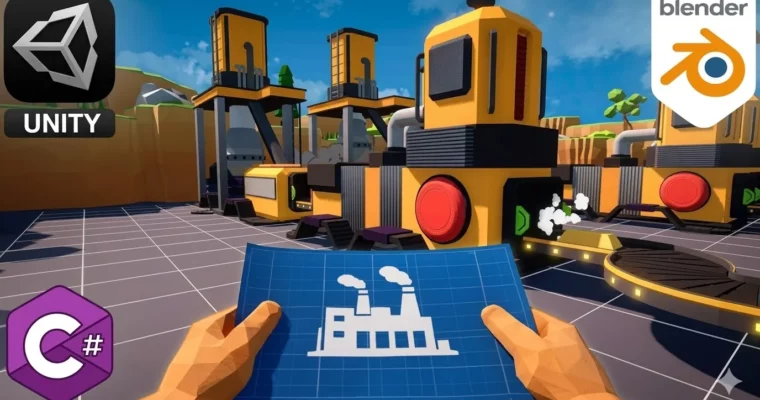
The Ultimate UNITY 3D & BLENDER Factory Game Course 2026 by Model Craft
Build a complete factory automation game from scratch using Unity 6 and Blender, covering everything from 3D modeling to C# gameplay systems.
Build a complete factory automation game from the ground up. This course takes you through the entire pipeline—modeling assets in Blender, texturing them, and then programming every gameplay system in Unity 6 with C#. No isolated examples, no skipping steps. You’ll create a fully playable game with grid-based building, conveyor logic, production chains, UI, save systems, and more.
🎯 What you’ll learn
Build a complete factory automation game using Unity 6 and C#
Model, texture, and optimize game assets in Blender
Create a flexible grid-based building system with removal mechanics
Develop conveyor belts, production buildings, splitters, mergers, and warehouses
Understand why to use Scriptable Objects, Inheritance, Interfaces, and Manager Systems
Export your finished game ready to share or expand with your own features
✅ Requirements
Skills: Basic computer knowledge, such as creating folders, installing software, and navigating Windows or macOS
Tools: A computer capable of running Unity 6 and Blender
Hardware: No previous experience with Unity or Blender is required
📝 Description
This isn’t just a programming course. You’ll follow the entire development pipeline—from creating 3D assets in Blender to programming gameplay systems in Unity 6 with C#. Every system is 100% explained, making this course suitable for beginners while still covering techniques used in professional projects.
You’ll start by modeling and texturing every major asset used in the game, including drill rigs, conveyor belts, smelters, constructors, warehouses, splitters, mergers, and more. You’ll learn how to create clean, game-ready models and prepare them for Unity. Once the assets are finished, you’ll move into Unity 6 and build the complete game step by step.
One of the biggest advantages of this course is that every feature is built from scratch. Instead of copying isolated examples, you’ll understand how complete gameplay systems are designed and how they work together in a real project. You’ll also learn how to organize large Unity projects using clean architecture and best practices, including Object-Oriented Programming (OOP), Scriptable Objects, Singleton Pattern, Interfaces and Inheritance, Manager-based Architecture, and Modular Game Systems.
Not interested in Blender? No problem. All models and textures created during the modeling section are included with the course, so you can skip directly to the Unity programming lessons whenever you want.
By the end of this course, you’ll have a fully playable factory automation game featuring dozens of interconnected systems and a solid understanding of how to design, build, optimize, and polish a complete Unity project.
🧑🎓 Who this course is for
Beginners who want to learn Unity by creating a complete game instead of isolated examples
Developers interested in factory automation games such as Satisfactory, Factorio, or Shapez
Students who want to learn both Blender and Unity within a single practical project
Unity developers looking to improve their understanding of project architecture, production systems, and gameplay programming
Anyone who wants to build a portfolio project demonstrating 3D modeling, gameplay programming, UI, save systems, optimization, and game architecture
Hobbyists and indie developers who want a solid foundation for creating their own simulation or automation games
🧑🏫 About the Author
Model Craft is a game development educator focused on practical, project-based learning. The studio specializes in creating comprehensive courses that combine 3D modeling in Blender with gameplay programming in Unity, helping students build complete, portfolio-ready projects from scratch.
🏁 Final Result
A fully playable factory automation game featuring a grid-based building system, conveyor belts, production buildings, UI, save/load functionality, sound effects, particle effects, and animations—ready to share or expand with your own features.
Curriculum
📋 Course content
Module 1: Blender Modeling & Texturing
Interface + Prepare Project8:08
Direct Conveyor Modeling14:41
Conveyor Texturing with Atlases12:13
Corner Conveyor Modeling + Texturing22:07
Blender Hot Keys Tips
Drill Rig Modeling || PART 115:13
Drill Rig Modeling || PART 219:27
Drill Rig Texturing with UV Mapping24:34
Smelter Modeling || PART 120:32
Smelter Modeling || PART 218:44
Smelter Texturing with UV Mapping19:49
Constructor Modeling || PART 120:08
Constructor Modeling || PART 215:42
Constructor Texturing with UV Mapping16:40
Merger & Splitter Modeling20:52
Merger & Splitter Texturing with UV Mapping10:13
Landscape Modeling || PART 118:41
Landscape Modeling || PART213:56
Landscape Texturing with UV Mapping13:45
Warehouse Modeling || PART 118:30
Warehouse Modeling || PART 220:21
Warehouse Detailing || PART 314:18
Warehouse Texturing with UV Mapping13:40
Items & Details Modeling14:02
Items & Details Texturing with UV Mapping6:29
Polishing The Entire Scene for Export to Unity || PART 118:23
Polishing The Entire Scene for Export to Unity || PART17:11
Module 2: Unity Setup & Player Controls
Way To Download Unity + Import Models7:30
Hot Keys for Unity
Player Movement Scripting13:41
Player Camera Rotation5:36
Player Jump System12:55
Full Level Design in Main Scene13:31
Module 3: Grid-Based Building System
Creating Grid For Building System11:37
Snapping Grid System11:44
Building Manager Script Logic7:31
Prevent Building Overlap10:51
Normalize Grid Size9:39
Multi-Cell Building Logic14:38
Ability to Rotate Objects on a Grid4:28
Redesign Own Optimized Grid System6:53
Create a Realistic Outline Around Buildings on a Grid10:21
Script Build Mode Toggle System3:16
Ability to Select Different Building16:09
Fix Rotation of Multi-Cell Buildings4:17
Create Remove Building Logic10:20
Add Remove Highlight Shaders9:02
Module 4: Conveyor & Production Logic
Create Conveyor Connection Points5:25
Automatically Connect Conveyors8:55
Move Items Along Conveyor11:34
Transfer Items Between Other Conveyors6:31
Movement of Objects Along an Arc For a Corner Conveyor12:47
Fix a Bug When Deleting Conveyors With Objects1:51
Create Conveyor Spacing System For Items3:02
Arrow Direction For Conveyor14:32
Drill Rig Mining5:18
Automatic Connection of the Building13:31
Fix Reverse Automatic Connection3:40
Scripting Ore Node Area8:55
Polish Drill Rig + Fix Arrow Bug7:45
Prepare Scene for Creating Smelter3:21
Make an Ability to Take items into Smelter6:57
Producing Process of Ingots in Smelter8:40
Create Limited storage in the smelter5:30
Constructor Logic + Abstract class9:27
Warehouse Storage + Fix Arrow Bug18:08
Scripting Splitter Logic13:17
Scripting Merger Logic5:38
Polish Arrows For Merger & Splitter7:16
Fix Player Movement Bug1:48
Colorful Arrows in Building Preview Mode5:33
Module 5: UI, Animation & Polish
How to Create & Import Atlases4:35
Basic UI Elements in Unity8:49
Visual Switching of Mods with UI4:47
Creating UI List of Building Icons9:13
Visual Interaction with Smelter & Constructor7:23
Open Interaction UI Menu in Buildings12:57
UI Menu Design + Creating SO for Details & Items13:06
Recipes for Producing Ingots&Details7:21
Fix Bug With Stored Ore in Buildings + Creating All Recipes8:44
Creating Left Corner Conveyor Belt10:07
Animation of Drilling Rig Parts + Basic Animation Tutorial10:40
Connect Script with Animation for Drill Rig11:33
Create Smelter Animation4:40
Create Constructor Animation7:06
Make Warehouse UI Scripting22:53
Warehouse UI Icons in Menu Storage8:32
Sound Manager Scripting9:14
Import Sounds + Connect them with Modules + 3D Sound11:59
Particle System Tutorial + How to Call them21:29
Module 6: Save Systems & Final Build
Creating Saving & Load Systems19:12
Save Recipe Save + Save Building Occupation on the Grid11:51
Save Warehouse Items + Auto Saving10:29
Create Main Menu + Transition Between Scene15:38
Create Pause Manager in Game Scene14:10
How to Create Effects With Global Volume11:16
Export Project to Windows Platform7:32
Conclusion & Recommendations for Further Development1:36
GIFT FOR ALL STUDENTS0:01
Watch online or Download for Free
The Ultimate UNITY 3D & BLENDER Factory Game Course 2026 by Model Craft




 Channel