Ad Clicks : Ad Views : Ad Clicks : Ad Views : Ad Clicks : Ad Views : Ad Clicks : Ad Views :
Oh Snap!

It looks like you're using an adblocker. Adblockers make us sad. We use ads to keep our content happy and free. If you like what we are doing please consider supporting us by whitelisting our website. You can report badly-behaved ads by clicking/tapping the nearby 'Advertisement' X text.

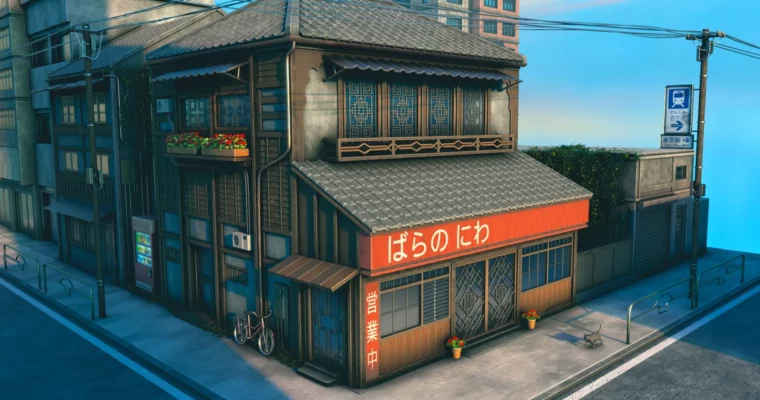
Stylized Japanese Environments in Blender by 3D Tudor & Marcus Rosefield

Stylized Japanese Environments in Blender by 3D Tudor & Marcus Rosefield

Author:3D Tudor & Marcus Rosefield

Duration:11 hours

Release date:2026, April

Publisher:Udemy

Skill level:Beginner

Language:English

Exercise files:Yes

Software:Blender

Course URL:https://www.udemy.com/course/stylized-japanese-environments-in-blender

Build a complete stylized Japanese street scene in Blender 5, from the first blockout to the final composited render, using a modular workflow.

Build a complete stylized Japanese street scene in Blender 5 from scratch. This project-based course walks you through the entire environment pipeline, from blockout and modular modeling to materials, lighting, and compositing. You will end with a portfolio-ready render and a reusable workflow for your own projects.

🎯 What you’ll learn

  • Build a complete stylized Japanese environment in Blender 5 from first blockout to final render.
  • Model Japanese roofs, balconies, storefronts, windows, doors, railings, and gutters with clean workflows.
  • Use a modular approach to duplicate, adapt, and expand buildings and environment details faster.
  • Create believable props such as signs, vending machines, poles, wires, pipes, and foliage.
  • UV unwrap assets and apply decals, image textures, and stylized materials with better control.
  • Light the environment with sky texture, HDRI, shadow control, and stronger render settings.
  • Finish the scene with mist, color grading, and compositing polish for a cleaner final image.

✅ Requirements

  • Skills: No advanced Blender knowledge is required. The course starts with viewport navigation and core tools.
  • Tools: A mouse and keyboard for easier navigation and modelling control.
  • Hardware: A computer that can run Blender for modelling, materials, and final rendering.

📝 Description

This isn’t a collection of random tips. It’s a full project where you build one coherent stylized Japanese environment from a blank file to a polished final image. You will model the architectural details that give the scene its identity, including roofs, balconies, storefronts, windows, doors, railings, and gutters. Then you push it further with props and story elements that make the world feel lived-in, such as signs, vending machines, wires, poles, pipes, and foliage.

A modular mindset runs through the whole project. You are not just making one scene look good—you are learning how to build assets and structures in a way that makes future environment work faster and more reusable. The included resource pack gives you project files, reference material, a PureRef board, decals, seamless stone and wood PBR textures, skybox support, ornamental references, extra props, foliage, vines, the 3DTutor compositor add-on, and a full finished environment file for comparison. That means you can stay focused on learning the workflow instead of wasting time trying to rebuild missing support material on your own.

By the end, you will have created a complete stylized Japanese environment and taken it through cleaner render settings, better depth, and subtle compositing polish. This course is a strong fit for students who want a guided Blender environment project with clear visual payoff, practical modelling and scene-building habits, and enough included support material to follow along with confidence.

🧑‍🎓 Who this course is for

  • Beginners who want a guided first full environment project in Blender rather than isolated tool lessons.
  • Beginner-to-intermediate Blender users who want stronger architectural modelling and scene finishing skills.
  • Environment artists who want to build stylized Japanese scenes with cleaner structure and stronger detail.
  • Students who learn best by building one complete scene step by step with a substantial resource pack.

🧑‍🏫 About the Author

3D Tudor is a well-known Blender educator with a library of project-based courses focused on environment art and hard-surface modeling. Marcus Rosefield is a 3D artist and instructor specializing in stylized architectural scenes. Together, they bring a practical, workflow-focused approach to teaching environment creation.

🏁 Final Result

  • A complete stylized Japanese street scene, fully modeled, textured, lit, and composited in Blender 5.
  • A reusable modular workflow for building and populating environments.
  • A portfolio-ready final render with cinematic lighting and color grading.

Curriculum

📋 Course content

  1. Module 1: Foundations & Blockout
    • Lesson 1 – Mastering Blender Viewport Navigation + [Resource Pack]7:00
    • Lesson 2 – Appending Assets & Installing Essential Add-ons3:29
    • Lesson 3 – Building Powerful Reference Boards with PureRef14:41
    • Lesson 4 – Core Modeling Tools: Extrude, Bevel & Edge Loops15:59
    • Lesson 5 – Blockout Buildings with Primitives and Face Snapping11:54
    • Lesson 6 – Front Building Blockout and Bevel Details7:33
    • Lesson 7 – Camera Setup and Background Building Blockout6:48
    • Lesson 8 – Modeling Sidewalks, Roads, and Electrical Poles7:31
    • Lesson 9 – Edge Loop Modeling for Stylized Wooden Fence8:57
  2. Module 2: Architectural Modeling
    • Lesson 10 – Building Front Details with Edge Loops and Bevel10:48
    • Lesson 11 – Window Frames and Metal Panels with Array Modifier7:55
    • Lesson 12 – Roof, Door, and Sign Modeling with Precise Snapping9:01
    • Lesson 13 – Realistic Roof Tiles with Array and Bevel Modifiers9:01
    • Lesson 14 – Modeling Doors, Beams and Entry Steps in Blender13:11
    • Lesson 15 – Balcony Details with Mirror Modifier and Bevel10:38
    • Lesson 16 – Finishing a Mirrored Balcony Railing with Diamonds11:14
    • Lesson 17 – Building the Window Shelter with Solidify and Bevel10:25
    • Lesson 18 – Modeling the Roof Gutter and Curved Wooden Border10:28
    • Lesson 19 – Creating a Detailed Roof with Array and Bevel17:10
    • Lesson 20 – Blocking the Left Wood Supports and Beams6:04
    • Lesson 21 – Boolean Window Cutouts & Clean Quad Topology10:13
    • Lesson 22 – Wood Panels, Window Frames & Array Modifiers8:06
    • Lesson 23 – Modeling Patterned Door Frames with Mirror Modifier10:13
    • Lesson 24 – Top Window Frames with Boolean and Edge Loop Tracing11:12
    • Lesson 25 – Modeling Mirrored Windows, Doors and Beveled Details15:08
  3. Module 3: UVs & Materials
    • Lesson 26 – UV Unwrapping and Image Textures in Blender11:44
    • Lesson 27 – Stylized Materials with Bevel and Ambient Occlusion17:01
    • Lesson 28 – Applying Materials with Smart UV Project and Texel Density12:08
    • Lesson 29 – Smart UV Project & Multi Material Assignment13:47
    • Lesson 30 – Mirror Modifier Workflow & Clean UV Mapping11:28
    • Lesson 31 – Stylized Sidewalk Shader with Noise and Voronoi15:31
    • Lesson 32 – Modeling Plant Pots & Creating a Clay Material9:03
    • Lesson 33 – Modeling Realistic Drain Pipes with Bézier Curves7:45
    • Lesson 34 – Creating Mirrored Metal Fences with Bézier Curves9:37
    • Lesson 35 – Decal Workflow with UV Maps and Mix Color Shaders6:15
    • Lesson 36 – Road Markings with UV Maps and Split Faces7:32
  4. Module 4: Props & Details
    • Lesson 37 – Modeling the Garage Structure with Bevel Details10:54
    • Lesson 38 – Creating Garage Doors and Window Frames with Panels12:01
    • Lesson 39 – Modeling a Stylized Vending Machine with Bevel Modifier11:40
    • Lesson 40 – Glass Materials, Emission Drinks, and Decal Setup9:15
    • Lesson 41 – Modeling Roof Tiles with Array Modifier & Bevel10:11
    • Lesson 42 – Building Detailed Windows, Doors & Wood Supports11:32
    • Lesson 43 – UV Unwrapping Wood, Metal & Glass Materials5:33
    • Lesson 44 – Creating Ornate Window Frames with Mirror Modifier16:44
    • Lesson 45 – Modeling Detailed Windows and a Patterned Door15:47
    • Lesson 46 – Creating Window Railings and an Electrical Box14:30
    • Lesson 47 – Modeling an Air Conditioning Unit with Boolean13:47
    • Lesson 48 – Creating Wires and Pipes with Bezier Curves8:34
    • Lesson 49 – Designing a Simple Background Building Facade8:36
    • Lesson 50 – Modeling Shopfront Windows, Door and Materials14:10
    • Lesson 51 – Building Repeating Facades with the Array Modifier13:03
    • Lesson 52 – Detailed Windows and Shutters for Background Buildings12:27
    • Lesson 53 – Modeling Electrical Poles with Bevel Details11:05
    • Lesson 54 – Realistic Sagging Wires with Bezier Curves16:18
    • Lesson 55 – Creating Realistic Road Signs with Image Textures12:18
    • Lesson 56 – Adding Foliage and Props for Final Scene Detail13:00
  5. Module 5: Lighting & Compositing
    • Lesson 57 – Sky Texture and HDRI World Lighting Setup11:27
    • Lesson 58 – Casting City Shadows to Frame Your Main Building5:19
    • Lesson 59 – Final Render Setup: Materials, 4K and Compositor6:52
    • Lesson 60 – Cinematic Compositing with Mist and Color Grading12:00
Watch online or Download for Free
Stylized Japanese Environments in Blender by 3D Tudor & Marcus Rosefield
NAME
SIZEDURATION


Join us on
  Channel    and      Group

Leave a Comment

Your email address will not be published. Required fields are marked *