


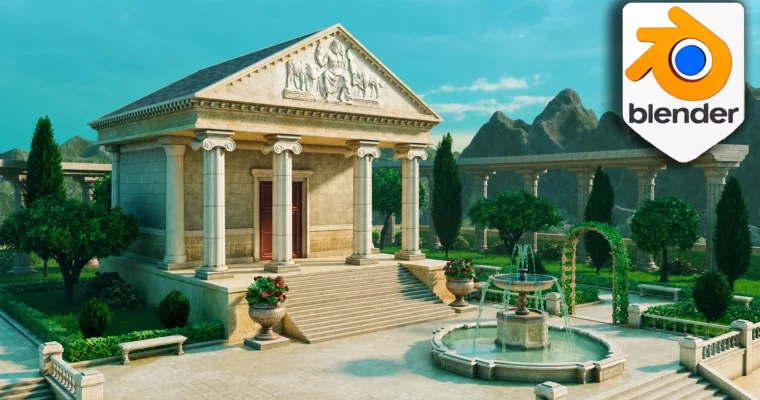
Stylized Blender 3D Environment Greek Temple Workshop by 3D Tudor, Marcus Rosefield

Duration:10 hours on-demand video
Actual Duration:9h 37m
Release date:2026
Publisher:Udemy
Skill level:Beginner
Language:English
Exercise files:Yes
Software:Blender
Course URL:https://www.udemy.com/course/stylized-blender-3d-environment-greek-temple-workshop
Ready to build awesome stylized 3D environments? This workshop walks you through creating a complete Greek temple and garden scene in Blender 4. You’ll go from a basic blockout to a polished final render, mastering modular architecture, Geometry Nodes foliage, cinematic lighting, and compositing along the way. It’s the perfect workflow for anyone who loves painterly worlds but wants a clean, repeatable process.
🎯 What you’ll learn
- Master a composition-first blockout process for scale and silhouette.
- Model a modular architecture kit including columns, arches, and planters.
- Utilize UVs, trimsheets, and decals for efficient detail and texturing.
- Create controllable foliage like grass carpets and ivy arches using Geometry Nodes.
- Design tree silhouettes for foreground, midground, and background rhythm.
- Apply shaders and dial in restrained stylization for cohesive materials.
- Shape mood with cinematic lighting and frame shots with cameras.
- Finish your scene using a provided compositor node stack for local contrast and color balance.
- Configure clean renders and turntables for portfolio presentation.
- Save your pipeline as a template for future projects.
✅ Requirements
- Skills: Basic Blender navigation (move, rotate, scale, viewport).
- Tools: Blender 4.x installed, Node Wrangler Addon (optional), PureRef or similar for reference boards (optional).
- Hardware: A computer (Windows, macOS, or Linux). GPU recommended for rendering.
📝 Description
Tired of stylized environments that stall out before the finish line? This workshop gives you a complete Blender 4 pipeline for a Greek Temple and Garden scene—modular architecture, trimsheet-driven detail, Geometry Nodes foliage, cinematic lighting, and a compositor finish that locks the mood. If you love painterly worlds but dislike messy workflows, this is your new go-to process.
Marcus Rosefield from 3D Tudor designed this class so you can work like an environment artist from day one. The same workflow scales from a single courtyard to full plazas and ruins. It is fast to iterate, easy to present, and satisfying to ship. Expect a few “oh, that is why mine looked off” moments. Little fixes to scale, spacing, and value contrast do more than exotic tricks ever will.
You will learn to build a complete stylized environment from scratch, going from blockout to final render with confidence. Master modular architecture for faster iteration with reusable components like columns, trims, doors, and arches. Learn efficient texturing using UVs, trimsheets, and decals to keep texel density consistent. Create controllable foliage with Geometry Nodes for grass, ivy, and bushes, plus design tree silhouettes for visual rhythm. Finally, direct the eye with cinematic lighting, craft compelling camera shots, and apply a reusable node stack in the compositor for a unified look and feel.
This workshop is like a gym for your environment art brain. We stretch composition, breathe through problem spots, and finish with a clean render that does not wheeze. You leave with confidence, not chaos. You get a focused toolkit including 8 materials, 2 trimsheets, 12 Greek decals, GN setups for grass and ivy, trees, a human-scale model, and the exact compositor settings used in the course. If you waste time hunting assets, this pack puts everything at your fingertips.
You will advance one temple courtyard from first blockout to polished stills. Every tool you touch serves composition, clarity, and speed—no wasted steps. Once you grasp the recipe here, you can reskin it for other worlds—Roman baths, temple ruins at dawn, a moody shrine in the woods. Same bones, fresh mood. Bring your curiosity. Marcus will bring the shortcuts that actually matter and the gentle sarcasm for the ones that do not. You will pick up a taste for restraint. A couple of well-placed forms and a clear lighting cue beat a screen full of noise every time.
The course is structured into clear sections: Kickoff & Blockout, Modular Architecture Kit, UVs, Trimsheets & Decals, Materials & Look Cohesion, Foliage with Geometry Nodes, Trees & Silhouette Design, Lighting & Cameras, Compositing & Export, Presentation & Turntable, and Wrap-Up, Reuse & Next Steps. You will feel the pace: quick enough to stay excited, calm enough to keep things neat. No mystery settings, no arcane rituals—just sensible steps that add up.
🧑🎓 Who this course is for
- Beginners levelling up: You want a clear route to your first complete environment.
- Environment art nerds: You enjoy Geometry Nodes, trimsheets, and lighting craft.
- Indie devs and asset tinkerers: You want modular kits that build quickly and present cleanly.
- Beginner & Intermediate Blender Users: You want a reliable route from blank scene to final render with clear milestones.
- Environment & Game Artists: You need modular speed, UV discipline, trims/decals that behave, and foliage you can art-direct.
- Stylised Look-Dev Artists: You want readable materials, controlled colour, and a compositing finish that locks the mood.
- Self-Taught Learners: You prefer practical steps, plain-English explanations, and habits you can reuse on the next environment.
🧑🏫 About the Author
3D Tudor is a studio founded by Neil Bettison, a professional prop and environment artist with 9 years of experience. Neil is a highly successful instructor on Udemy, known for his clear, to-the-point instructions and live on-screen tooltips that help learners follow along easily. His courses often focus on Blender, medieval Tudor themes, and sci-fi assets, with a strong emphasis on practical application for game development and 3D modeling hobbyists.
Marcus Rosefield is a self-taught 3D Environment Artist with over 6 years of industry experience, specializing in creating stylized environments in Blender for video games and animations. He focuses on strong visual storytelling and attention to detail, and is passionate about sharing his knowledge to help others grow their skills in 3D art.
🏁 Final Result
- A portfolio-ready, stylized Greek temple and garden environment scene created entirely in Blender 4.
- Completed stills and a turntable animation showcasing your environment.
- A reusable pipeline including modular assets, lighting setups, and compositor presets for future projects.
 Channel





48 is missing