


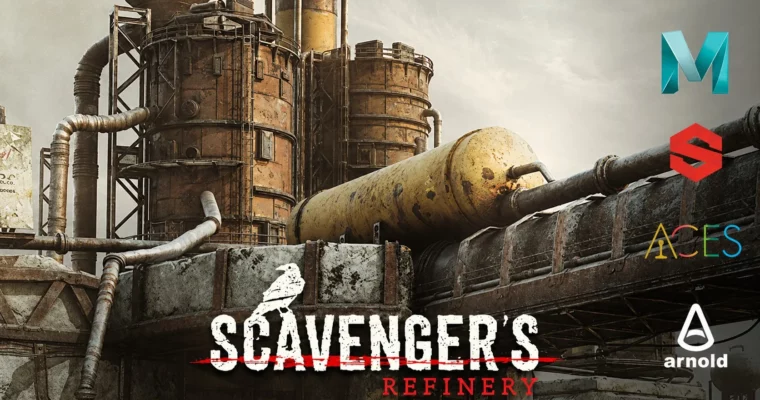
Scavengers Refinery EP.2 – Environment Texturing by Substance Painter by Alexandre Huyaux

Duration:+80 hours
Actual Duration:85h 23m
Release date:2026, May 13
Publisher:Gumroad
Skill level:Intermediate
Language:English
Exercise files:Yes
Software:Autodesk Maya, Arnold Render, Substance Painter, Substance Alchemist, Megascan Library & Bridge, Adobe Photoshop
Course URL:https://skart.gumroad.com/l/scavengersep2
The second part of a series focused on texturing a complete sci-fi environment. Alexandre Huyaux walks you through his entire process, from setting up ACES color management to final look development in Maya and Arnold. You’ll learn how to use Substance Painter for the heavy lifting, bring in Substance Alchemist for custom detail work, and wrap it all up with a polished render. It’s a practical, no-fluff look at a professional environment texturing pipeline.
🎯 What you’ll learn
- Configure ACES color space in Maya and Substance Painter
- Texture a full environment in Substance Painter
- Use Substance Alchemist to add custom details
- Set up shaders and UV layouts for complex assets
- Create a matte painting in Photoshop for final polish
✅ Requirements
- Skills: Intermediate knowledge of Maya, Substance Painter, and Arnold. You should be comfortable navigating these tools.
- Tools: A 3-button mouse is recommended.
- Hardware: A computer capable of running Maya and Substance Painter smoothly. 16GB+ RAM and a dedicated GPU are strongly advised.
📝 Description
This isn’t a beginner’s walkthrough. Alexandre assumes you already know your way around the software and focuses on the actual decisions and techniques that make a scene look good. The core of the course is over 80 hours of real-time, QHD 1440p footage showing the entire texturing process from start to finish.
You’ll start by getting your color pipeline right with ACES, which is critical for consistent results between Substance Painter and Maya. Then it’s straight into the assets: preparing them, setting up shaders and UVs, and diving into Substance Painter for the full texturing pass. Alexandre also shows how to use Substance Alchemist to generate custom details that elevate the final look. The course wraps up with a matte painting pass in Photoshop and a final render in Arnold.
The video content is mostly without audio commentary, so you can watch the process unfold in real time. There are a few key sections with audio commentary to explain the ACES setup and the overall approach. This format lets you see every brush stroke and every slider adjustment without any fluff.
🧑🎓 Who this course is for
- Intermediate 3D artists who want to improve their environment texturing skills
- Artists looking for a practical, real-time look at a professional Substance Painter workflow
- Anyone wanting to learn how to integrate ACES color management into their pipeline
🧑🏫 About the Author
Alexandre Huyaux, also known as Skart™, is a passionate Art Director and CG Lead. He has extensive experience in the industry and shares his knowledge through live streams on Twitch and tutorials. His portfolio on ArtStation showcases a range of high-quality 3D work, and he is dedicated to teaching practical, production-ready techniques.
🏁 Final Result
- A fully textured sci-fi refinery environment, ready for rendering in Arnold
- A 6K final render image
- A solid understanding of the ACES workflow for environment texturing
 Channel




Some videos do not contain sound
maybe cuz the author didn’t record any audio?