Plasticity Car Modelling Course by Nikita Kapustin

Actual Duration:14h 44m
Release date:2024, September
Publisher:Nikita Kapustin
Skill level:Intermediate
Language:English
Exercise files:Yes
Software:Plasticity
Course URL:https://nikitakapustin.com/courses/plasticity-car-modeling/
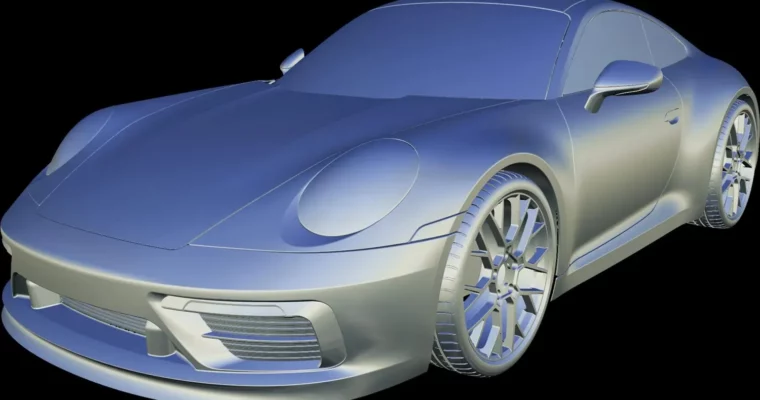
This course is a straight shot to modeling a Porsche 911 from scratch in Plasticity. No fluff, just a step-by-step process that covers everything from blueprint setup to final panel thickness. You’ll learn the specific techniques for building complex car surfaces, handling curves, and creating those seamless transitions that separate a good model from a great one.
🎯 What you’ll learn
- Model a complete Porsche 911 from scratch using Plasticity Indie.
- Master surface modeling techniques for complex automotive shapes.
- Create precise spline cages and blockouts from blueprints.
- Achieve professional G1 and G2 surface continuity.
- Add realistic details like panel gaps, micro fillets, and intricate rear lighting.
✅ Requirements
- Skills: Basic understanding of 3D modeling and Plasticity’s interface.
- Tools: A computer capable of running Plasticity Indie.
- Hardware: 3-button mouse recommended.
📝 Description
This isn’t a generic overview of Plasticity. It’s a focused, project-based deep dive into car surface modeling. You’ll start by setting up real-world blueprints, then build a precise spline cage that acts as the skeleton for the entire model. The blockout phase teaches you how to get proportions right from the start, using high-quality surfaces to define the car’s main volumes.
The real meat of the course is in the surface transitions. You’ll learn specific workflows for blending complex surfaces, achieving that flawless reflection quality that’s the hallmark of professional automotive design. The instructor breaks down G1 and G2 continuity into practical steps, showing you exactly how to use Plasticity’s tools to get clean, predictable results.
Every lesson includes the Plasticity project file, so you can jump in at any point if you get stuck. The course covers the entire process, from the initial curves to the final micro fillets and panel thickness that give the model a production-ready feel. It’s a complete, no-nonsense pipeline for anyone serious about hard-surface modeling in Plasticity.
🧑🎓 Who this course is for
- Intermediate 3D modelers who want to specialize in car modeling.
- Plasticity users looking to master advanced surfacing and curve workflows.
- Artists transitioning from polygonal modeling to CAD-based surface modeling.
🧑🏫 About the Author
Nikita Kapustin is a professional 3D artist specializing in hard-surface and automotive modeling. He has developed a reputation for creating clear, practical tutorials that focus on efficient workflows and high-quality results. His expertise lies in using Plasticity for complex design tasks, and he is known for breaking down intimidating techniques into manageable steps.
🏁 Final Result
- A complete, fully detailed 3D model of a Porsche 911, ready for portfolio presentation.
- Mastery of a professional car modeling workflow that can be applied to any vehicle design.
 Channel