It looks like you're using an adblocker.
Adblockers make us sad. We use ads to keep our content happy and free. If you like what we are doing please consider supporting us by whitelisting our website. You can report badly-behaved ads by clicking/tapping the nearby 'Advertisement' X text.
Godot 4 Create A Third Person Shooter Controller by Chaff Games
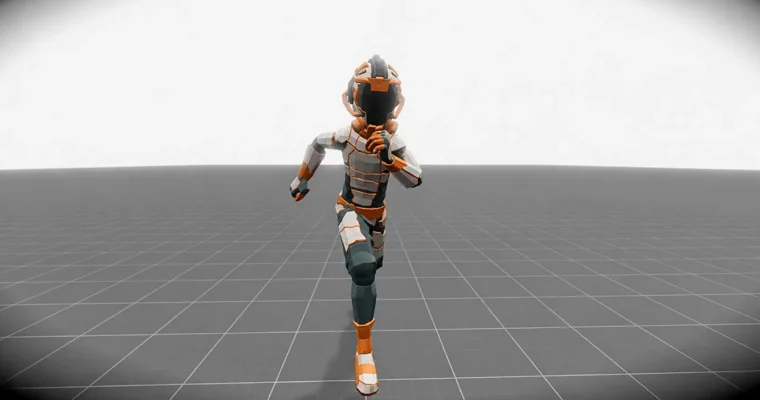
Build a complete third-person shooter controller in Godot 4, from a basic capsule to a full control rig with a weapon manager and inverse kinematics.
Build a complete third-person shooter controller in Godot 4 from scratch. This course walks you through creating a player character with a full control rig, a weapon manager, and smooth combat mechanics. You’ll learn how to structure your project with a finite state machine, handle animations with blend spaces, and implement inverse kinematics for realistic aiming.
🎯 What you’ll learn
Create a third-person shooter controller with non-combat movement and full combat mechanics
Build a complex and dynamic animation state machine with smooth blending and transitions
Use custom classes and resources to create a robust, modular system
Master Godot’s scene structure, composition, and custom signals
Implement a finite state machine to control player actions and prevent unexpected transitions
✅ Requirements
Skills: Basic understanding of Godot and programming fundamentals.
Tools: A 3-button mouse and keyboard.
Hardware: A computer capable of running Godot 4.
📝 Description
This course is a straight-up, no-fluff guide to building a third-person shooter controller in Godot 4. You’ll start with a blank project and a capsule, and by the end, you’ll have a fully functional character with a control rig, weapon manager, and smooth combat transitions.
The core of the course is building a finite state machine from scratch. This isn’t a pre-made plugin; you’ll write the logic yourself, giving you full control over how your character behaves. You’ll learn how to structure states for movement, sprinting, aiming, and combat, ensuring that each action has clear rules and no unexpected transitions.
We’ll also dive deep into animation blending using the Animation Tree. You’ll learn how to create blend spaces for smooth transitions between idle, walk, and run animations, and how to use nested state machines to handle complex combat scenarios. The course covers importing animations from Mixamo and setting up a full character rig.
Finally, you’ll implement inverse kinematics (IK) to make your character’s hands and spine follow the camera and weapon. This ensures your character always looks natural when aiming, with the left hand gripping the weapon and the body aligning with the target. The course also covers weapon pickups, ammo management, and projectile systems.
🧑🎓 Who this course is for
Beginners to Godot who want to tackle a more complex project
Beginner programmers looking to understand game architecture
Beginner game developers wanting to build a third-person shooter
🧑🏫 About the Author
Chaff Games is run by Isaac, a game developer from Queensland, Australia. He’s been making games since he was 16, starting with RPG Maker 2003 and Game Maker. He discovered Godot in 2019 and has been using it ever since, building a reputation for clear, practical tutorials.
🏁 Final Result
A complete third-person shooter controller with a full control rig, weapon manager, and ammo system.
A robust finite state machine that can be adapted for other game genres.
A character with smooth, realistic animations and inverse kinematics for aiming.
Curriculum
📋 Course content
Module 1: Getting Started
Getting Help (126)
Download Godot3:04
Introduction9:52
Set Up A Basic Character9:37
Set Up Basic Camera13:31
Spring Arms11:13
Switching The Camera Alignment12:41
Aiming With The Camera12:17
Adding A Sprint Action10:50
Clean Up12:11
Module 2: State Machine
Why Use A Statemachine7:23
Making The State Class5:12
Making the State Machine14:19
Making the Motion Class12:46
Making the Basic States10:12
Making The Sprint State11:10
Linking The Sprint State To The Camera To Change The FOV6:10
Setting A Sprint Duration9:10
Adding A Delay To The Sprint Recharge4:43
Creating An Aim State14:11
Clean Up 1 – Creating Movement Stats11:52
Clean Up 2 – Refactor14:29
Module 3: Animation
Getting Animations and Importing them into Godot19:19
Fixing a potential issue with the animation2:23
Creating and Using An Animation Tree10:39
Signalling From The State Machine To The Animation Controller10:51
Preventing The Character From Rotating With The Camera4:49
Rotating The Character On Input11:19
Detecting the ground9:06
Animation Clean Up4:14
A Small Refactor11:39
Add Another Animation Tree12:10
Nested State Machines16:36
Creating A Combat Status Enum5:17
Blend Space 2D Blend Position5:16
Adding A Bone Attachement6:06
Creating A Resource7:33
Weapon Animations6:39
Creating The Weapon Manager4:03
Communicating With The Character Model7:19
Attaching The Weapon Model4:37
Equiping Weapons7:50
Small Refactor8:31
Changing Weapons10:28
Waiting For An Action To End10:52
Fine Tuning The Change Weapon Animations10:50
Shoot And Reload Animations8:07
Fixing The Start Animation1:26
Module 4: Weapons and Ammo
Setting Up The Bullet Spawn Point8:43
Setting Up The Ammo Resource9:38
Setting Up The Ammo UI12:21
Setting Up The Ammo Logic11:26
Setting Up The Projectile (Raycasting)15:55
Setting Up The Projectile (Rigid Body)12:39
Loading The Projectile19:45
Creating A Reticle3:19
Automatic Fire7:19
Detecting Bullets and Hitboxes12:28
Despawning Bullets3:15
Creating Ammo Pick Ups9:38
Detecting The Ammo Pick Ups12:12
Limiting The Ammo Pick Ups6:22
Limiting The Ammo Pick Ups – Addendum4:25
Weapon Pick Ups19:22
Weapon Drops16:36
Weapon Drops – Controlling The Animations10:11
Weapon Drops – Quick Fix2:11
Module 5: Inverse Kinematics
Introduction1:48
Spine Rotation and Alignment18:54
Controlling IK With Code5:36
Right Arm IK12:47
Left Arm IK11:14
Animating IK Positions16:41
Setting Up The Hip IK12:11
Making The IK Follow The Camera9:07
Right Hand IK35:31
Left Hand IK14:17
Module 6: Final Polish
A Quick Overview5:36
Considerations and Importing The model20:38
Fixing The dependencies16:18
Weapon Animations and IK15:16
This Is The End Of The Course0:54
Add A Gamepad To The Project18:54
Watch online or Download for Free
Godot 4 Create A Third Person Shooter Controller by Chaff Games
05 Creating A State Machine
19 – Adding A Delay To The Sprint Recharge
10 Inverse Kinematics Godot 4.6
67 – Introduction
68 – Spine Rotation and Alignment
69 – Controlling IK with Code
70 – Right Arm IK
71 – Left Arm IK
72 – Animating IK Positions
12 Changing The Character Model
77 – A Quick Overview
78 – Considerations and Importing The MOdel
79 – Fixing The Dependencies
80 – Weapon Animations and IK
14 Bonus and Extras
82 – Add A Gamepad To The Project




 Channel


Can we add this to the new library
Round table animations
combat bootcamp
https://www.roundtableanimation.com/combat-animator-landing
Any chance you can get this course please, https://coloso.jp/products/visualartist-anima-jp
Please update this course.
05 Creating A State Machine
19 – Adding A Delay To The Sprint Recharge
10 Inverse Kinematics Godot 4.6
67 – Introduction
68 – Spine Rotation and Alignment
69 – Controlling IK with Code
70 – Right Arm IK
71 – Left Arm IK
72 – Animating IK Positions
12 Changing The Character Model
77 – A Quick Overview
78 – Considerations and Importing The MOdel
79 – Fixing The Dependencies
80 – Weapon Animations and IK
14 Bonus and Extras
82 – Add A Gamepad To The Project