


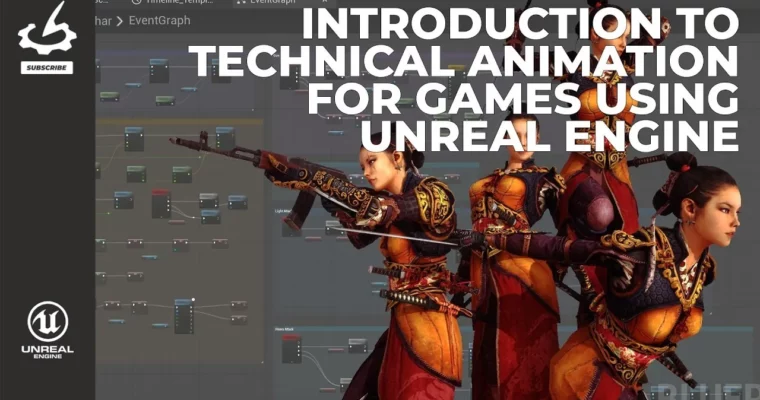
Introduction to Technical Animation for Games using Unreal Engine by Taylor Whitsett

Duration:5 hours 15 minutes
Actual Duration:5h 15m
Release date:2026, April 2
Publisher:Gnomon
Skill level:Intermediate
Language:English
Exercise files:Yes
Software:Unreal Engine 5, Maya
Course URL:https://www.thegnomonworkshop.com/workshops/introduction-to-technical-animation-for-games-using-unreal-engine
Ready to bridge the gap between animation and gameplay in Unreal Engine 5? This workshop dives into creating robust, production-ready character animation systems. You’ll follow a workflow used in actual game development, focusing on how animation directly impacts gameplay. It’s perfect for artists and animators who know their way around UE5 basics and want to get their characters moving realistically in-game.
🎯 What you’ll learn
- Prepare skeletal meshes and rigs for runtime animation.
- Implement core gameplay systems for character control.
- Build complex animation logic using Animation Blueprints.
- Integrate Root Motion for realistic character movement.
- Create dynamic melee combo systems with Animation Notifies.
- Master animation retargeting using IK Rig and IK Retargeter.
- Utilize Unreal’s Enhanced Input System for responsive controls.
- Debug and polish animation systems for better game feel.
✅ Requirements
- Skills: Foundational knowledge of Unreal Engine 5 navigation, basic 3D principles.
- Tools: Maya (for asset preparation), Unreal Engine 5.
- Hardware: A computer capable of running Unreal Engine 5 smoothly.
📝 Description
This workshop is all about the technical side of character animation for games. Taylor Whitsett breaks down how animators and technical artists fit into the game development pipeline, focusing on making animations work seamlessly with gameplay logic in Unreal Engine 5. You’ll learn a production-tested workflow, moving from asset preparation in Maya to implementing complex systems directly within UE5.
The course covers everything from setting up skeletal meshes and rigs to diving deep into Animation Blueprints, Blend Spaces, and Aim Offsets. You’ll tackle practical challenges like implementing Root Motion, building combo systems using Animation Notifies, and mastering animation retargeting with IK Rig. Plus, you’ll get hands-on with Unreal’s Enhanced Input System, camera setup, and character movement logic. Taylor shares valuable insights on debugging, structuring your logic, and best practices for creating scalable, data-driven animation systems that are easy to iterate on.
By the end, you won’t just understand the theory; you’ll have built a fully playable character with locomotion, aiming, melee attacks, and retargeted animations. You’ll also gain a solid grasp of how Unreal Engine’s animation and gameplay systems work together, preparing you for real-world game development challenges.
🧑🎓 Who this course is for
- Beginner to intermediate artists and animators looking to specialize in technical animation for games.
- Technical artists aiming to strengthen their skills in Unreal Engine animation systems.
- Game developers who want to understand the integration of animation with gameplay mechanics.
🧑🏫 About the Author
Meet Taylor Whitsett, a Senior Technical Animator who has turned the complex art of character rigging into a career spanning the entire gaming landscape.
A graduate of the Gnomon School of Visual Effects, Taylor originally started in the industry as an animator. However, his natural knack for the “how things work” side of the craft led him to pivot toward technical animation, rigging, and pipeline tooling. Since then, he’s become a vital bridge between creative movement and technical execution.
His portfolio is as diverse as it is impressive, covering everything from indie gems to massive AAA productions across PC, console, mobile, and VR. You’ve seen his handiwork in titles like:
- The Walking Dead: Saints & Sinners
- Medal of Honor: Above and Beyond
- Paladins
- Archangel
- PWND
Beyond the studio, Taylor is a known advocate for the game animation community. Whether he’s building production-ready rigs or developing custom tools to streamline workflows, his goal is always the same: making the creative process smoother for everyone involved.
🏁 Final Result
- A fully playable character in Unreal Engine 5 featuring locomotion, aiming, melee combos, and retargeted animations.
- A clear understanding of how to build, debug, and iterate on complex animation systems within UE5.
- Portfolio-ready examples of technical animation integration for game development.
 Channel


Hello, could you please add these two domestika courses, if possible
Illustration for Patterns with Soul by Catalina Estrada Uribe
https://www.domestika.org/en/courses/1266-illustration-for-patterns-with-soul
Illustrating Nature: A Creative Exploration by Laura McKendry
https://www.domestika.org/en/courses/1503-illustrating-nature-a-creative-exploration
So glad you are back, incredibly grateful for what you are doing!