Introduction to Houdini Grains by David Silberbauer

Duration:6h 18m
Actual Duration:6h 18m
Release date:2025, June
Publisher:Gnomon
Skill level:Beginner
Language:English
Exercise files:Yes
Software:Houdini, Solaris, COPs
Course URL:https://www.thegnomonworkshop.com/workshops/introduction-to-houdini-grains
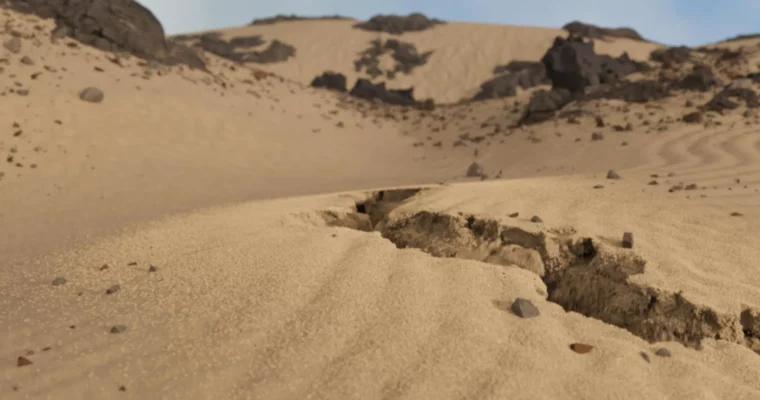
Ready to make some sand fly? This workshop dives into creating a cool sinkhole effect in a desert scene using Houdini. It’s perfect if you’re just starting out with Houdini or want to sharpen your skills. You’ll learn how to manipulate attributes, get a handle on HeightField basics, and even play with the MPM solver. Plus, we’ll cover using VDB for sources and touch on FLIP fluids.
🎯 What you’ll learn
- Manipulate attributes for dynamic simulations
- Understand HeightField basics for terrain creation
- Work with the MPM solver for granular effects
- Create sources using VDB processes
- Explore FLIP fluids basics
- Implement HeightField scattering and instancing
- Master Meshing fluids
- Utilize Houdini’s GPU-accelerated MPM solver
- Integrate elements in Solaris for final rendering
- Perform lighting, material, and render setup
- Add final touches in COPs
✅ Requirements
- Skills: Basic understanding of 3D concepts and familiarity with software interfaces.
- Tools: Houdini (any version), Solaris, COPs.
- Hardware: A decent computer capable of running Houdini and rendering.
📝 Description
This workshop is all about getting you comfortable with Houdini‘s diverse tools, especially for creating environmental effects. We’ll start from the ground up, covering the unique Houdini interface and workflow. You’ll learn professional techniques that make working in Houdini efficient and intuitive.
We’ll dive into HeightFields, learning how to build procedural terrain quickly. You’ll also get a solid understanding of DOPs and how to build simulations from scratch. The course emphasizes controlling simulation attributes using Ramp, Wrangle, and Noise nodes to achieve interesting visual results. Finally, we’ll bring it all together in Solaris for lighting, materials, and rendering, with a quick look at Copernicus for final touches.
🧑🎓 Who this course is for
- Beginner Houdini artists looking to learn procedural workflows and simulation basics.
- Intermediate artists wanting to refine their techniques for environmental effects and grain simulations.
- Anyone interested in creating realistic natural phenomena in 3D.
🧑🏫 About the Author
David Silberbauer is a seasoned VFX and Procedural Artist at Sunrise Animation Studios, bringing over nine years of industry experience. He excels at building flexible Houdini systems that encourage creative exploration, often drawing inspiration from natural patterns. David has contributed to notable projects like Escape Room, Deep Blue Sea 3, and Star Wars: Visions, working with studios such as Triggerfish Animation and BlackGinger. His passion lies in recreating the complexity of nature through procedural effects.
🏁 Final Result
By the end of this workshop, you’ll have a portfolio-ready scene featuring a realistic desert sinkhole effect, complete with dynamic sand simulations and a polished render. You’ll also have a solid understanding of Houdini’s HeightField, MPM, and Solaris workflows.
 Channel