Ad Clicks : Ad Views : Ad Clicks : Ad Views : Ad Clicks : Ad Views : Ad Clicks : Ad Views :
Oh Snap!

It looks like you're using an adblocker. Adblockers make us sad. We use ads to keep our content happy and free. If you like what we are doing please consider supporting us by whitelisting our website. You can report badly-behaved ads by clicking/tapping the nearby 'Advertisement' X text.

Houdini FX  Creating a Building Explosion by Eric Ebling

Houdini FX Creating a Building Explosion by Eric Ebling

/

Author:Eric Ebling

Duration:10h 57m

Actual Duration:10h 56m

Release date:2025, August

Publisher:Udemy

Skill level:Intermediate

Language:English

Exercise files:Yes

Software:Houdini, Natron

Course URL:https://www.udemy.com/course/houdini-fx-creating-a-building-explosion

Learn to blow up a real-world building from a photograph using Houdini's RBD, Vellum, and sparse fire simulation tools.

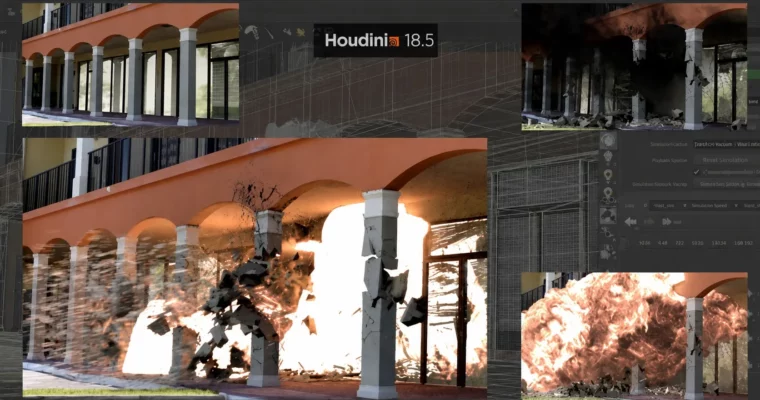
A practical, hands-on course that walks you through the entire pipeline of destroying a building in Houdini, from a real-world photograph to a final VFX composite. You’ll fracture geometry, set up RBD simulations, add Vellum for bending elements, and use the sparse solver for a fireball explosion. No fluff, just a straight shot to a portfolio-ready shot.

🎯 What you’ll learn

  • Fracture building geometry into custom concrete, glass, and blind chunks.
  • Set up and refine RBD simulations for different material types.
  • Use Vellum to create deforming geometry from the explosion force.
  • Simulate a fireball explosion with the modern sparse solving method.
  • Render all necessary passes (beauty, shadow, reflection, embers).
  • Composite the final shot in Natron with camera shake.

✅ Requirements

  • Skills: Working knowledge of Houdini is strongly recommended.
  • Tools: A recent release of Houdini (18+) with Sparse solving tools.
  • Hardware: A computer with enough power to run Houdini and a decent internet connection for HD streaming.

📝 Description

This course skips the hand-holding. You’re expected to know your way around Houdini basics, so Eric gets straight to the point: taking a real photograph of a building and turning it into a full CG destruction shot.

You’ll start by fracturing the building’s geometry into distinct pieces—pillars, arches, glass, and window frames. Each material gets its own RBD setup, with concrete behaving differently than glass or blinds. Then you’ll throw Vellum into the mix to get those blinds bending and deforming realistically from the blast force.

The fireball is handled with the sparse solver, a more modern and efficient approach to pyro simulation. You’ll also set up particle embers for extra detail. All rendering is done with Mantra, keeping everything stock Houdini. No third-party plugins needed.

Finally, you’ll composite all the passes—beauty, shadow, reflection, and fireball interactive light—in Natron, adding camera shake to sell the impact. By the end, you’ll have a repeatable workflow you can apply to any building you photograph.

🧑‍🎓 Who this course is for

  • FX artists who want a practical, step-by-step guide to building destruction in Houdini.
  • Intermediate Houdini users looking to expand their skills into realistic RBD and pyro workflows.
  • Anyone interested in seeing a professional pipeline from a 20+ year veteran of the industry.

🧑‍🏫 About the Author

Eric Ebling is an award-winning visual effects artist and photographer with over 24 years of experience in the entertainment industry. He has worked on numerous post-production projects and brings a no-nonsense, practical approach to teaching Houdini FX. When he’s not at a computer, he’s exploring the Western US National Parks, hiking and photographing the landscape.

🏁 Final Result

  • A fully composited VFX shot of a building explosion, including RBD debris, Vellum blinds, a sparse fireball, and particle embers, ready for a demo reel.
Curriculum

📋 Course content

  1. Module 1: Setup & Fracturing
    • Finding the Right Building6:12
    • Creating a Clean Plate for our Building10:03
    • Review of the Building Geometry7:07
    • Importing our Camera and Building into our scene2:51
    • Fracturing the Pillar Geometry15:41
    • Fracturing the Arch Geometry2:31
    • Fracturing the Glass Geometry9:45
    • Fracturing the Wall and Window frame Geometry15:14
    • Fixing the Edge Detail Problem Geometry3:33
  2. Module 2: RBD & Vellum Simulations
    • Initial RBD setup of our Pillars21:33
    • Refining our RBD setup23:27
    • Setting up the Glass RBD’s16:12
    • Setting up the Blinds RBD’s10:46
    • Setting up the Wall and Window Frame RBD’s7:18
    • Setting up the Collision Geometry8:29
    • Adding Fracture cracking to the Static Pillar Geometry10:14
    • Adding Extra edge Fracture RBD sims – part 118:41
    • Adding Extra edge Fracture RBD sims – part 211:57
    • Adding a Vellum Window Blinds setup – part 123:16
    • Adding a Vellum Window Blinds setup – part 215:06
    • Adding a Vellum Window Blinds setup – part 315:31
    • Organizing all our simulation Geometry – part 116:58
    • Organizing all our simulation Geometry – part 25:16
  3. Module 3: Shading & Fire Simulation
    • Setting up shaders on our Hard Surface Geometry – part 127:02
    • Setting up shaders on our Hard Surface Geometry – part 219:40
    • Setting up shaders on our Hard Surface Geometry – part 39:31
    • Comparing sparse and dense solver methods19:34
    • Setting up the sparse fireball simulation40:07
    • Setting up the particle embers simulation – part 133:29
    • Setting up the particle embers simulation – part 211:38
  4. Module 4: Rendering
    • Rendering the static clean frame of our building13:51
    • Fixing our Missing Cap Geometry before we render2:42
    • Rendering the Dynamic Building Data14:52
    • Setting up the Shadow Pass Render10:37
    • Rendering the Fireball Explosion29:27
    • Rendering the Fireball Interactive Light19:23
    • Rendering the Fireball Reflection11:53
    • Rendering the Embers9:12
    • Note about the next lecture0:14
    • Reviewing our Renders9:42
  5. Module 5: Compositing
    • A note about Natron0:04
    • Creating our Comp – Part 142:38
    • Creating our Comp – Part 221:11
    • Wrapping up the Course6:58
  6. Module 6: Extra Lectures
    • Welcome to the EXTRA Lectures2:01
    • Using a timing sphere to trigger the RBD’s23:35
Watch online or Download for Free
Houdini FX Creating a Building Explosion by Eric Ebling
NAME
SIZEDURATION
5. Compositing our Renders and wrapping up the course
80.9 MB1h 10m

Download all Videos (45)
611.8 MB10h 56m

Project Files (Assets, Resources)
924.2 MB

Download all

Join us on
  Channel    and      Group

Leave a Comment

Your email address will not be published. Required fields are marked *