Creating Facial Blendshapes Using Photogrammetry by Adam Spring

Duration:4h 18m 4s
Actual Duration:4h 18m
Release date:2024, September
Publisher:Gnomon
Skill level:Intermediate
Language:English
Exercise files:Yes
Software:Agisoft Metashape, Faceform Wrap, Lightroom, Photoshop, ZBrush, Maya
Course URL:https://www.thegnomonworkshop.com/workshops/creating-facial-blendshapes-using-photogrammetry
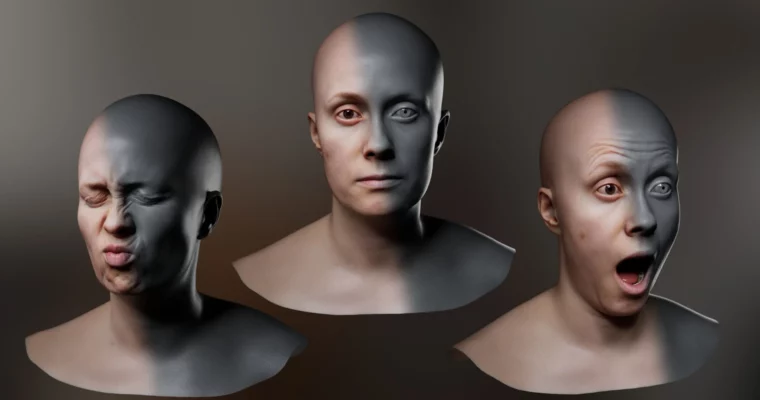
This workshop shows you a practical, no-nonsense pipeline for creating FACS-based facial blendshapes using photogrammetry. Instructor Adam Spring walks through the entire process, from capturing expression scans with a DSLR to building a dynamic rig in Maya. It’s a direct, hands-on approach for artists who want to skip manual sculpting and get production-ready results.
🎯 What you’ll learn
- Capture and process multiple FACS scans using a single DSLR camera.
- Wrap and clean up raw photogrammetry data for rigging.
- Isolate facial areas in ZBrush to create targeted blendshapes.
- Build a complete blendshape rig in Maya with dynamic skin textures.
- Integrate FACS-based rigs into games or VFX pipelines.
✅ Requirements
- Skills: Foundational knowledge of Maya, ZBrush, and photogrammetry workflows.
- Tools: DSLR camera, Agisoft Metashape, Faceform Wrap, Lightroom, Photoshop, ZBrush, Maya.
- Hardware: Minimum 16GB RAM, dedicated GPU.
📝 Description
This workshop is built around a real-world problem: creating realistic facial blendshapes without spending weeks manually sculpting each expression. Adam Spring’s solution is a photogrammetry pipeline that captures actual human expressions and processes them into clean, usable data.
The course kicks off with the theory behind FACS (Facial Action Coding System) and how it applies to 3D rigging. From there, it’s straight into the practical work. You’ll learn how to batch-process multiple scans in Agisoft Metashape, clean them up in Wrap, and align them in Maya. The real heavy lifting happens in ZBrush, where Adam shows you how to isolate specific facial areas from the scan data to create individual blendshapes.
The final section is where it all comes together. Adam demonstrates how to build a blendshape rig in Maya that not only deforms the geometry but also drives dynamic skin textures. This means your character’s skin color and detail change naturally with each expression. It’s a technique that adds a huge amount of realism without extra manual work.
🧑🎓 Who this course is for
- Intermediate to advanced 3D artists looking to improve their facial rigging workflow.
- Character modelers and rigging specialists working in games or VFX.
- Technical directors and facial animation specialists who need a production-ready FACS pipeline.
🧑🏫 About the Author
Adam Spring is a senior 3D artist specializing in character and facial production for visual effects and animation, with over a decade of industry experience. He has worked as a Facial Modeler at Blur Studio and contributed to projects for studios like MPC, Activision, and Ubisoft. His expertise lies in building robust, production-ready character pipelines, with a focus on high-fidelity facial modeling and FACS-based workflows.
🏁 Final Result
- A complete FACS-based facial rig with isolated blendshapes, ready for integration into a games or VFX pipeline.
- A dynamic shader system that automatically updates skin textures based on facial expressions.
 Channel