

Ad Clicks : Ad Views : Ad Clicks : Ad Views : Ad Clicks : Ad Views : Ad Clicks : Ad Views :
Oh Snap!

It looks like you're using an adblocker. Adblockers make us sad. We use ads to keep our content happy and free. If you like what we are doing please consider supporting us by whitelisting our website. You can report badly-behaved ads by clicking/tapping the nearby 'Advertisement' X text.

The Ultimate Game Art Creation Kit Maya Substance Painter by Shoaib Mohammed
The Ultimate Game Art Creation Kit Maya Substance Painter by Shoaib Mohammed

Author:Shoaib Mohammed

Duration:20 hours

Release date:2026, October

Publisher:Udemy

Skill level:Beginner

Language:English

Exercise files:Yes

Software:Autodesk Maya, Adobe Substance 3D Painter, Marmoset Toolbag 4, Adobe Photoshop

Course URL:https://www.udemy.com/course/the-ultimate-game-art-creation-kit-maya-substance-painter/

Build AAA-ready game props from blockout to final render with Maya, Substance Painter, and Marmoset.

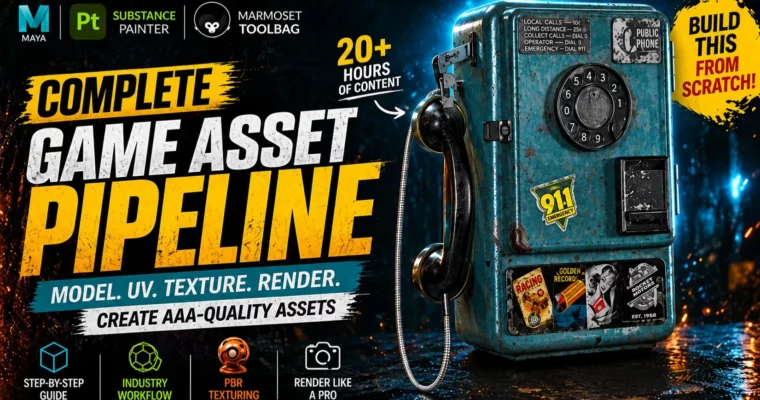
You start with a Pokeball and end with a portfolio-ready payphone. This one walks you through the full AAA pipeline — Autodesk Maya for modeling, Substance 3D Painter for texturing, and Marmoset Toolbag 4 for that final render that actually gets you hired.

🎯 What you’ll learn

  • Build hard-surface game models in Maya from blockout to low-poly
  • Create clean high-poly models and optimize topology for games
  • Unwrap efficient UVs with good texel density for real-time assets
  • Bake normal, AO, and curvature maps from high to low-poly in Substance 3D Painter
  • Layer PBR materials, smart masks, stencils, and decals for realistic wear
  • Light and render portfolio shots in Marmoset Toolbag 4

✅ Requirements

  • Skills: No prior 3D experience needed, basic computer skills and an eye for games
  • Tools: Autodesk Maya, Adobe Substance 3D Painter, Marmoset Toolbag 4, Adobe Photoshop for post-processing
  • Hardware: 64-bit PC with 16GB+ RAM, dedicated GPU for baking and ray tracing, 3-button mouse

📝 Description

This isn’t theory. You build stuff from lesson one. First a simple Pokeball to learn Autodesk Maya navigation and basic forms. Then a full oil barrel — blockout, high-poly, low-poly, UVs, textures. By the time you hit the hero payphone, you already know the loop.

The payphone section is where it gets real. You’ll block out complex hard-surface shapes, push a proper high-poly with supporting edges, then retop to a clean game-ready low-poly. UVs get three full videos. No rushing. You learn how to pack shells, keep texel density consistent, and avoid the stretching and baking errors that kill junior portfolios.

Texturing is done entirely in Substance 3D Painter. You start with bakers — normal, AO, curvature — then stack up base materials, edge wear with mask generators, rust, oil spills, stencils, and decals. The instructor shows why each layer exists. Chipped paint on metal edges because that’s where hands grab it. Grime in cavities because that’s where dust sits. It’s practical, not random sliders.

You finish in Marmoset Toolbag 4. Lighting setup, camera angles, ray tracing, and output settings for sharp ArtStation shots. Plus a quick Photoshop pass for cleanup and presentation. You also cover stuff studios actually care about — mesh budgets, real-time export for Unreal Engine and Unity, and how to present breakdowns.

🧑‍🎓 Who this course is for

  • Complete beginners who want to get into 3D game art from zero
  • Maya users who can model a bit but struggle with UVs, baking, and PBR texturing
  • Aspiring freelancers and studio artists who need an ArtStation-ready hero prop
  • Career switchers who learn best by following full projects start to finish

🧑‍🏫 About the Author

Shoaib Mohammed is a 3D game artist focused on hard-surface props and real-time workflows. He teaches the full production loop — Maya modeling, Substance texturing, and portfolio rendering — with an emphasis on clean topology and job-ready presentation. His courses are built for beginners who want practical studio habits, not just button clicks.

🏁 Final Result

  • A finished payphone hero prop with background elements, fully textured in Substance 3D Painter and rendered in Marmoset Toolbag 4 — ready to post on ArtStation as a complete game environment piece.
Curriculum

📋 Course content

  1. Module 1:  Maya Basics and First Project
    • Introduction to Autodesk Maya – Setting Up for 3D Game Modeling17:49
    • Modeling Basics in Maya – Creating a Pokeball (Beginner Project)42:17
    • Finishing the Pokeball – Fundamentals of 3D Modeling18:33
  2. Module 2:  Oil Barrel – Full Prop Workflow
    • Blocking a Game Asset in Maya – Oil Barrel Example19:40
    • Creating a High-Poly Game Asset – Oil Barrel High-Poly Workflow18:02
    • Creating a Low-Poly Game Asset – Oil Barrel Low-Poly Workflow38:05
    • UV Unwrapping Game Assets – Oil Barrel UV Workflow39:44
    • Introduction to Adobe Substance 3D Painter for Game Texturing16:52
    • Starting Texture Painting in Substance Painter – Oil Barrel Example13:10
    • Adding Surface Detail & Small Features to Game Assets21:37
    • Creating Dents, Logos & Decals for realistic 3D Game Assets18:01
    • Adding Oil Spill & Rust Effects in Substance Painter21:46
    • Rendering and Post-Processing Game Assets with Photoshop39:27
  3. Module 3:  Hero Asset Blockout – Payphone
    • Starting the Hero Asset Project – Reference & Blockout in Maya29:40
    • Blocking Game Assets in Maya – Payphone Part 131:37
    • Blocking Game Assets in Maya – Payphone Part 246:20
    • Blocking Game Assets in Maya – Payphone Part 329:31
    • Finalizing the Blockout – Payphone Game Prop26:55
  4. Module 4:  High-Poly to Low-Poly – Payphone Modeling
    • High-Poly Game Asset Modeling – Payphone Part 126:08
    • High-Poly Game Asset Modeling – Payphone Part 222:57
    • Finalizing High-Poly Game Model – Payphone Project31:51
    • Low-Poly Game Asset Modeling – Payphone Part 135:02
    • Low-Poly Game Asset Modeling – Payphone Part 237:16
    • Finalizing Low-Poly Game Asset – Payphone Project40:40
  5. Module 5:  UVs, Baking and Texturing – Payphone
    • UV Unwrapping Game Assets – Payphone Part 133:33
    • UV Unwrapping Game Assets – Payphone Part 238:07
    • UV Unwrapping Game Assets – Payphone Part 335:35
    • Baking Maps & Preparing Textures in Substance Painter – Payphone Part 150:10
    • Texturing Game Assets in Substance Painter – Payphone Part 216:59
    • Texturing Game Assets in Substance Painter – Payphone Part 334:41
    • Texturing Game Assets in Substance Painter – Payphone Part 431:05
    • Texturing Game Assets in Substance Painter – Payphone Part 51:14:37
    • Stencil Painting & Detailing in Substance Painter – Payphone Part 635:36
    • Finalizing Payphone Textures – Complete Game Prop32:02
  6. Module 6:  Environment and Final Portfolio Render
    • Creating Background Elements for a Game Environment31:48
    • Texturing Background Assets for Game Environments38:14
    • Adjustments & Workflow Updates – Project Continuation33:12
    • Rendering Game Assets in Marmoset Toolbag 4 – Final Project34:34
Watch online or Download for Free
The Ultimate Game Art Creation Kit Maya Substance Painter by Shoaib Mohammed
NAME
SIZEDURATION
1 – Introduction
26.3 GB

Download all Videos (38)
26.3 GB


Download all

Join us on
  Channel    and      Group

Leave a Comment

Your email address will not be published. Required fields are marked *