

Advanced Hard Surface Creation ZBrush by Seller Information

Actual Duration:9h 44m
Release date:2024, March 16
Publisher:Artstation
Skill level:Intermediate
Language:English
Exercise files:Yes
Software:ZBrush, KeyShot, Photoshop
Course URL:https://www.artstation.com/marketplace/p/6g96z/advanced-hard-surface-creation-in-zbrush
Follow along as Hafez Yadollahi builds an advanced hard surface character for product-style presentation. You get the full ZBrush sculpt from scratch, plus KeyShot materials, lighting, and render — all recorded in real time with no cuts.
🎯 What you’ll learn
- Block out anatomy and hard surface mesh together for a sci-fi character
- Refine shapes and build clean forms ready for detail pass
- Sculpt face details and mechanical armor panels in ZBrush
- Use alphas and custom brushes for small details and paneling
- Set up default materials and shaders in KeyShot step by step
- Light and render for portfolio, via KeyShot and ZBrush to Photoshop
✅ Requirements
- Skills: Solid understanding of ZBrush UI and sculpting workflow, familiarity with 3D character pipeline, not suitable for complete beginners
- Tools: ZBrush, KeyShot, Photoshop, drawing tablet, Hafez ZBrush UI included
- Hardware: PC capable of handling high-poly sculpts, minimum 16GB RAM, dedicated GPU recommended for KeyShot rendering
📝 Description
Heads up: this one has no voiceover. It’s 24 HD videos recorded at normal speed, no omissions. You watch every stroke, every decision, start to finish. If you learn best by watching a pro work and pausing to copy, this format works great.
It starts in ZBrush with a rough blockout. No separate basemesh — anatomy and hard surface mesh are blocked in together so proportions and design stay linked. Then you push into refinement: cleaning shapes, fixing silhouette, getting that tight, manufactured look before any detail goes on.
Once the high-poly is solid, you go for clean topology and start layering small stuff. Face gets a full pass across videos 9-16, then armor gets its own pass in 17-22. Think panel lines, vents, bolts, edge wear via alphas and custom brushes. All alphas, brushes, and Hafez’s UI are included, so you can match his setup exactly.
Final stretch is presentation. You’ll set up basic KeyShot materials from defaults, tweak shaders step by step, then light and render. There’s also a ZBrush to Photoshop render path for a quick portfolio shot. End goal is simple: a sharp final image that actually looks like product work.
🧑🎓 Who this course is for
- Intermediate character artists who know ZBrush and want to push into hard surface and sci-fi
- 3D artists tired of beginner tutorials who want a full AAA-style workflow without talking heads
🧑🏫 About the Author
Hafez Yadollahi is a senior character artist working in AAA games and cinematics. His credits include the Rebel Moon game trailer for Netflix, Assault Sector, No Body’s Left, plus several cinematic and VFX projects. He specializes in sculpted hard surface characters built for high-end presentation.
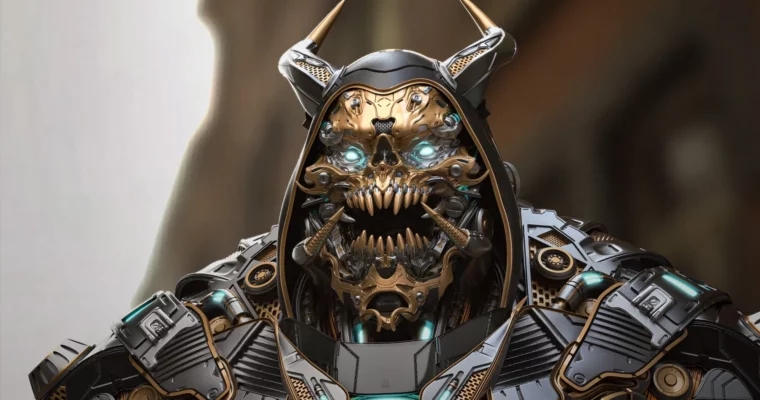
🏁 Final Result
- Finished sci-fi hard surface character sculpted in ZBrush, presented with KeyShot lighting and materials as portfolio-ready final renders.
 Channel