Ad Clicks : Ad Views : Ad Clicks : Ad Views : Ad Clicks : Ad Views : Ad Clicks : Ad Views :
Oh Snap!

It looks like you're using an adblocker. Adblockers make us sad. We use ads to keep our content happy and free. If you like what we are doing please consider supporting us by whitelisting our website. You can report badly-behaved ads by clicking/tapping the nearby 'Advertisement' X text.

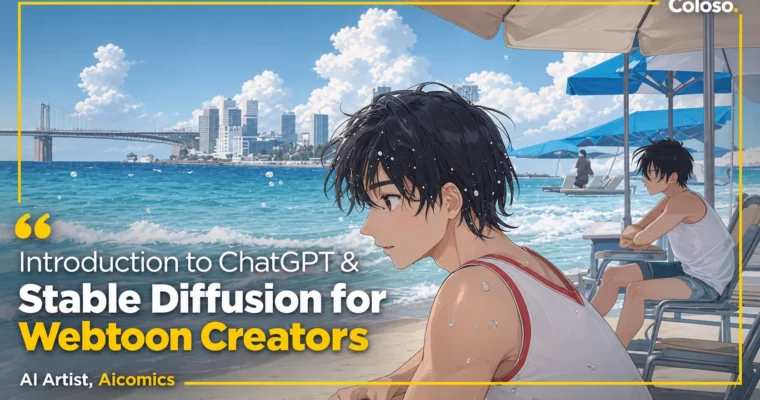
Introduction to ChatGPT & Stable Diffusion for Webtoon Creators by AIComics (Shim Yunsu, Kwak Bonghyo, Mirinome, Deep Fusion)

Introduction to ChatGPT & Stable Diffusion for Webtoon Creators by AIComics (Shim Yunsu, Kwak Bonghyo, Mirinome, Deep Fusion)

/

Author:AIComics (Shim Yunsu, Kwak Bonghyo, Mirinome, Deep Fusion)

Duration:89 clips, about 29 hours

Actual Duration:57h 58m

Release date:2024, August 26

Publisher:Coloso

Skill level:Intermediate

Language:English

Exercise files:Yes

Software:ChatGPT, Stable Diffusion (WebUI), Clip Studio Paint EX, Photoshop

Course URL:https://coloso.co.kr/products/dictionary-aicomics

A step-by-step webtoon production guide that cuts repetitive work with ChatGPT and Stable Diffusion.

A complete AI-assisted webtoon workflow: ChatGPT handles story, synopsis, characters and storyboards while Stable Diffusion generates consistent characters, backgrounds and finished panels — from concept to a polished webtoon episode.

🎯 What you’ll learn

  • Build story foundations (theme, Kishotenketsu, three-act structure, plot, climax)
  • Write synopses and character sheets with ChatGPT (classics, motifs, originals)
  • Install and drive Stable Diffusion WebUI: TXT2IMG, IMG2IMG, extensions
  • Lock art style and character consistency with LoRA, ControlNet and prompt control
  • Produce backgrounds, merge characters, draw 4-panel comics
  • Finish a full webtoon flow: storyboard, generation, retouch in Photoshop and Clip Studio

✅ Requirements

  • Skills: Interest in comics or webtoons; one of writing, drawing or directing helps.
  • Tools: ChatGPT access, Clip Studio Paint EX, Photoshop (install separately, not provided).
  • Hardware: NVIDIA GeForce RTX 3060 12GB or better for smooth Stable Diffusion work.

📝 Description

The course follows the real webtoon pipeline in four parts: story directing with ChatGPT (structure, synopsis drills, character and plot setup), Stable Diffusion fundamentals (WebUI, TXT2IMG/IMG2IMG, quality and UI extensions, LoRA and ControlNet basics plus a first finished mini-comic), background and character production with LoRA and prompt grammar (models, merging, inpainting, a 4-panel comic), and full webtoon assembly (storyboards, advanced ControlNet, Photoshop and Clip Studio retouch, effects and lettering). Lecture materials per lesson (slides, PDFs, practice zips) are included in Class Materials.

Count note: the publisher page lists 89 lectures, but the delivered set holds 92 video files — lessons 11, 12 and 15 each come in two parts, and lesson 20 (Other AI tools intro) is not in the site curriculum. The card plan above follows the actual 92 files. Release came in two batches (lessons 1–69 on 2024-05-30, 70–89 on 2024-08-26); updated_at marks the full release. The GBC thread teaser still shows the early “36 lectures” promo art.

Materials note: lesson-23 checkpoint bundle (c23-…-강의자료.zip, 19G of breakdomain safetensors) fails CRC on breakdro_I1464.safetensors at the source (7z t error) and is excluded from the materials archive — the other 70 material files pack cleanly.

🧑‍🎓 Who this course is for

  • Aspiring webtoon creators who want an AI-accelerated production process
  • Comic artists curious about ChatGPT story development and Stable Diffusion art
  • Beginners to intermediate artists (course level: intro to intermediate)

🧑‍🏫 About the Author

AIComics (AI 코믹스) is a team of AI-comic creators: Shim Yunsu, Kwak Bonghyo (marketer and Western painter, grand prize at the 1st AIComics AI comic contest 2023), Mirinome (AI creator, 2023 contest winner, contributor to AI Player Yearbook 2023) and Deep Fusion (AI creator, 1st AIComics contest winner). They teach the story-to-webtoon workflow they use in practice.

🏁 Final Result

  • A complete AI-assisted webtoon flow in your portfolio: ChatGPT synopsis and storyboard plus Stable Diffusion panels finished in Photoshop/Clip Studio with effects and dialogue.
Curriculum

📋 Course content

  1. Part 01. Story directing basics & ChatGPT — SECTION 01. Directing foundations
      1. Instructor and AI intro
      1. Comics history
      1. Socratic questioning with AI
      1. Concepts via three persuasion elements
      1. Rhythm in 4-panel and 8-page comics
      1. Three-act structure
      1. Character motivation
      1. Reading events through flow
      1. Backgrounds through examples
  2. Part 01. Story directing basics & ChatGPT — SECTION 02. Story practice with ChatGPT
      1. Theme and subject
    • 11-1. Practice: classic-based synopsis with AI (1)
    • 11-2. Practice: classic-based synopsis with AI (2)

    • 12-1. Practice: motif-based synopsis with AI (1)
    • 12-2. Practice: motif-based synopsis with AI (2)
      1. Original work practice
      1. Seven synopsis tips
    • 15-1. AI character details (1)
    • 15-2. AI character details (2)
      1. Backgrounds and movement lines
      1. Plot and keyword climax
      1. Concretizing story with ChatGPT
      1. Splitting episodes into Kishotenketsu
      1. Other AI tools intro
  3. Part 02. Stable Diffusion setup & basics — SECTION 03. WebUI, generation, quality
      1. WebUI specs and key features
      1. Pinokio install and launch
      1. WebUI interface tour
      1. Text to image 01
      1. Text to image 02
      1. Image to image 01
      1. Image to image 02
      1. UI convenience extensions 01
      1. UI convenience extensions 02
      1. Image quality extensions
      1. Composition and color extensions
  4. Part 02. Stable Diffusion setup & basics — SECTION 04. LoRA and ControlNet basics
      1. Understanding LoRA
      1. LoRA extensions install and use
      1. ControlNet install and basics
      1. ControlNet models 01
      1. ControlNet models 02
      1. Webtoon style via LoRA
      1. Webtoon style via prompts
      1. Character consistency via prompts
      1. Consistency extensions
      1. Retouch extensions 01
      1. Extra WebUI extensions
  5. Part 02. Stable Diffusion setup & basics — SECTION 05. Simple comic practice
      1. Story and storyboard with ChatGPT
      1. Page panels in Stable Diffusion WebUI
      1. Finishing a simple comic with AI tools
  6. Part 03. Backgrounds with LoRA & prompts — SECTION 06. Stable Diffusion and LoRA in depth
      1. Course and instructor intro
      1. Model overview
      1. Model categories
      1. Model merging
      1. Generation practice
      1. LoRA explained
      1. LoRA types
      1. LoRA merging theory and practice
      1. Image production with LoRA
  7. Part 03. Backgrounds with LoRA & prompts — SECTION 07. Background production
      1. Backgrounds with text to image
      1. IMG2IMG from T2I results
      1. Inpainting backgrounds
      1. Backgrounds with external art tools
      1. LoRA detail control: rich particles
      1. LoRA detail control: simplified colors
  8. Part 03. Backgrounds with LoRA & prompts — SECTION 08. Characters meets backgrounds
      1. Characters with text to image
      1. Recreating existing characters
      1. Creating your own character
      1. Simple vs IMG2IMG merging
  9. Part 03. Backgrounds with LoRA & prompts — SECTION 09. Prompt grammar
      1. Weights and color mixing
      1. BREAK syntax
      1. Image generation for 4-panel comics
      1. Producing each panel in Stable Diffusion
      1. Dialogue and effects per panel
  10. Part 04. ControlNet, extensions & Clip Studio — SECTION 10. Storyboards and SD fixes
      1. Course and instructor intro
      1. Good vs bad storyboards
      1. Drawing a storyboard
      1. Stable Diffusion features and extensions
      1. Generating faces, characters, backgrounds
      1. Seed, CFG and inpaint fixes in WebUI
  11. Part 04. ControlNet, extensions & Clip Studio — SECTION 11. ControlNet and extensions
      1. Trying ControlNet
      1. Advanced ControlNet
      1. Extension showcase and use cases
  12. Part 04. ControlNet, extensions & Clip Studio — SECTION 12. Webtoon production
      1. Photoshop basics for webtoon use
      1. Fixing generated images in Photoshop
      1. Clip Studio basics
      1. Webtoon character production
      1. Webtoon background production
      1. ControlNet production method (1)
      1. ControlNet production method (2)
      1. Webtoon from storyboard (1): sketch and layout
      1. Webtoon from storyboard (2): generation and edit
      1. Webtoon from storyboard (3): effects, dialogue, polish
      1. Wrap-up and production tips

📢 Guys, this is a Group Buy campaign, check the GBC forum thread to get access

You can find the course preview in the download section below.

Watch online or Download for Free
Introduction to ChatGPT & Stable Diffusion for Webtoon Creators by AIComics (Shim Yunsu, Kwak Bonghyo, Mirinome, Deep Fusion)
NAME
SIZEDURATION

Download all

Join us on
  Channel    and      Group

Leave a Comment

Your email address will not be published. Required fields are marked *