Mastering 3D Modeling in Maya by Elementza

Actual Duration:33h 30m
Release date:2018, July
Publisher:Elementza
Skill level:Intermediate
Language:English
Exercise files:Yes
Software:Maya, Arnold, Redshift
Course URL:https://elementza.com/maya-masterclass/
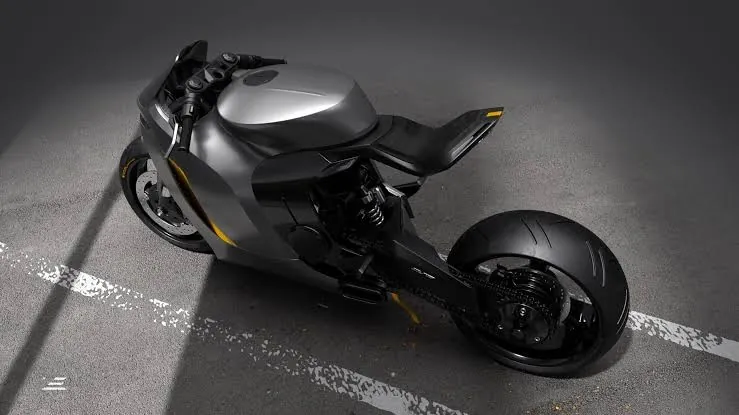
If you always wanted to model properly in Maya instead of just pushing verts around, this is your starting point. You go from interface and basic tools to clean topology, simple props, then a helmet and a full motorbike you can actually put in your portfolio.
🎯 What you’ll learn
- Navigate the Maya interface and use core modeling tools with confidence
- Understand topology rules, edge flow and edge redirection
- Work with SubD and Non-SubD modeling techniques
- Break down concepts, block out shapes and plan when to add detail
- Model simple assets like a switch concept with clean mesh
- Tackle complex shapes like a helmet with production-ready edge flow
- Build a complete motorbike from start to finish and clean up heavy topology
- Render your models in Arnold and Redshift for presentation
✅ Requirements
- Skills: No prior 3D modeling experience needed, basic computer skills are enough
- Tools: Autodesk Maya, Arnold and Redshift for rendering chapters
- Hardware: PC capable of running Maya, dedicated GPU recommended for Redshift
📝 Description
This training is linear on purpose. Classes 1-4 open in week one, class 5 opens in week two, so you don’t jump into a motorbike before you get edge flow right. Everything is step by step, real-time with live narration.
You start with the Maya interface and basic modeling tools, then you get into the stuff that actually matters: topology rules, SubD modeling, and how to redirect edges without wrecking your mesh. No theory for theory’s sake — you apply it right away on a simple switch concept.
Then it scales up. You block out a helmet, refine the forms, and learn how to keep the mesh clean when shapes get complicated. The final class is the big one: a full motorbike workflow from start to finish, dealing with messy designs and heavy cleanup like you would in production.
Rendering is covered too, not just modeling. You’ll present your work with Arnold and Redshift, so your final images look portfolio-ready and not like grey viewport screenshots.
🧑🎓 Who this course is for
- Complete beginners who want a solid, step-by-step start in Maya modeling
- Blender users or hobbyists who know basic tools and want stronger topology and hard-surface skills for portfolio pieces
🧑🏫 About the Author
Elementza is a training studio focused on practical hard-surface modeling and production workflows. Their classes are known for real-time, narrated builds with zero shortcuts — blocking, cleanup, and rendering included. This Maya masterclass follows that same hands-on approach they use across their concept and production courses.
🏁 Final Result
- A portfolio-ready hard-surface motorbike modeled from scratch in Maya with clean, production-ready topology, plus supporting props like a switch concept and helmet, rendered in Arnold / Redshift.
 Channel