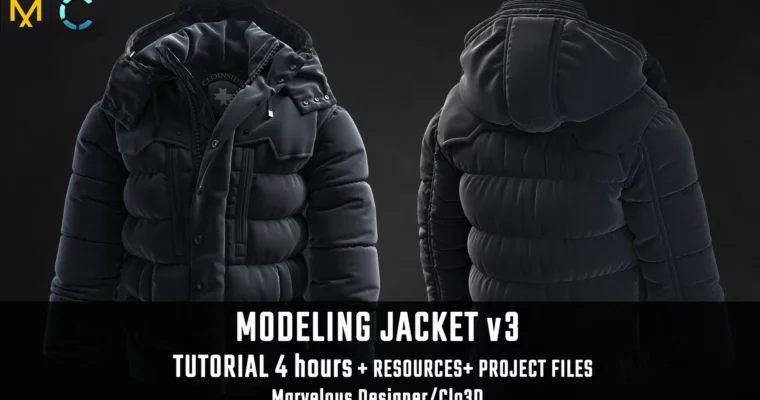
Tutorial MDClo3D – Jacket v3 by Vadim Meshcherekov

Duration:4 hours
Actual Duration:3h 47m
Release date:2024
Publisher:Artstation
Skill level:Intermediate
Language:English
Exercise files:Yes
Software:CLO3D, ZBrush
Course URL:https://www.artstation.com/marketplace/p/WmazO/tutorial-md-clo3d-jacket-v3
This course walks you through the complete process of creating a realistic jacket using CLO3D and ZBrush. You’ll start with a blockout, move into detailing, and finish with textures and rendering. The focus is on achieving a high-quality, realistic result for portfolio work, not game assets.
🎯 What you’ll learn
- Create a garment from blockout to final render
- Detail a jacket with realistic folds and seams
- Model a zipper in ZBrush and integrate it into CLO3D
- Set up materials and textures for realistic rendering
- Export and manage project files for a clean workflow
✅ Requirements
- Skills: Familiarity with basic CLO3D or Marvelous Designer functions
- Tools: CLO3D, ZBrush
- Hardware: Computer capable of running CLO3D and ZBrush smoothly
📝 Description
This tutorial is all about getting a garment to a polished, realistic finish. The workflow is built around CLO3D for modeling and rendering, with ZBrush used specifically for the zipper. You’ll work through three clear stages: blockout, detailing, and texturing. Each step is designed to build on the last, so you end up with a jacket that looks ready for a close-up render.
The course assumes you already know the basics of CLO3D or Marvelous Designer, so it skips the UI intro and gets straight to the practical stuff. You’ll get access to the project files, including the MD/CLO project, OBJ and FBX exports, and the avatar in both pose and A-pose. There are also Substance materials and graphics included, so you can follow along without hunting for assets.
The focus here is on quality, not speed. The instructor emphasizes bringing the garment to a complete, high-quality finish suitable for realistic renders. This is not a game-ready workflow, so if you’re aiming for portfolio pieces or high-end visualization, this is the right track.
🧑🎓 Who this course is for
- 3D artists who want to improve their garment modeling skills
- Designers looking to create realistic clothing for portfolio work
- Anyone familiar with CLO3D or Marvelous Designer who wants to refine their workflow
🧑🏫 About the Author
Vadim Meshcherekov is a 3D artist with a focus on realistic garment creation. His work emphasizes high-quality finishes and practical workflows, making his tutorials valuable for artists who want to produce portfolio-ready results.
🏁 Final Result
By the end of this course, you’ll have a fully detailed and textured jacket model, ready for realistic rendering. The project files and resources provided will help you achieve a polished, professional result.
 Channel