ZBrush Core Mini for Beginners by Pierre Rogers

Duration:1h 39m
Actual Duration:1h 39m
Release date:2025
Publisher:Skillshare
Skill level:Beginner
Language:English
Exercise files:Yes
Software:ZBrush Core Mini
Course URL:https://href.li/?https://www.skillshare.com/en/classes/zbrush-core-mini-for-beginners/645528751
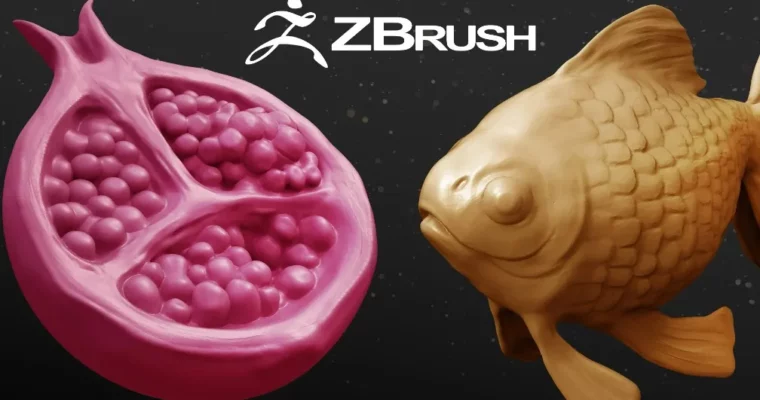
This course is your no-nonsense entry point into digital sculpting. Forget the intimidating interfaces and complex pipelines—Pierre Rogers walks you through ZBrush Core Mini, the free app that lets you jump straight into shaping 3D forms. You’ll learn the core brushes, navigation, and a practical workflow by sculpting two complete projects: a pomegranate and a goldfish. No prior experience needed.
🎯 What you’ll learn
- Navigate the ZBrush Core Mini interface and customize your workspace.
- Use all the essential brushes and the Sculptris Pro mode for dynamic topology.
- Apply a complete sculpting workflow from primitive shapes to a finished model.
- Sculpt organic forms like fruit and animals with confidence.
✅ Requirements
- Skills: No prior 3D experience required.
- Tools: A computer with ZBrush Core Mini installed (free download).
- Hardware: A mouse is sufficient; a drawing tablet is recommended for better control.
📝 Description
This isn’t a theory-heavy lecture. Pierre gets you sculpting within minutes. The course is built around two hands-on projects that teach you the fundamentals by doing. First, you’ll tackle a pomegranate—a great exercise for understanding form, volume, and using basic brushes to create organic shapes. Then, you’ll level up to a goldfish, where you’ll apply more advanced techniques like symmetry, masking, and refining details.
The teaching style is direct and practical. Pierre explains the “why” behind each step, not just the “how.” You’ll learn why you choose a specific brush for a certain task, how to use Sculptris Pro to add detail without worrying about polygon count, and how to think about form in 3D space. By the end, you won’t just have two finished models; you’ll have a repeatable workflow you can apply to any sculpting project.
🧑🎓 Who this course is for
- Complete beginners who have never touched a 3D sculpting app.
- Artists from 2D or traditional media looking to transition into digital 3D.
- Hobbyists interested in 3D printing who want a free, low-barrier entry point.
🧑🏫 About the Author
Pierre Rogers is a professional Character Artist and Digital Sculptor with years of freelance experience. His passion for character design and development started in his youth, and he now shares his knowledge through focused, beginner-friendly video courses. He understands the common pitfalls new sculptors face and breaks down complex concepts into clear, actionable steps.
🏁 Final Result
- Two complete, portfolio-ready digital sculptures: a pomegranate and a goldfish.
- A solid understanding of the ZBrush Core Mini interface and core tools.
- A repeatable workflow for starting and finishing your own sculpting projects.
 Channel